
BitRecover®
MBOX to CSV Converter

Convert Multiple Large MBOX Files to Clean CSV for Audits & Imports on Mac & Win MBOX to CSV export Tool

  • Fast Standalone MBOX to CSV Conversion from Any Source with Attachments & Character Preservation
  • Accurately Map & Export MBOX Emails to CSV: Name, From & To Mail ID, Subject, MSG ID & Body, etc.
  • Offline & On-Premise MBOX to CSV Data Extractor with HIPAA, CAPA & GDPR Compliance

Download MBOX to CSV Converter

Screens

Video

Guide

3 Step Conversion

How to Use BitRecover MBOX to CSV Converter Tool?

Easy-to-use interface for exporting MBOX to CSV with no technical knowledge or system requirements.

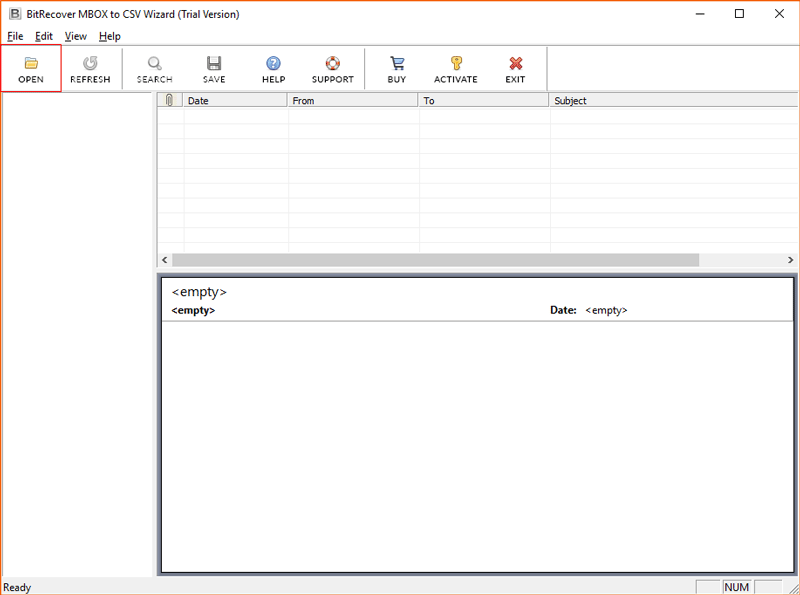
  1. Run MBOX to CSV Converter on Mac or Windows.
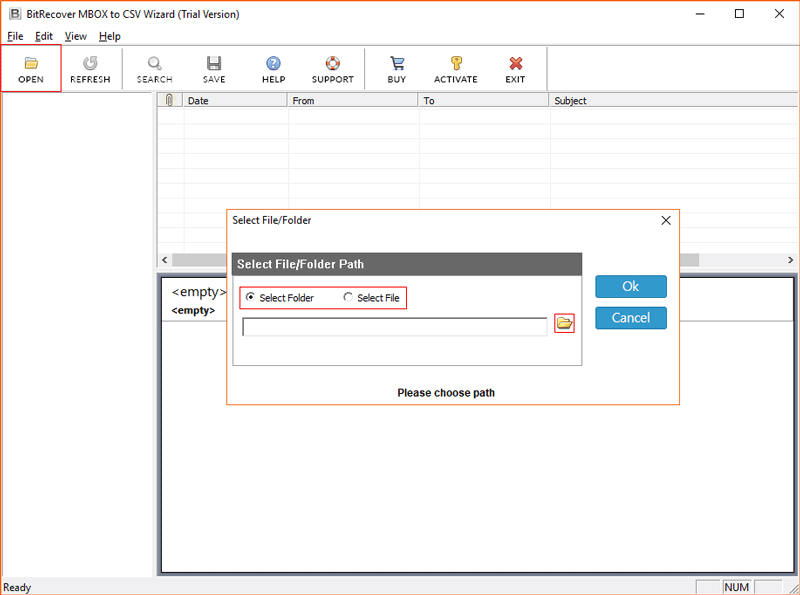
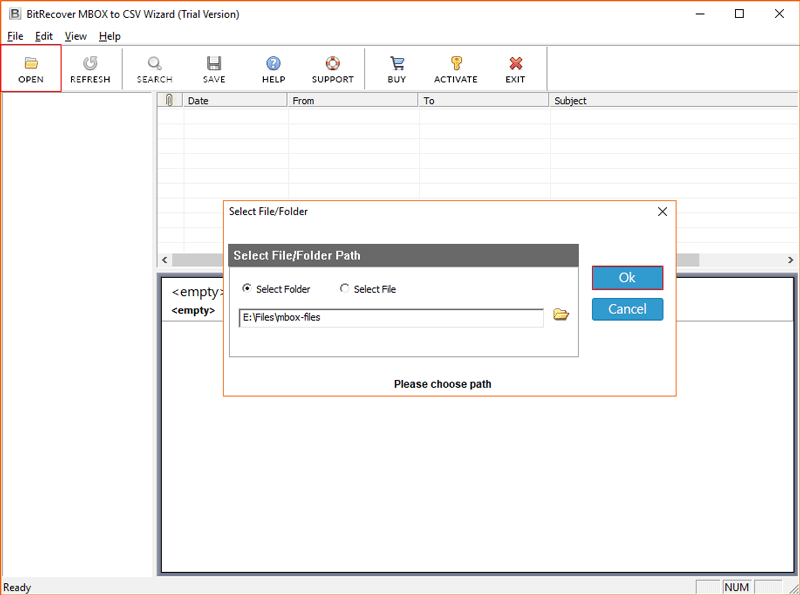
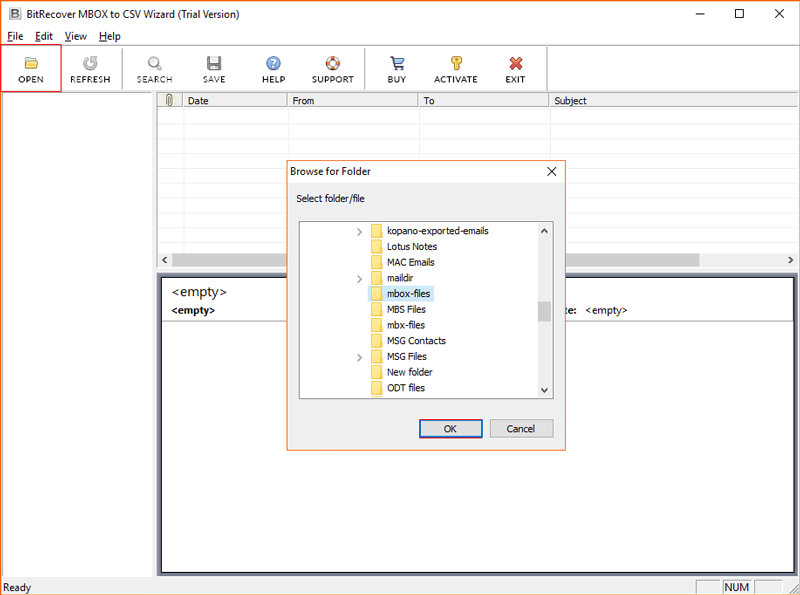
  2. Open & Browse your source MBOX file or folder.
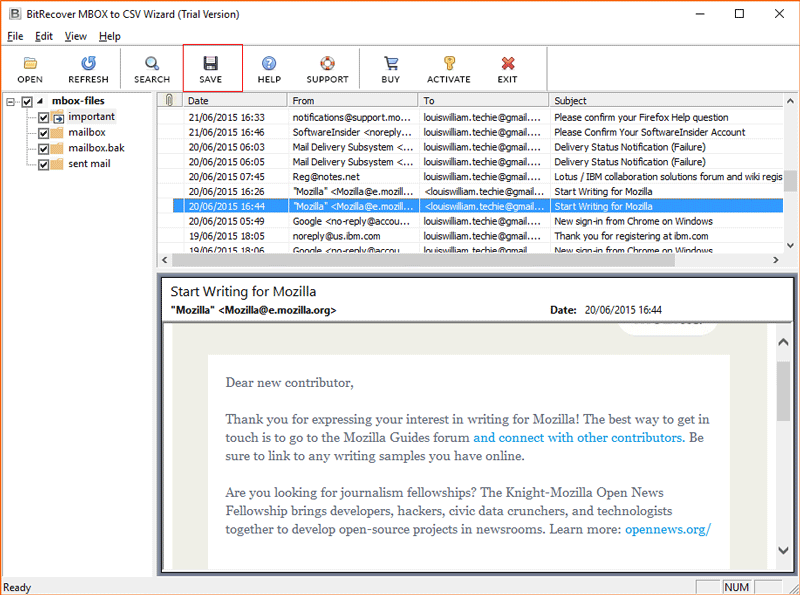
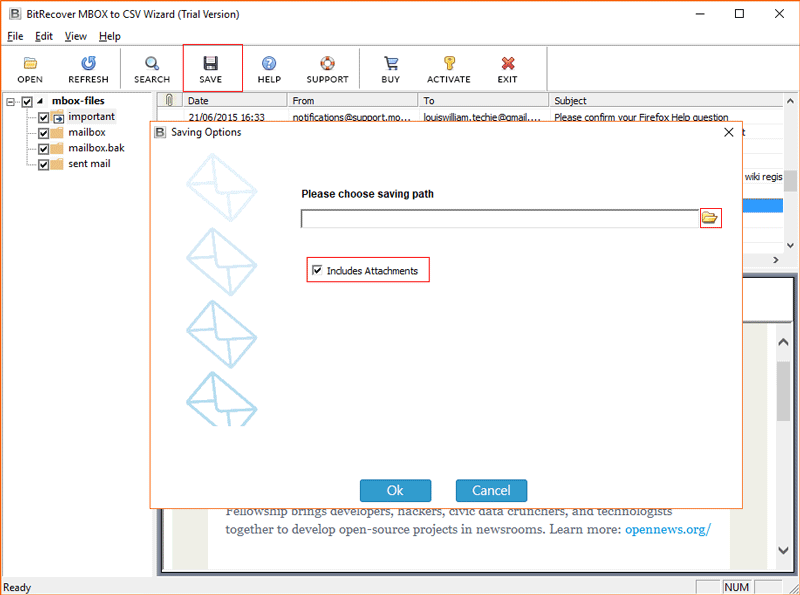
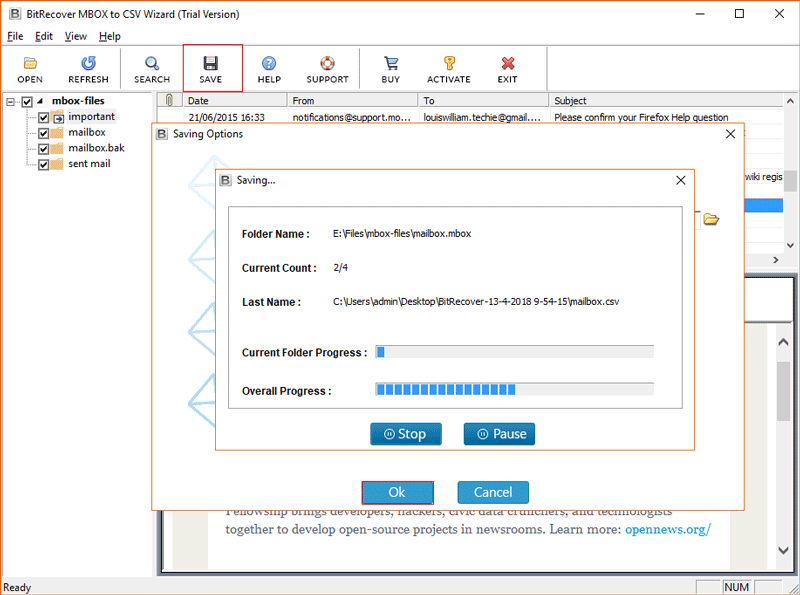
  3. Click Save to extract MBOX data to CSV.

Step-By-Step Video Guide: Understanding MBOX to CSV File Conversion

MBOX to CSV Data Extractor

Works for All MBOX to CSV Export Needs

MBOX to CSV Converter with Wide File Input Support

Convert multiple MBOX files of 100 GB+ from any email client or service to CSV (Comma-Separated Values) with 2 standard input options: Select File or Select Folder.

  • File Types: Support MBOX, MBX (legacy MBOX), MBS, MBOXO, MBOXRD, MBOXCL, and MBOXCL2.
  • Email Clients & Services: Convert MBOX to CSV from Thunderbird, Google Takeout, Entourage, Apple Mail, Postbox, and backup MBOX files from other email services.

Capabilities & Benefits

Key Features of the Best MBOX to CSV Converter Tool

 Field Mapping

Precise Field Mapping

BitRecover MBOX to CSV converter automatically and accurately maps MBOX details in important columns like Date, Subject, Body, From, To, Cc, Attachments, and Attachments Location. Skip the hassle of manual mapping and convert MBOX to CSV without loss.

Batch Convert

Batch Convert MBOX Files to CSV

Convert multiple MBOX files to CSV (Comma-separated values) at once without crashing. There is no restriction on the input MBOX file size, the number of MBOX files (under a folder), or the MBOX email count. Save time for IT admins, SMEs, organizations, and businesses.

Attachments

Keep All Attachments

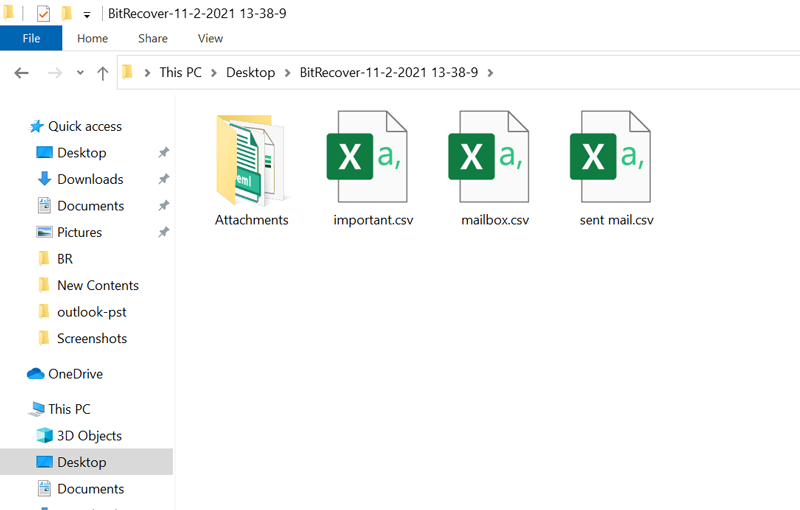
Convert MBOX to CSV with attachments in the original format. BitRecover MBOX to CSV Wizard saves all attachments separately under the output folder. Skip the need for manual attachment extraction from MBOX. Check or uncheck the “Including Attachments” option.

Filters

Selective MBOX to CSV Conversion

BitRecover MBOX Converter for CSV format lets you choose only the required folder under the MBOX files simply via a checkbox. It also offers advanced Date, Subject, Sender & Receiver filters to export MBOX emails to CSV to avoid unnecessary conversion.

Preview

Analyze Mailboxes Before Conversion

The Mailbox to CSV Wizard lets you search and view MBOX file data with attachments in the software window after selecting the source file or folder. High-demand feature to verify accurate MBOX to CSV conversion of all emails.

Secure

Secure & Offline Export

BitRecover MBOX File to CSV Converter is much more reliable than other MBOX to CSV file export tools, as it does not require an internet connection. It is ad-free, you do not need to add an account, and your data stays fully local without being uploaded to any external server.

All rounder

Highly Versatile of MBOX to CSV Tool

Convert MBOX files to CSV on all Mac & Windows devices. The tool works well with minimal system requirements and is compatible with multiple MBOX architecture types.

saving Location

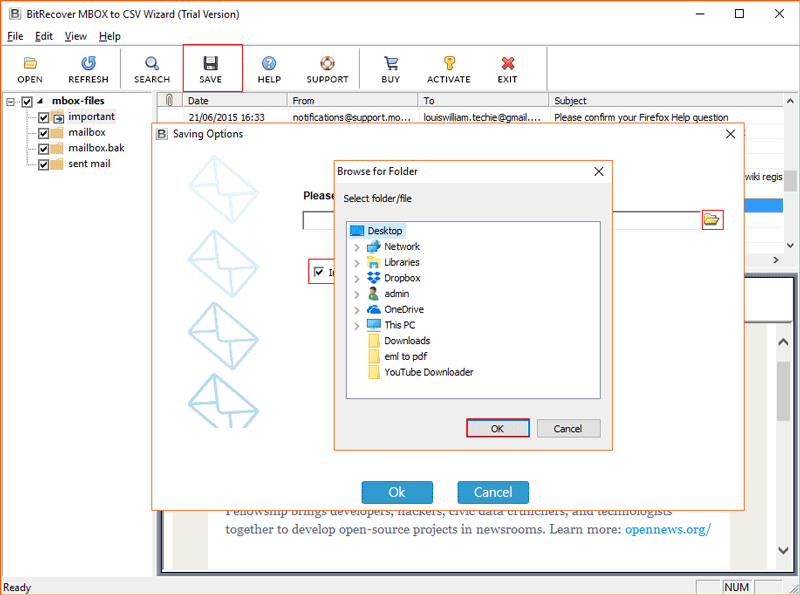
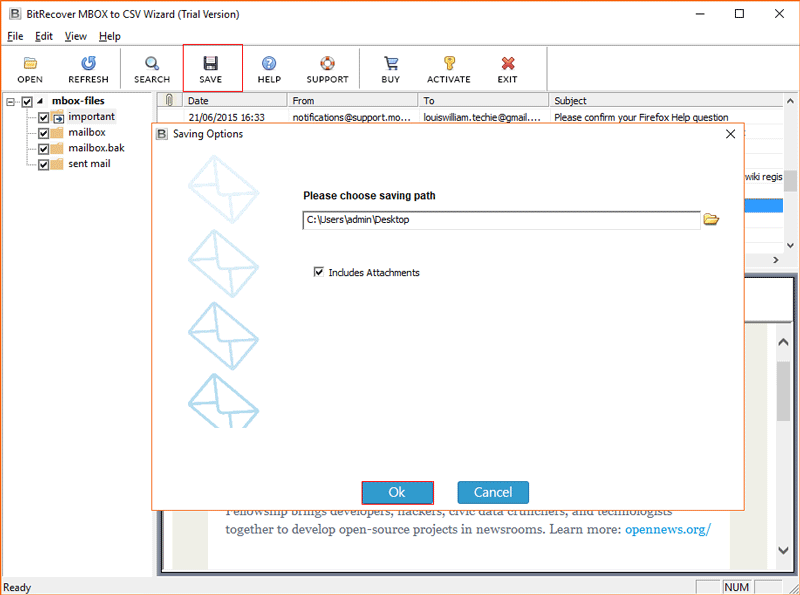
Choose Preferred Storage Location

You can save the converted MBOX field to any desired location on your PC or to an external hard drive. For easy organization of exported CSV files for backup, sharing, or future analysis.

BitRecover MBOX To CSV Converter V/S Online Tools

Why is BitRecover Chosen by Experts Over Online MBOX to CSV Tools?

Features Online Tools BitRecover Tool
File Limit Small (50–200 MB) Unlimited large files
Security Risk of data breach Fully secure offline
MBOX Structure Not preserved Preserved
Attachments Not supported Fully preserved
Field Mapping Basic mapping (with Gibberish Characters) Advanced mapping
Duplicate Entries Commonly Reported No Duplicates
Corruption Handling Not supported Minor Handling
Platform Anywhere with web browser All Mac & Windows devices
Cost Free or Paid Free Demo Version Available

Add More Power

What Sets BitRecover MBOX to CSV Converter Apart?

decoding

Automatic Data Standardization

MBOX to CSV export tool automatically decodes MIME and Base64 encoding and removes additional HTML formatting of MBOX files without any dependency on an email client to convert them into a readable CSV.

universal conversion

Ready-to-Use MBOX to CSV Generation

The output CSV can be used directly in Power BI, CRMs, Excel, Outlook & other research tools. Clean MBOX to CSV conversion without mojibake (Character encoding corruption). With Unicode support, the tool can handle English and characters from other languages.

advanced data handling

Handles Corruption and Duplication

Using the tool lets you avoid risks of duplicates when converting MBOX data to CSV format, as compared to the manual process. The tool can automatically handle mirror corruption of MBOX that can't be converted manually.

Why Choose BitRecover MBOX to CSV Data Extractor?

BitRecover MBOX to CSV Converter is an industry-standard tool chosen by hundreds of top businesses, IT admins, Professionals & Home Users due to its unique user-demand features and wide support.

Simple Interface

Ultra Simple GUI

MBOX to CSV converter has an intuitive interface to be easily used by both technical and non-technical users.

fast conversion

High-Speed Conversion

Advanced algorithms to manage bulk data without crashes. Convert over 10 GB of MBOX to CSV in minutes.

Logs

Logs Report

Auto-creates a saving and error log report for audit needs and to track conversion status. With details like Timestamp, Conversion Status, etc. to help users track conversion results.

Support & Customization

Extensive Support & Customization

Get 24/7 Free live chat support globally in case you need assistance to extract MBOX data to CSV. You can also request for MBOX to CSV conversion services in case you are dealing with sensitive bulk data or in scenarios where conversion can be complex.

BitRecover MBOX to CSV converter is a fully customizable tool. Add more features like output file splitting, multiple output options, transfer to cloud service or customized mapping by connecting to our support team via Live Chat.

Download Now

Real-World Use Cases

User Scenarios Where MBOX to CSV Conversion Tool is Extremely Useful

import in Outlook

Import in Outlook

Converting MBOX to CSV makes the MBOX import in Outlook possible when migrating platforms since MBOX files can't be directly imported manually.

Data Analytics

Data Analytics

Business data analysts and forensic experts often export MBOX to CSV for use in Excel and analysis tools to ensure compliance and identify patterns.

data Extraction

Extract Key Info

Businesses often convert MBOX to CSV to extract customer email IDs, manage employee records, or for investigation purposes.

Integration

Data Integration

To integrate MBOX data with CRM tools like Salesforce, HubSpot, Zoho CRM or with data analytic & forensic applications.

System Requirements

Minimum System Requirements of Using MBOX to CSV Converter

bitrecover box
Product Name: BitRecover MBOX to CSV Converter Wizard
Version: 9.5
Size: 46.8 MB
License: Single as well as Multi-User Support
Edition: Standard & Pro

Demo Version Limitations

Download the demo version of this MBOX File to CSV Wizard to test and evaluate the software and its features smoothly. Please note that the free version of the Windows & Mac MBOX File to CSV Converter is limited to converting only the first 25 MBOX files to .csv format from each folder to the selected export option.

System Specifications

Hard Disk Space
200 MB of free hard disk space

RAM
Minimum 4 GB (Recommended)

Processor
Intel® Pentium 2.4 GHz (Recommended)

Supported Application Versions

  • Windows System – Windows OS 11 (64 bit), 10, 8, 7 (32 bit or 64 bit) & Windows Server 2025, 2022, 2019, 2016, 2012 R2, 2008.
  • Mac OS – 15 Sequoia, 14 Sonoma, 13 Ventura, 12 Monterey, 11 Big Sur, 10.15 Catalina, 10.14 Mojave, 10.13 High Sierra, 10.12 Sierra, OS X 10.11 El Capitan, 10.10 Yosemite, 10.9 Mavericks, 10.8 Mountain Lion, etc.
  • MBOX Variants – Standard MBOX, MBX, MBS, MBOXO, MBOXRD, MBOXCL, MBOXMBX, MBOXCL2, MBOX-ME, MBOX-J, MBOX-TXT, MBOX-GZ, etc.

Electronic Delivery

We will automatically send you an email containing the download link and activation keys once your payment is confirmed. You can then easily activate the product and start using it.

Comparison: Free & Licensed Version

Feature Comparison of Export MBOX to CSV Tool for Windows - DEMO and Licensed Version
  •  
  • Transfer single/ multiple mailbox
  • Directly Convert Mailboxes to Excel
  • Preview Files
  • Windows & Mac Support
  • 24*7 Tech Support & Secure 100%
  • Specify Output Location
  • Convert unlimited Data
  • Price
  • Free
  • 25 emails/folder
  • Free
  • Download
  • Most Popular
    Pro
  • Unlimited
  • $39
  • Buy

User's Queries and Their Answers

FAQs: Convert MBOX Files to CSV

MBOX is a standard email container that can hold thousands of emails with attachments and metadata in a structured way. Supported by multiple email clients like Thunderbird, Apple Mail, Gmail (via Takeout), The BAT, Entourage etc.

CSV (Common Separate Values) is an open source tableau way for storing data. It can be accessed on mobiles or via multiple application like Excel or Google Sheets.

BitRecover .mbox to CSV file converter has a free-demo version available that lets you convert 25 MBOX emails per folder to CSV. Get the licensed version by connecting with the support team.

Yes, the resulting CSV file can be accessed on any platform supporting tabular data, including Excel and Google Sheets.

No, BitRecover MBOX to CSV Converter is a standalone tool.

Although you can convert MBOX to CSV via manual approaches like Python scripts, ImportExport Tools NG, or online sites, they are often not recommended due to loss of integrity and risk of data breach or corruption.

Yes, the tool provides a separate option to export MBOX files to CSV with attachments or without attachments, depending on your requirements. While email hierarchy is always preserved.

Yes, it is authorized to convert unlimited MBOX files to MS Excel.

Client Testimonials

MBOX to CSV Converter Tool - Client Reviews

Write a Review ❯


Live Chat