

What a great work by the programmers of BitRecover PST Viewer software. It is not merely a standalone application that requires no Outlook installation for reading PST files; it also keeps the email attributes intact throughout the process.
BitRecover®
Free PST Viewer for Mac and Windows
Open and read Outlook PST files without installing Outlook. Works on Mac and Windows, including corrupted and password protected PST files. It shows emails, attachments, contacts, calendars and tasks exactly as they were stored.
2,036,480 Downloads Since 2011
Free forever for viewing. Export needs the paid upgrade.
- Runs on Mac and Windows. Most free PST viewers are Windows only.
- Portable build runs from a pen drive with no install, for forensic and legal work.
- Opens corrupted, orphaned and password protected PST files.
- Read only access. It never changes the PST or its created and modified dates.
- Free to view with no item limit. Upgrade only when you need to export.
Best PST Viewer Tool Features
Trusted Software to Read Outlook PST Files on Mac & Windows OS

Scan Corrupted PST Files
Once a user uploads the Outlook PST file items into the PST reader software, it automatically starts a detailed analysis of the content of the PST file. The tool immediately filters all the damaged or corrupted Outlook PST file items so that the user can flawlessly read the PST file in a healthy format for usage. Read and view all accessible as well as corrupt PST files with free online PST Viewer.

Helpful for Forensics Analysis
The forensics investigation often do not allow investigators to install the Outlook application on the affected computer but sometimes they want to analyze Outlook PST data items. PST Viewer is a landmark (or essential) piece of software because investigators can run it via a portable drive to read and view the email header without an Outlook setup. BitRecover Free PST file viewer is a portable PST file reader to view contents of .pst file without Outlook. Read PST file to view Outlook email, contact, etc.

Supports Password Protected PST Files
This Free PST Viewer supports both ANSI and Unicode file formats of Outlook Data Files. If you have a password-protected PST file, this toolkit can access it easily. You just need to simply add the PST documents and you will get an accurate outcome without a doubt.

View Single or Batch PST Files
With this PST reader, you have the choice to go for either accessing a single PST file or multiple files. This multi-featured PST Viewer utility provides you with the option to batch read or open PST files without Outlook in a single process. After uploading the PST file, the user can check and uncheck the required data to view multiple Outlook PST files simultaneously.

View & Read PST File Attachments
After uploading the PST file to the software panel, it will show all email items, including attachments. If any email has an attachment, then it will show the email with a (*) star. After clicking on the email, you can bulk view the PST email attachments in the PST Viewer Mac software.
Read All PST File Attributes
The PST Viewer Software Shows Entire Outlook PST File Data

Emails

Attachments

Contacts

Calendar

Signature

Header

Footer

Formatting

Subject

Tasks

Notes

Journals
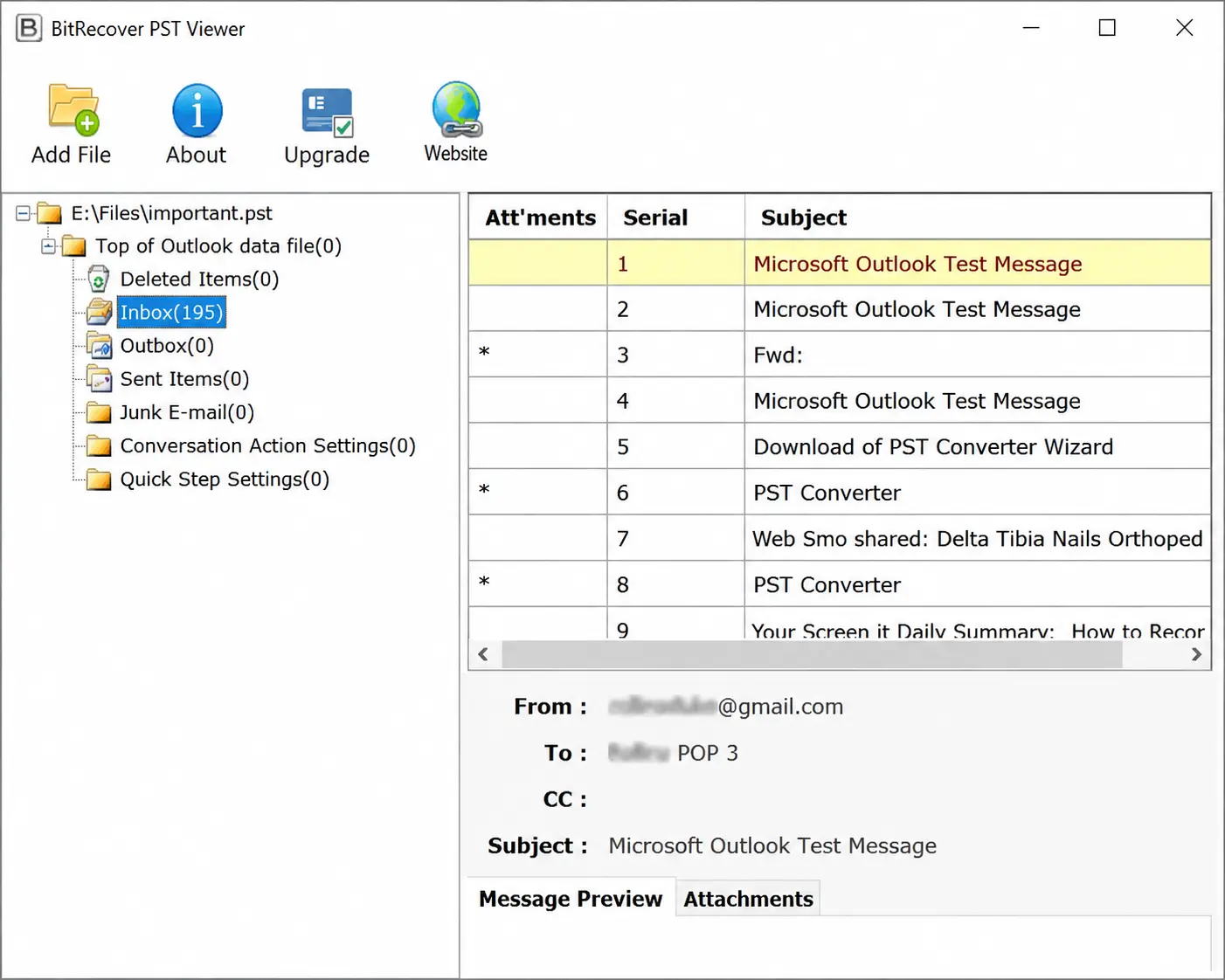
How to Read PST File with PST Viewer?
Viewing PST files is easy with the PST file reader tool. Follow the steps mentioned below to learn how to read PST files using the application:
- Download BitRecover PST File Viewer Software.
- Click on Add File button then select PST file.
- Browse the Preview all the PST folders and subfolders.
- Click on the folder that you want to view.
- Software will show you entire PST file information.
These are the 5 ‐ quick steps to easily view a PST file along with the emails, attachments, contacts, calendars and header information without an Outlook account using the PST viewer tool. Both ANSI and Unicode PST files are read, so an archive made in Outlook 97 opens the same way as one made in Outlook 2024. A large mailbox takes longer to scan the first time, and the folder counts appear as the scan finishes.
Salient Features of Best Free PST File Reader
PST Viewer to read PST file information Without Data Modification

Endlessly View PST File without Data Breach
Using the Outlook PST reader tool, users can view PST file contents without encountering any crash reports. It maintains the integrity of information throughout the process of viewing Outlook PST files. It reads every item in the file, so nothing in the mailbox is skipped. It gives a preview of each PST file with attachments without any data loss. The free file viewer tool for PST data lets you read PST files without Outlook, to view email contents

Upgrade Option for PST Conversion
For more than reading, the paid PST Converter converts PST files with no limit on how many. With this facility tool, users will be able to export Outlook data files into 39 file formats. The viewer also gives you the option to split PST files into smaller parts without losing any details of Outlook email messages.

In-Depth Preview of Outlook PST Files
Once the free PST Viewer tool accesses Outlook PST files in the software panel, it starts to display the number of Outlook emails present in the mailbox. After selecting a particular folder, you will be able to view PST messages and each of the attachments associated with them. Also, the Outlook PST file reader undergoes .deep scanning of each email and its corresponding header details such as From, To, Cc, Subject, etc.
Easily Scan & Read Corrupted PST Files
BitRecover PST Viewer is an advanced tool that automatically scans healthy as well as corrupt Outlook PST files and allows you to read the data without interruption. Users having a bunch of inaccessible or damaged PST files can use this professional tool to read the entire PST file data and information without needing Microsoft Outlook installation. This is a quick and efficient tool to explore large PST files and retrieve important data.

Free Tool to Read All Items in PST
The PST file reader tool is designed to explore and view the entire content available in PST files without extra steps. Hence, the tool allows you to view PST file items such as emails, attachments, contacts, calendars and tasks. The layout is plain, so you can move through the content and open individual items with a few simple clicks. It is an ideal choice for both forensic analysis and general view.

Simple Interface & Easy to Use
The Outlook PST viewer has a plain layout that anyone can follow, whether you read email for a living or you just need one old message. The software is easy to navigate and access emails, attachments, contacts, calendars and all other items with just a few clicks. The PST reader tool is straightforward and requires no technical knowledge which is ideal for both professionals and beginners. Download the application for a quick and detailed analysis of your PST file.

Free View PST Files on Mac & Windows
The free PST file reader lets you open an Outlook PST file and read what is inside it at no cost. It was built around what people actually need from a viewer, so it opens on Windows and on Mac with no extra setup. You run it on the machine you already have and read the file there.

No Need to Install Outlook
There is no need to install Outlook to read PST file content. Free PST viewer is an independent tool designed to work all alone. It allows users to view Outlook PST files that do not have Outlook on their system. With the upgraded features of this software, you can also read PST in various formats including ANSI and Unicode. This is a must-have solution for all personal and professional user who requires quick access of their Outlook data.
What Is a PST File and Why It Will Not Open
The Format Explained in Plain Words Before You Try to Open It
A PST file, short for Personal Storage Table, is the file Microsoft Outlook uses to store a full mailbox on your computer. One PST holds emails, attachments, contacts, calendars, tasks and notes, along with the folder structure they sit in.
What it holds
Emails, attachments, contacts, calendars, tasks and notes in one file.
Why it will not open
The format belongs to Outlook. Windows and macOS have nothing built in that reads it.
Where to find it
On Windows, look under Documents and then Outlook Files.
Windows and macOS have no built in way to open a PST file. Double clicking one does nothing unless Outlook is installed, because the format is proprietary to Outlook and is not a document or an archive. Renaming the extension does not help either, since a PST is not a compressed container.
This is why a dedicated PST viewer exists. It reads the file format directly, without Outlook, without an Exchange profile and without an IMAP connection. Inbox, Sent Items, Deleted Items and every subfolder show up the way they were stored. BitRecover Free PST Viewer runs on both Mac and Windows, opens corrupted and password protected PST files and shows every mailbox item with its attachments intact.
On Windows, Outlook keeps these files under Documents and then Outlook Files, so that is the first place to look for one. A PST is a standalone archive you can copy from one computer to another. An OST file is not the same thing. It is a cached copy tied to a single Outlook profile, which is why an OST often will not open once that profile is gone. For those, use the free OST Viewer instead.
How to Open a PST File without Outlook
Three Routes Compared and What Each One Actually Does
There are three ways to open a PST file when Outlook is not installed. Two are free but limited. One is a dedicated PST viewer, which is what most people end up using. Here is what each one actually does.
Swipe the table sideways to see every column.
| Method | Cost | Mac | Corrupt PST | Attachments | Folders | Setup |
|---|---|---|---|---|---|---|
| Google Migration tool | Free | No | No | Partly | No | 30 to 60 min |
| Rename the extension | Free | No | No | No | No | Does not work |
| Free PST Viewer | Free | Yes | Yes | Yes | Yes | Under 2 min |
Google Workspace Migration Tool
Google built this to move PST data into a Google account, not to read it. It runs on Windows only, it needs a Google Workspace login and it stops on a damaged PST. You also end up with your mail inside Gmail rather than in front of you.
Renaming the File Extension
Changing a .pst to .zip or .txt does not work, because a PST is not an archive and not a text file. It is a proprietary database. The rename either fails to open or shows unreadable characters, and on a large file it can leave the PST damaged.
A Dedicated PST Viewer
This reads the PST format directly. You point it at the file, the folder tree loads and you click any email to read it with its attachments. Nothing is installed into Outlook, nothing is uploaded and the file is opened read only.
The reading happens on your own machine. The PST is never sent to a server, no Microsoft account or sign in is needed and no Outlook profile is created or changed. That matters when the mailbox holds contracts, invoices or anything else you would not upload to a website you do not control. People usually land here after moving from Outlook to Thunderbird, Gmail or Office 365 and finding the old archive will no longer open.
PST Viewer for Mac
Native Mac Build to Read Outlook PST Files without Outlook
Most free PST viewers are Windows only. This one has a native Mac build, so you can open an Outlook PST file on a Mac without Outlook, without borrowing a Windows machine and without setting up a virtual machine. It reads the file from wherever you keep it, including a PST copied off an old Windows PC or pulled from a backup drive. To move that mail into Office 365 or another account, that is a conversion job rather than a viewing one.
Can I Open a PST File on a Mac without Outlook?
Yes. Outlook for Mac does not even use PST files, so a PST copied from a Windows machine will not open there. The Mac build of this viewer reads the PST format directly and shows the folder tree, the message list and the full email in its original folder hierarchy, all without Outlook installed.
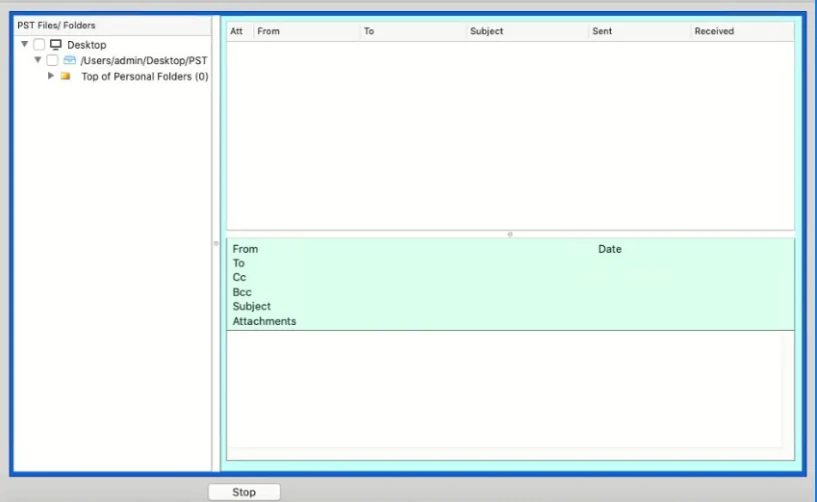
The PST file is read straight from the Mac desktop.
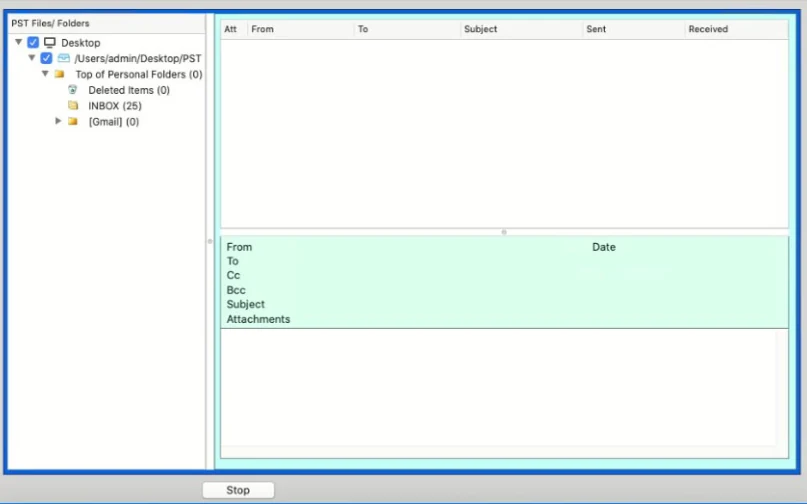
The full folder tree loads with an item count on each folder.
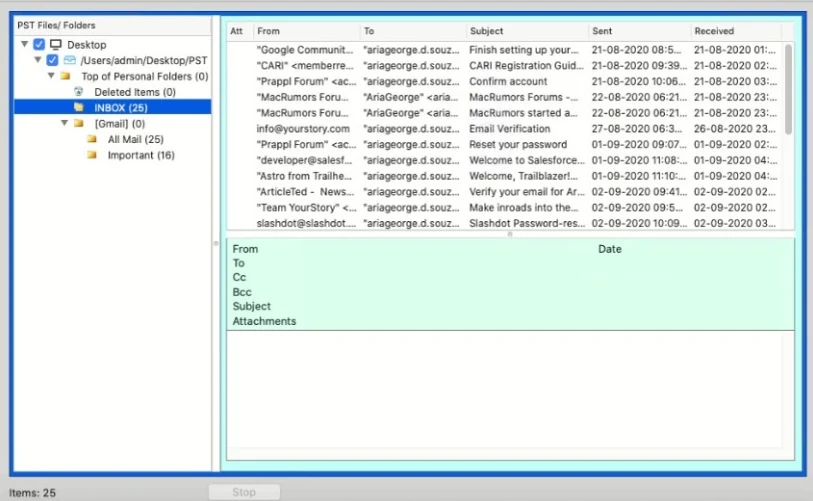
Every message shows sender, recipient, subject, sent and received dates.
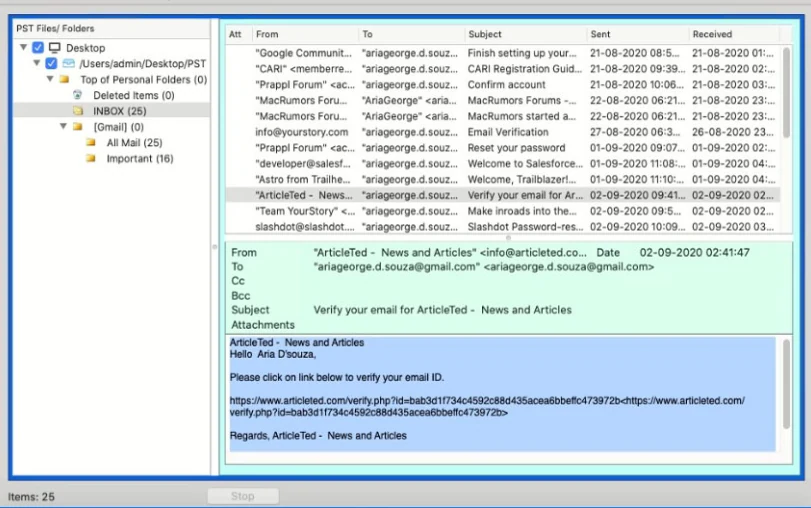
The preview pane shows headers, attachment names and the full message body.
Free Version vs PST Converter
What the Free Build Covers and When the Paid Upgrade Is Needed
Swipe the table sideways to see every column.
| What you get | Free PST Viewer | PST Converter |
|---|---|---|
| Open PST without Outlook | Yes | Yes |
| Mac and Windows build | Yes | Yes |
| Corrupted and password protected files | Yes | Yes |
| Items you can view | No limit | No limit |
| Search filters on To, From, Subject and date | – | Yes |
| Save attachments | – | Yes |
| Export to PDF, MBOX, EML, MSG and more | – | 39 formats |
| Cost | Free forever | Paid upgrade |
Read as much as you like. You only pay to take the data out of the PST.
Who Uses BitRecover PST Viewer: Forensic and Legal Work
Portable, Read Only and Safe to Use on Evidence
A large share of the people who open PST files for a living are not reading their own mail. They are reading someone else's, under rules about what they are allowed to touch. Three things in this tool matter to them.
It runs from a pen drive
Fully portable, so an investigator can carry it to a machine, run it without installing anything and leave no software behind. No license key, no Outlook profile and no sign in is needed, so it works on a locked down machine.
It never writes to the file
The PST is opened read only. Created, accessed and modified dates on the original file stay exactly as they were, which is what makes the output defensible. A file too damaged to read needs PST repair first.
It reads what Outlook hides
Messages parked in the root of the file, under Top of Personal Folders or Top of Outlook Data File, are shown along with the normal folder tree, so nothing is missed in review.
Best PST File Viewer Tool Specifications
Hardware and Software Requirements to View PST Files in Bulk
Trial Limitations
The Free PST Viewer only previews Outlook Emails with Attachments. Upgrade to PST Converter for Advanced Search Options & to Export PST Emails into other formats.
System Specifications
Hard Disk Space
50 MB of free hard disk space
RAM
Minimum 2 GB is Required
Processor
Intel® Pentium 1 GHz processor (2.4 GHz is recommended)
Supported Editions
- Windows OS: Windows 11 (64 bit), Windows 10, 8, 7 (32 bit or 64 bit) & Windows Server 2025, 2022, 2019, 2016, 2012 R2, 2008, 2003, etc.
- Mac OS: 15 Sequoia, 14 Sonoma, 13 Ventura, 12 Monterey, 11 Big Sur, 10.15 Catalina, 10.14 Mojave, 10.13 High Sierra, 10.12 Sierra, OS X 10.11 El Capitan, 10.10 Yosemite, 10.9 Mavericks, 10.8 Mountain Lion, etc.
- Outlook Edition: Outlook 2024, 2021, 2019, 2016, 2013, 2010, 2007, 2003, 2002, 2000, 98 and 97.
Electronic Delivery
Once the payment is successful, we will send you the latest download link and license keys in 15 minutes the given email id.
How Does PST Viewer Work?
Watch Video Tutorial to Know How to View PDF Files Using the Software
FAQs ‐ PST File Reader Software
Find Answer of All Your Questions about Free PST viewer Process
Yes, you don’t need to have a separate version to access Outlook PST on Mac. You can download PST Viewer for Mac to read PST file contents on your Mac.
No, the free portable PST reader software does not permit you to view or save PST attachments in the software panel. You need to get an updated version of this PST File viewer app if you want to save all those PST attachments.
Yes, this free PST viewer is a fully portable application. You can download it straightforwardly to your pen drive and run it from there.
Yes, you can easily view messages stored in your root of .pst file. This tool supports both metadata formats such as "Top of Personal Folder" and "Top of Outlook Data file".
No, it will not make any changes to Outlook.pst file dates. PST Viewer is a forensically sound application and it performs a read-only operation to read messages from a PST file. Software doesn't modify any metadata from .pst files.
Yes, you can access corrupt .pst files in this application and it will give you a preview of all of your messages from corrupt or damaged Outlook data files in healthy format.
No, currently we do not support this feature in this free portable PST viewer tool.
Step-1: Download and install the Free PST File Viewer.
Step-2: Add the PST files using the Add Folder option.
Step-3: Click on the PST folder you want to view from the software Preview.
Yes, the free PST viewer tool helps users to view PST files of any size. It also reads several PST files in one run. Very large archives are easier to work with once you split PST files into smaller parts.
No, If you use the free PST reader then you do not need to install or access an Outlook account to view PST files. It is an independent tool that works without the help of any other application.
Use a dedicated PST viewer. It reads the PST format directly, so Outlook does not have to be installed and no Exchange or IMAP profile is needed. Download the free viewer, add the PST file and the folder tree loads for reading.
Yes. Outlook for Mac does not use PST files at all, so a PST copied from a Windows machine will not open there. The Mac build of this viewer reads the file directly and shows the folder tree, the message list and the full email body.
No. A PST is a proprietary database, not an archive and not a text file. Renaming it to .zip or .txt either fails to open or shows unreadable characters, and on a large file the rename can leave the PST damaged.
Yes. The viewer scans damaged, orphaned and password protected PST files and previews whatever it can read, even when Outlook refuses to open the same file. Nothing is written back to the PST during the scan.
No. The free viewer opens PST files of any size and reads them in bulk. A large mailbox takes longer to scan, but there is no cap on file size and no limit on how many items you can view.
Not in the free viewer. It has no search box today, so you browse by folder and sort the message list by sender, subject or date. Search filters on To, From, Subject and date range are part of the paid PST Converter.
Words of Clients
Read What Our Clients Say About PST Viewer Tool

Chicago
Houston
This PST file reader application offers a bunch of advanced functionalities that are free of cost. It enabled me to view PST files without Outlook installation on a Mac machine. I am truly impressed with the working of this amazing toolkit. It immediately gave me a full preview of all Outlook 2024 emails along with attachments. Mesmerizing software, great job BitRecover team!
London
I really love this 'PST Reader' app. Now it’s part of my daily office software tools and I am using it to read thousands of Outlook emails at once. I want to say that it is a must-have software for all the professionals out there. It not only saves your time but, your effort also. I have been a regular customer of BitRecover and I love the amazing solutions they provide. Thank you!


