How to Print Emails for Court – Best Way to Present E-evidence during Legal Trials

Today with the ongoing digital development, technology has spread its effects to every single part of society. Everything, from correspondence to handling to documentation has gone computerized. Law has not been indifferent to digitization. On account of the consistently expanding web-based business exercises, the admissibility of email evidence in the court of law has turned into an appropriate issue. A massive number of electronic proofs are presented in the courtroom as legal evidence. In this blog, we are going to talk about the various circumstances wherein a user wants to present email evidence in court. And most precisely, we will talk about the method and the best way to print emails for court during legal trials.
Challenges – How to Present Email Evidence in Court
1 – My sister is being prosecuted over a messed-up tenancy agreement. All her communication is stored on the G Suite account. However, it is very difficult for us to download messages in a comprehensible manner, without setting up a free account like on Thunderbird. We have an MBOX file as a backup file straight from the G Suite account. Are there any free methods to solve this issue by using email as evidence in court? Any suggestions on how to print emails for court?
2 – Need to present E-evidence in a legal case so want to print emails for court! Are there any tips like ensuring that all the attachments embedded with emails and mail headers are also printed? I am asking this because it will help me to elaborate on all the timeline of events present in the emails in order to present email evidence in court. Any assistance would be valued indeed.
3 – My colleague had done marriage through a well-recognized marital site. She has some communication in her Gmail mailbox account. However, presently in court, her husband denies acknowledging that he had done such communication. I want to know is there any admissibility of email evidence in the court of law? If yes, then how to present emails in court? What can be the best way to print emails for court??
4 – We want to file a money recovery suit and so we have some 30+ email transactions on that subject matter. Does email hard copy is documentary evidence in court? Whether the court will accept email as evidence? How to print emails for court?
5 – I am an NRI and want to know does online bank statements are validated/presented as email evidence in court of law? Any early response will be highly appreciated.
Best Way to Print Emails for Court as a Legal Proof
Do you need to present emails as evidence in the courtroom? Want to get some specific emails exchanged between two or more people? Then, you may require to show these emails as a paper print-out or as a computer data file – PDF.
Well, if that’s so then you can easily print emails for court in PDF file format. This can be done in a secured manner with the help of third-party software. BitRecover Email Backup Wizard is one such application that is widely known for its trustworthiness in the digital world. This all-in-one utility has the capacity to convert multiple email messages into document formats like PDFs so that a user can present emails in court of law as documentary evidence.
You can print bulk emails from any webmail, email server with the usage of our software. It comes without any restrictions so you can print emails for court in a limitless manner. Also, the various benefits which are associated with this application are its add-on.
How to Print Emails for Court of Law ?
Follow these steps to how to present email evidence in court-
- Download and Open software on Windows or Mac machines.


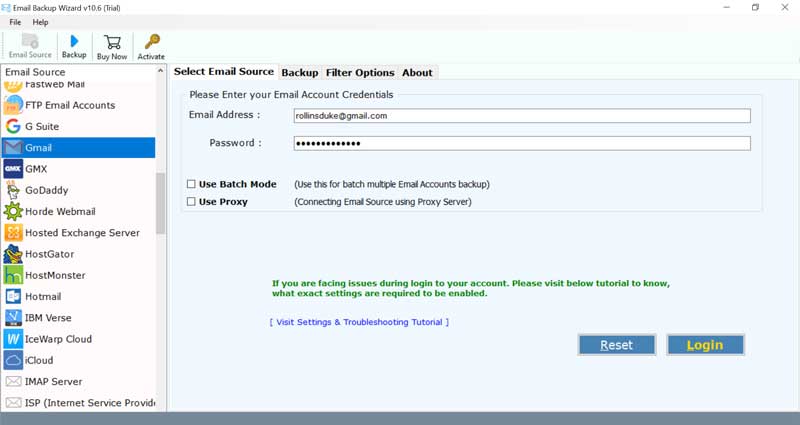
- Choose any email source & specify its account login credentials.
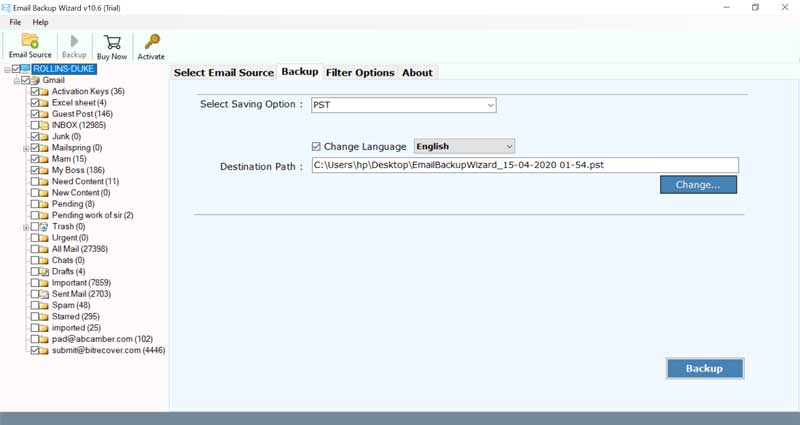
- Enable specific mailboxes to print messages.
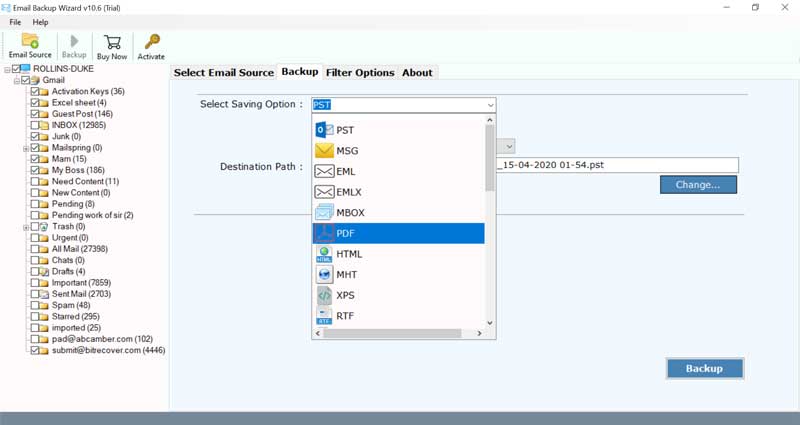
- Select the saving option as PDF format.
- Choose a destination location & a file naming option.
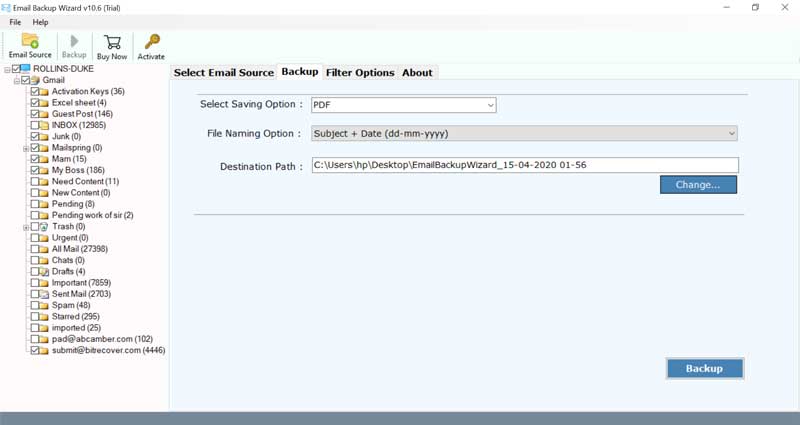
- Click on the backup button to print emails for court.
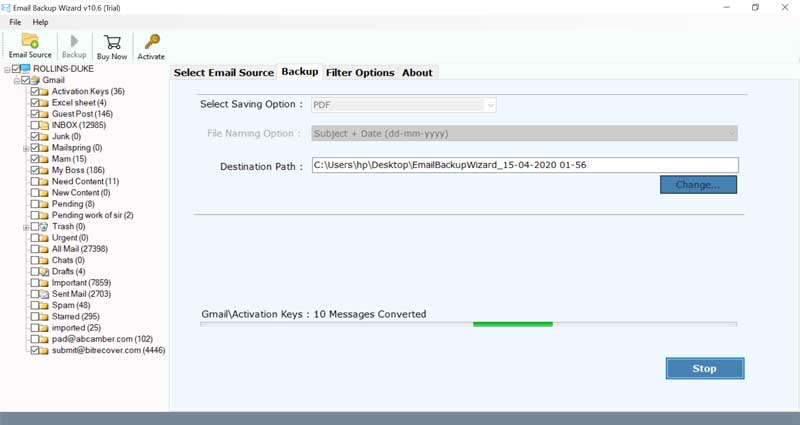
Know the Top-notch Advantages of Using our Software
- With our tool, you can bulk print emails for court at once.
- Users can choose multiple email accounts for downloading email data as legal proof.
- This utility comes with many file naming conventions so that you can store the emails in a systematic manner.
- No external app is needed to use this software.
- It is the most reliable and user-friendly solution which you can use to present evidence in a court of law.
- The selective email conversion from any webmail can be also be done very easily with our software.
- Any Windows and Mac user can utilize our tool without any hassle.
Why PDFs have Better Admissibility of Email Evidence in the Court of Law ?
To present email evidence in court, one should use a file format that someone can’t change. Such documents have higher admissibility of email evidence in the court of law. Practically in all forensic or legal workplaces, saving or sharing of crucial documents need to be done in PDF format.
In spite of the fact that there is another file format which you can use, for example, picture formats like PNG, GIF, JPGE, the PDF is one of the most utilized and favored document formats. That’s why in this article, we have exclusively focussed on the techniques to print emails for court into PDF as e-evidence.
During the research practice or during legal discovery, one should store all the electronic mail proof in an unalterable file format. One can easily track any alterations in a PDF file and present emails as evidence.
We are sure that now you know how to solve queries like ‘Can email evidence be used in court’. Try the most proficient and the best way to print emails for court.
