How to Convert MHT to MBOX to View and Share as Email File?
Fact-checked and reviewed in accordance with our Editorial Policy
Summary: Converting MHT to MBOX to access it inside modern email clients for archival, readability, or forensic analysis needs can be complex, as no email client supports both MHT and MBOX files. In order to save MHT (web archive) files to .mbox format without a complex setup while preserving email headers, attachments, folder structure, and formatting, you can use the BitRecover MHT to Mailbox Converter Wizard. There are manual workarounds, such as renaming the format or using Thunderbird; however, they often fail with most MHT variants and can lead to data loss.
What Makes the User Convert MHT to MBOX Format?
There are multiple reasons that make a user save MHT to MBOX, and some of the most common ones among them are as follows:
- There was a time when some email platforms used to export data in MHT format. But now, if the user wants to move to modern emailing solutions, they need a way to convert MHT to MBOX to maintain the workflow without data loss.
Read More: How to Import MHT Files in Thunderbird?
- People also change MHT to MBOX so that they can manage the data in a structured mailbox format, which makes searching, restoring, and indexing easier than ever before.
- A lot of digital forensics investigators and legal firms need an MBOX file since this file format gets easily integrated with advanced tools, which is not otherwise possible with an MHT file.
- Also, an MHT file may give a different output based on the browser you are using to open it. However, if the user converts MHT to MBOX, everything remains in the original form in an email structure.
- Users convert MHT files to MBOX as MBOX being a plain text format is much more better option for archival.
Secure-Professional Way to Convert MHT Web-Archive to MBOX File
The manual way to save MHT to MBOX file format may look easy, simple, and free, but it has lots of limitations. Thus, to rescue the user from that and provide a solution that is reliable for data safety and accuracy, experts always recommend the BitRecover MHT Converter.
This tool gives a free demo version, supports bulk conversion, works offline, has 5+ export options, and is compatible with all Windows operating systems. Not only that, but it is also virus-free, giving advanced customer support, and even allows for connecting for feature customization, if needed.
Last but not least, it is so tech-friendly that nobody requires prior technical knowledge or a manual in their hands to use it to convert MHT to MBOX file format.
Convert MHT Files to MBOX Format in 3 Simple Steps
- Install & open the MHT To MBOX Converter.
- Select MHT Files and Folders from your computer.
- Choose MBOX as the output option and press convert
Why Choose BitRecover to Export MHT Web Archive to MBOX Format?
There are various features that this advanced utility provides. One who knows how to utilize it smartly can really enhance their productivity in no time. Hence, to have a look at those key highlights of the tool, read the points shared below.
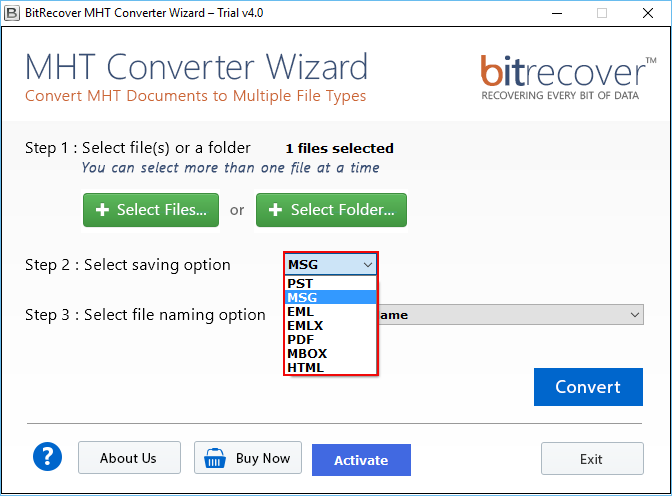
- One screen GUI, which makes understanding the tool easier and puts all the options in one place.
- Has dual selection modes that are Select Files and Select Folder to choose bulk yet specific MHT files.
- Maintain the folder hierarchy even after the conversion to ensure complete authenticity.
- Supports and converts all the elements of the MHT file to MBOX, such as multimedia, source links, text, etc.
- The user can also customize or add new features to it to fulfill all the work requirements. For that, they just have to connect with the support team.
- This MHT to MBOX converter is a desktop-based tool that works completely offline and standalone.
- Has a file naming and file saving destination option to ensure quick access and professional data management of the output MBOX files.
- Gives free demo version that anyone can download and test to check the efficiency of the tool.
- Virus-free, signed by MVPs, and fast as compared to other tools and methods available for this concern.
Manual Ways to Save MHT to MBOX File Format
So, there are two most prominent yet indirect ways to do this conversion conventionally. They might look simple to follow, but they have various limitations that cannot be ignored for data accuracy. Therefore, to know about them in detail, read the methods mentioned below.
Method 1: Rename the Extension
In this method, the user just needs to rename the file extension and then resave it. This is an indirect way, but it may not work out every time for each MHT file. Still, to learn the steps, read the steps mentioned below.
- Go to the path of the MHT file and right-click on it.
- Then, click on Rename and change the extension from .mht to .mbox.
- Finally, hit the Enter button and check whether it has been converted from MHT to MBOX or not.
Drawbacks:
- Does not do the actual conversion as the internal structure remains the same.
- High chances that email clients won’t accept it as an email.
- Folder hierarchy and metadata are not preserved professionally.
- There is a high risk of data loss with this method to convert MHT to MBOX.
Method 2: Transform MHT to MBOX Using Thunderbird
Another way to export MHT files in MBOX format is using an MBOX based emails client like Thunderbird.
The detailed steps for the same are as follows:
- Open the MHT file with any Web-browser and copy the content using Ctrl+A >> Ctrl+C.
- Once done, install and run Thunderbird on your device. (You may also require to setup an email account in Thunderbird before proceeding).
- Click on New Message button on top-left.
- Paste the content of MHT files. Give a Subject and send the message to yourself.
- Create a New empty subfolder and drag & drop the send message to the new folder.
- Then, install the ImportExportTools NG plugin in Thunderbird.
- Further, select the folder, right-click >> ImportExportTools NG >> Export MHT as MBOX.
Drawbacks:
- It is a technical approach that a lot of users can find complex.
- This is also an indirect way and does not guarantee data accuracy.
- Email structure can also be manipulated in this way to convert MHT to MBOX.
- There is no batch mode in this solution, which consumes a lot of user time and resources.
FAQs: Convert MHT To MBOX
Q1: Is MHT to MBOX conversion lossless?
Yes using the tool all the MHT data – HTML content, Images, links, and other web-page resources are preserved. Note: The converted MHT to MBOX will not have email address (To/From), time stamps, subject as MHT is not actually an email format it is a web-page format.
Q2: How long does MHT to MBOX conversion take?
Using the tool to convert multiple MHT files to MBOX takes minutes [Tested Speed – 1GB MHT to MBOX In 5 Mins]. Manual conversion can even take up to hours due to extensive manual effort.
Q3: How is an MHT File different from MBOX?
- MHT is a web archive file format that stores HTML formatting, JavaScript, CSS, images, and other linked resources in a single file. It is used for offline viewing of web pages.
- MBOX is an email file format used by many email clients for local storage. It can also serve as a long-term email archiving format.
Conclusion
In total, the right way to save MHT file in MBOX format is to use the MHT to MBOX Converter by BitRecover. Thus, the manual ways are completely indirect and, moreover, not reliable for crucial data. Whereas, on the other hand, the professional tool gives expert support, ease of use, data safety, data accuracy, and advanced options in a single independent solution.
Read More: How to Convert MBOX to MHT / MHTML?
About the Author

