How to Convert MHT to DOC Format Quickly With Easy Steps?
Fact-checked and reviewed in accordance with our Editorial Policy
Blog summary: Users can convert MHT to DOC format using manual methods like Microsoft Edge and by using Word. However, it is a time consuming method and also not reliable so, the user can convert the file with the BitRecover MHT to DOC converter tool. It is a secure and easy-to-use tool.
Most corporate and enterprise users primarily use MHT file to store invoices and government records. Even though MHT files are used on a massive scale, they also have drawbacks. That is why the majority of users convert MHT to DOC.
An MHT file is a single file that contains webpages and their resources, as a comparison MHT file can’t be edited, and also many modern apps and browsers do not fully support MHT files anymore. With this article, we will explain to you an advanced solution to convert MHT to DOC format.
Why Do Users Convert MHT to DOC?
Here are the most common reasons why users convert MHT to a DOC file:
- MHT files are difficult to edit and mostly read-only, but DOC files can be easily edited in MS Word.
- The MHT file support is limited, while the DOC format works in all word processing software.
- DOC files keep the content more organized and neat compared to MHT files.
- Copying text from an MHT file can be messy when extracting the content, but it is a simple process in a DOC file.
- Mostly MHT files need specific browsers, but DOC files do not.
- DOC files print the document more clearly and properly than MHT files.
- MHT files do not open correctly on all systems.
Prerequisites to save MHT to DOC
These are the prerequisites to save MHT to DOC:
- The user should have a basic knowledge of how to use a computer.
- Need a free storage in device to install and operate the software.
- The user needs a sufficient internet connection for software installation and activating the license.
- A compatible processor is required to operate the software properly.
Manual Process to Convert MHT to DOC
These are some manual methods for converting the MHT file to a DOC file:
1: Using the Word Direct Open
The user can convert the MHT to a DOC file manually using the Word direct open method:
- Open Microsoft Word.
- Click File, select Open, and select Browse.
- Find the MHT file and select it.
- Click Open, once it loads, go to the File option and select Save As.
- Select Word Document from the Save as type options.
- At the end, click Save.
2: Using The WordPad
User can manually convert the MHT file to a DOC file with WordPad. Here are the instructions:
- First of all, go to the location where the MHT file is stored.
- Right-click on the MHT file.
- Select Open With and select Word.
- MHT file will directly open in Word.
- Select File and choose Save As from the left panel.
- And choose the desired location according to the work.
- Select Word Document from the Save as type options.
- Click the Save button to save your MHT file to DOC format.
3: Using Microsoft Edge Browser
Here are the instructions to follow for convert MHT to DOC using the Microsoft Edge manual method:
- At first, find the MHT file on the system, where it is located.
- Right-click on the MHT file.
- Click open with and select Microsoft Edge Browser.
- Press Ctrl + A to select the entire content.
- Press Ctrl + C to copy the selected content.
- Now open MS Word and open a blank document.
- Press Ctrl + V to paste the content.
- Adjust the text, images, and layout if required.
- Click File, then select Save As to choose the desired place to store the file.
- Then select Word Document from the Save as type options to save the file as a DOC.
Challenges in Manual Methods
We can use the manual method for free; however, it also has certain drawbacks, such as the following:
- If a user has multiple files, they have to repeat the process again and again. It consumes most of the time.
- Because everything is processed by hand, there is always a chance of human error.
- While copying and pasting the content. The user can accidentally forget to copy content.
- After the conversion process is complete, the document often needs extra editing.
- The manual method is not trusted for important business and official documents.
- There is no batch processing like an automated tool.
- During the manual conversion process, some parts of the document, like hyperlinks, special symbols, and embedded content, may be lost.
Advanced Solution to Convert MHT to DOC
There are many manual methods to convert MHT to DOC format, but it is not secure, and it also consumes a lot of time. So, to resolve this issue, we have brought an advanced solution, which is BitRecover MHT Converter Wizard, which is certified by most of the IT professionals. This MHT to DOC converter offers 8+ format options.
With this converter tool, the user can convert the file very easily, without any interruption or complication, because of its user-friendly interface. So, let’s dive into the advanced solution, with easy steps to convert MHT to DOC.
Here are the clear steps to convert MHT to DOC.
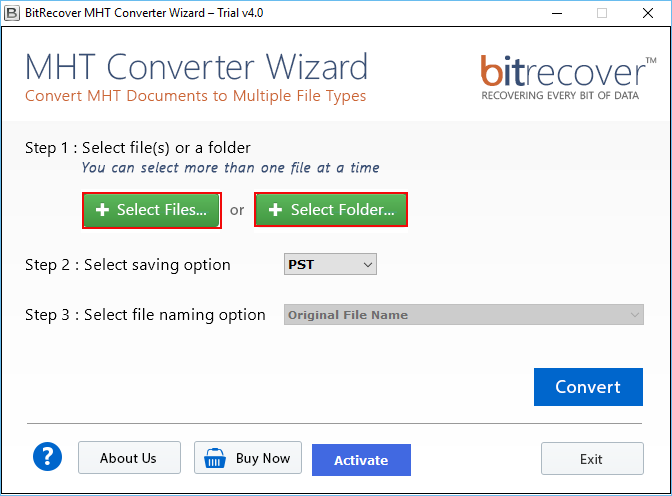
- Install the MHT to DOC Converter tool on the system.
- Select Files from the Select file or a folder option, as per your requirements.

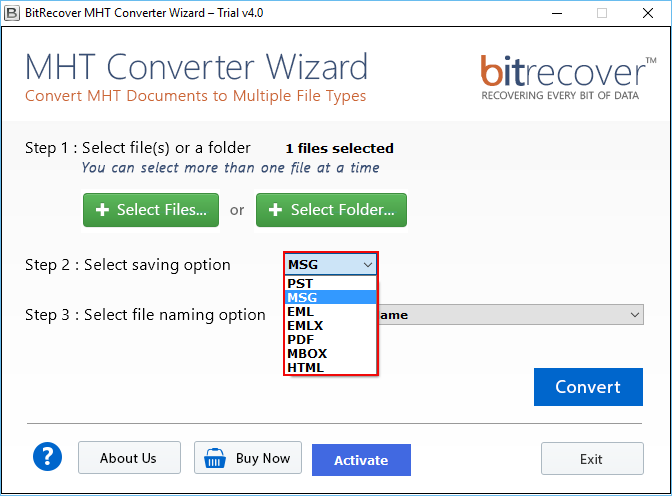
- Choose the DOC format from the Select saving option.
- Choose the file name from the bottom file naming option.
- Click the Convert button and choose the desired location to save the file.
- After selecting the location, click ok, and your file conversion process will start.
Advantages of MHT to DOC Converter Tool
The MHT to DOC converter tool has so many advantages, such as:
- This software keeps the user data safe.
- All functions, tools, and controls are available on one screen. No need to do complicated steps.
- MHT to DOC converter tool can convert many files at once.
- It has two ways to add files to the conversion process: select a single file or an entire folder.
- During file conversion, text, images, and formatting remain the same. originality of content won’t be damaged.
- This converter tool can convert MHT to HTML, PDF, PST, EML, MBOX, EMLX, EML, and DOC, etc.
- It has an easy file-naming option, and the user can save the data by renaming output files using date and time.
- User doesn’t need to install any other third-party software to convert the file.
- Converter tool offers a free trial version, user can check the software’s performance before activating the license.
- The user can select the desired location to save the converted file.
- This converter tool provides remote services without visiting the client’s location.
- It is a globally used software with several MVPs approved.
- MHT to DOC converter tool only needs an internet connection while installing and enabling the license; after that, the user can operate it offline.
- If the user wants to coordinate with us face-to-face, we can conduct video conferencing.
Post Requisites to change MHT to DOC
Here are some of the post requisites of the MHT to DOC converter tool:
- MHT files have been successfully converted into DOC format.
- The original layout and design of the page are preserved after file conversion.
- Users can rename the files according to their work requirements.
- All converted files are stored in the selected location.
- Multiple MHT files can be converted at once.
FAQs
Q1. Can I convert MHT file to PDF?
You can choose BitRecover MHT to PDF converter tool to convert MHT to PDF. This tool will convert files in bulk at once, and for new users, it gives the opportunity to convert 25 files to any file format.
Q2. How to convert an MHT file?
To convert the MHT file, go to the location of MHT files, right-click on the MHT file, click open and select edge, after page open, press Ctrl + A to select content and Ctrl + C to copy content, after this open MS Word, Press Ctrl + V to paste content, click file then select save as to choose location and then select Word Document form the Save as type options. To make the process easy, consider the expert choice converter tool by BitRecover.
Q3. What is an MHT file format?
Webpages are stored in a single file, which is called an MHT file.
Q4. How to open MHT file format?
You can open MHT file format by going to the MHT file location right-click on the MHT file, select open with and then select Microsoft Edge to open the MHT file.
Conclusion
In conclusion, it is a powerful and standalone software that doesn’t require any other converter tool to convert the file. Users can depend on this software for their large-volume file conversion process; it is safe and secure, and is globally used and certified by IT professionals. So, if you need to convert MHT to DOC format, you can use the MHT to DOC converter.
About the Author

