What Is the Best Way to Convert MHT to HTML File Quickly?
Fact-checked and reviewed in accordance with our Editorial Policy
Blog Summary: You can convert MHT to HTML file with using google chrome and microsoft edge which is a manual method, which have drawbacks so, we recommended you the BitRecover MHT to HTML converter tool for converting MHT files to HTML files; it is easy to use and secure.
Are you looking for a trustworthy solution to convert MHT to HTML? Then you are at the right place, because in this article, we will discuss and explain to you an expert way to convert an MHT to HTML with easy and clear instructions.
The MHT file is a web archive format that contains all webpages in one file. This MHT file is often used by business professionals to save their reports and invoices, and it is also used by legal teams to preserve the web content as evidence or records.
MHT files are used in most of the professional places. However, many users still prefer converting the MHT file to HTML format, because they are more flexible and widely supported. That’s why users convert an MHT file to an HTML file with an MHT to HTML converter, but choosing a reliable utility is essential to ensure accuracy and data security.
Reasons Why to Convert MHT to HTML?
Many users convert MHT to an HTML file because an HTML file is more flexible, editable, and widely used. Here are the reasons why to convert an MHT file to HTML format:
- MHT files are difficult to edit and customize, but HTML can be edited easily.
- They can’t be opened in all browsers properly, but HTML files can work in almost every browser.
- MHT files are not appropriate for website hosting.
- Sharing and managing large MHT files can be difficult for users.
- Some software does not support the MHT format.
- In MHT files, extracting images and content can be complicated, but in HTML, it is easier to manage
- Search engines cannot index MHT files like HTML webpages.
- HTML files can be published directly to websites, while MHT files are mainly for storage.
Pre-Requisites of the Software
The conditions needed before operating the tool are:
- A Windows-based system is essential.
- Basic computer knowledge to use the tool.
- Enough storage space to save the converted file.
- Stable system for handling bulk conversion tasks.
- Users need a good internet connection for downloading the tool or doing the manual process.
Manual Process to Convert MHT to HTML
Users can convert the MHT file to HTML through a manual method. Here are some of the manual methods:
1: Using Google Chrome
Here are the instructions for converting the MHT file to HTML, using Google Chrome. These are the steps to perform using Google Chrome:
- Open the MHT file in Chrome.
- Press the Ctrl+ S buttons.
- Select WebPage, HTML Only from the ” Save As Type ” option.
- Choose the desired location to save the file.
- At last, click the Save button to save the file.
2: Using Microsoft Edge
By following these steps for converting MHT to HTML file using Microsoft Edge, you can understand the process:
- Go to the MHT file location.
- Right-click on the MHT file.
- Select Microsoft Edge from the options.
- After opening the file, press Ctrl+S.
- Look at the Save as Type option at the bottom, and change it to Webpage Complete.
- Click Save.
Limitations of Manual Methods
Although manual methods are free, there are also limitations of the manual methods, which are:
- MHT files store images inside the file. Most of the time, manual conversion fails to extract them properly.
- Formatting may get damaged, layout, styles, and structure may not appear the same in the HTML file with the manual method.
- By the manual method, the link can stop working, and some internal or embedded links may not convert correctly.
- Converting multiple files manually, one by one, will consume more time for users than an automated tool.
- The user can not schedule the conversion process in the manual method. If they have a large number of files to convert, they cannot convert them in bulk.
- Most of the time, users need technical knowledge to convert the files manually, which is not beginner-friendly.
- Risk of unfinished conversion process in the manual method. The user might only get text, not full webpage content.
Expert Way to Convert the MHT to HTML File
We gained knowledge on how users can manually convert the MHT file to HTML format without spending a single penny. However, alongside this process, we also informed you of its limitations: using the manual method can be time-consuming for the user, it is not a fast conversion method, nor is it secure for important data.
That’s why we need a converter tool that users can trust for their data security and fast conversion. This is why we are recommending our MHT file converter, which is an advanced solution for data conversion.
With the help of this converter tool, user can convert MHT to HTML file without losing their data, and it is easy to use, with no complicated steps to perform to convert the data. Not only this, but this tool gives you up to 8 formats in which a user can convert their files.
Step to Convert the MHT to HTML Using the Pro Tool
Easy instructions to follow for converting the MHT file to HTML:
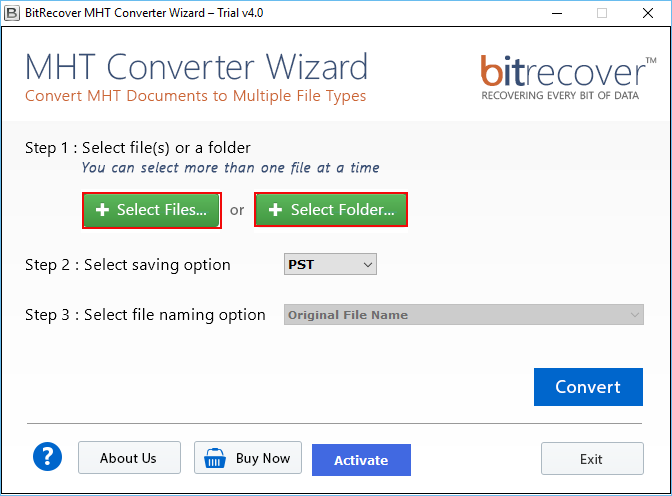
- Install the BitRecover MHT to HTML converter tool on your system.
- Select the Select File or Select Folder option. You can convert the entire folder with the select folder option.

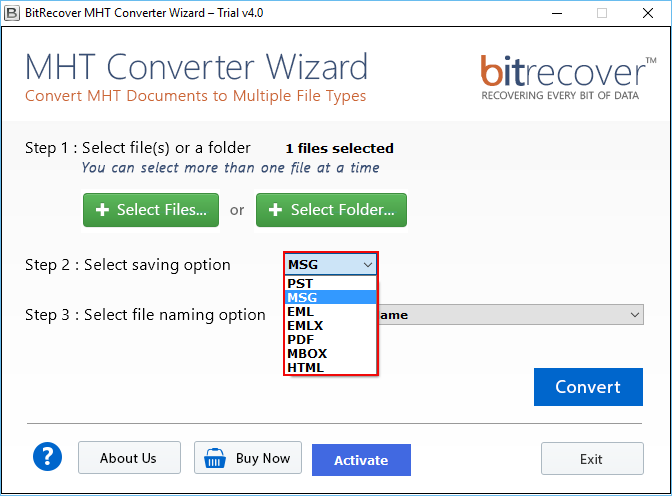
- Choose HTML format from the Select Saving Option.
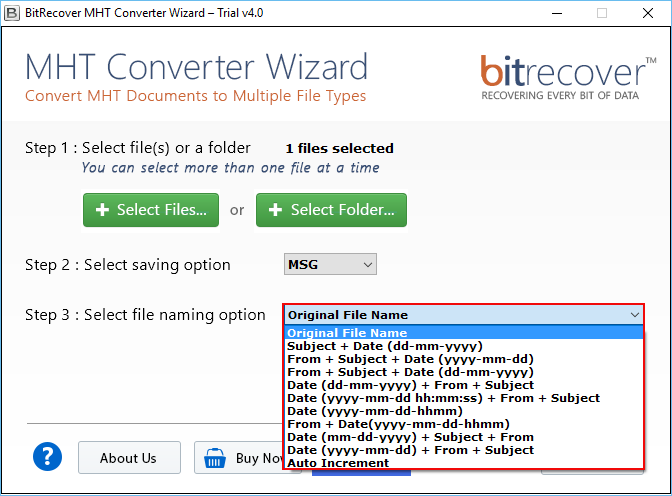
- Select the file name from the select file naming option.
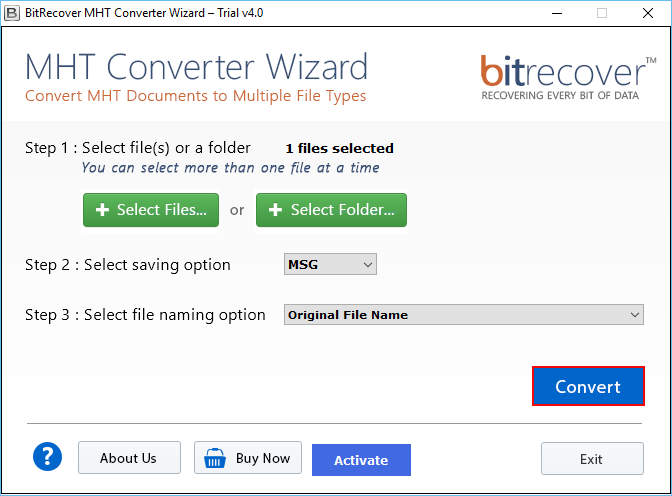
- Click the convert button, and select the destination to save the converted file.
- Click Ok to convert the file.
Why Choose an Expert Solution?
Here are the advantages of an expert solution to convert MHT to HTML:
- The user can also convert MHT to PDF, PST, MSG, EML, EMLX, MBOX, HTML, and DOC, etc.
- This tool has a batch mode feature, which can convert the entire file at once.
- It has various file naming options, user can name their file according to work needs.
- It is a standalone tool that doesn’t require any other software installation to perform conversion.
- The MHT to HTML converter tool converts the file correctly without losing images, text, or layout.
- This tool provides two options, select the file to convert a single file, or select the folder to convert many files together in one go.
- MHT to HTML converter is very easy to use, it has a simple and clear interface with easy-to-use screens and buttons.
Post-Requisites of the Software
Here are the post-requisites of the tool:
- MHT files are successfully converted into HTML format.
- It preserves the original webpage formatting and structure.
- File naming is modified as per the user’s requirements.
- Converted files are saved in the selected location folder.
- Bulk conversion of various MHT files is completed.
Note: If you think or find that anything is inappropriate as per your requirement, then you can connect with the support team, who are available around the clock, to resolve the queries.
FAQs
Q1. How to convert MHT file to HTML?
You can use the BitRecover MHT to HTML converter tool to convert MHT to HTML. This tool provides you with the option to select a file to convert a single file and select a folder to convert the entire folder in bulk.
Q2. How do I open an MHT file in Chrome?
The easiest way to open an MHT file in Chrome is to open Google Chrome, find the MHT file on your computer, right-click on the file, then select Open With and choose Google Chrome to view the MHT file.
Q3. What is the difference between MHT file and HTML file?
MHT files store the complete webpage, including images, text, and links, in a single file, but HTML files contain the webpage structure, while images, videos, and other files are usually stored separately in different folders.
Q4. How to save MHT file in Chrome?
With these easy steps, you can convert the MHT file in Google Chrome. First of all, open the webpage in Google Chrome, press Ctrl+ S, choose WebPage, HTML Only from the ” Save As Type ” option, and select the location where you want to save the file. Lastly, click save. To make the conversion process easy, you can install the MHT to HTML converter tool by BitRecover.
Q5. What are the disadvantages of MHT?
The disadvantages of the MHT file is it is not easy to edit and customize an MHT file, and some applications or devices may not support the MHT format.
Conclusion
The BitRecover MHT to HTML converter tool is a complete software that helps users to convert MHT to HTML file quickly and accurately without any interruption. This converter tool preserves webpages content, images, formatting, and structure during the process of file conversion. Overall, this tool offers a simple, fast, and advanced solution for managing MHT files in HTML format.
About the Author

