How to Convert MHT to PDF File Easily and Efficiently?
Fact-checked and reviewed in accordance with our Editorial Policy
Blog Summary: You can convert MHT to PDF using Chrome, Edge, and even the copy-paste method. However, they have limitations, and that is why using the BitRecover MHT to PDF Converter is recommended. It is a simple, fast, and advanced solution for anyone wishing to convert MHT to PDF file.
To improve document compatibility, many professionals convert MHT to PDF for daily business use. MHT files are web files that save the whole webpage into a single file. This one file can store HTML content, images, scripts, and links. MHT files are used by web developers to save the complete webpages for testing and offline website analysis, and government offices uses it to preserve the online records, notices, and official information for documentation purposes. Similarly, many users rely on MHT files.
Often, people use MHT files, but there are also some drawbacks to using MHT files. This is why users use the MHT to PDF converter to convert MHT into a PDF file, which is more secure than an MHT file.
Reasons Why to Convert MHT to a PDF File?
Here are the main reasons why users convert the MHT file to PDF:
- Unlike an MHT file, a PDF does not need a browser or a particular software to view the file.
- PDFs are easy to share via email or any messaging platform.
- Many updated apps and systems do not support MHT files, but PDF is globally accepted on every system.
- Printing MHT files may result in layout issues, while PDF ensures accurate print output.
- PDF can be protected by a password and encrypted for safety.
- MHT files contain embedded HTML and resources, while PDF is organized professionally.
- The MHT files mostly depend on the internet or the browser, while PDF does not.
Pre-requisites of the tool
These are the pre-requisites of the tool:
- Download the tool on your system.
- Keep the important files ready on your computer before starting the process.
- Your computer must have enough storage.
- You must have a good internet connection.
Manual Method to Convert MHT to PDF File
There are various methods to change MHT to a PDF file, some of which are:
1: Using Google Chrome
Google Chrome allows the user to print the open file using the print shortcut keys. It is easy to use but comes with some limitations. Here are the steps:
- Go to the MHT file location.
- Right-click on the file.
- Click on Open With.
- Select Google Chrome.
- Press Ctrl+P.
- Select Save as PDF from the destination option.
- Click the Save button to save the converted PDF file.
Now your MHT file will be converted to a PDF.
2: Using Microsoft Edge
Here you can understand the process to convert the MHT file to PDF using Microsoft Edge:
- To convert the MHT to PDF, go to the place where the MHT file is located.
- Right-click on the MHT file.
- Choose Open With from the options.
- Now, click on Microsoft Edge.
- Click the Print icon.
- Choose Save as PDF from the options.
- Click the Save button.
Your PDF is created now.
3: Using MS Word
These are the steps to follow for converting the MHT file to PDF format using MS Word:
- At first, open the MHT file.
- Select the content, Press Ctrl+ A to select the entire page, and or manually select the required content.
- Copy the Content with Ctrl- C.
- Now, open MS Word.
- Create a new blank document.
- Press Ctrl- V to paste the content.
- Go to File, then Save As or Export.
- Choose PDF as a file type.
- Click the Save button.
Now, your converted PDF file is saved on your system.
Drawbacks of Manual Methods
Manual methods are free, but there are also some drawbacks to convert MHT to a PDF file, and they are:
- Users have to repeat the steps again and again, as it needs manual effort to convert each MHT file to PDF format.
- There is no process of batch conversion. You can’t convert multiple MHT files at once.
- Some MHT files can be lost due to any accidental cause.
- This manual method is free but takes a lot of time to convert each file.
- Most of the time, layout, images, and styling get distorted during the manual conversion process.
- There is no automation support. The user can not schedule it to convert the files automatically.
Professional Method to Convert MHT to PDF
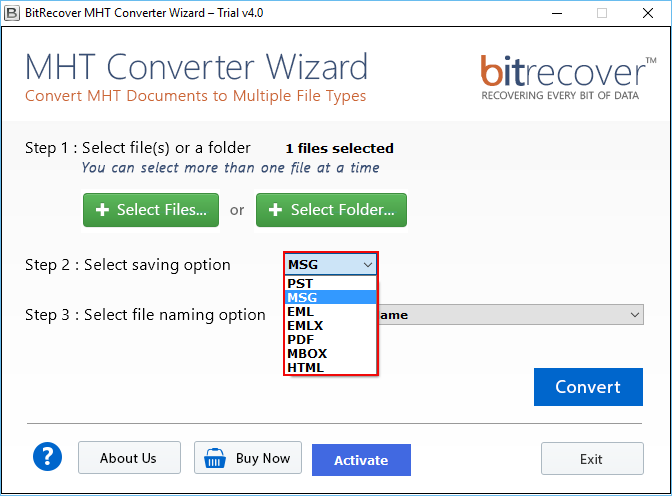
We know that using the manual method to convert the file is a time-consuming task, and it is not a secure process to change MHT to PDF. This is why we are introducing our IT-certified BitRecover MHT Converter Wizard. This is the ultimate solution for converting MHT to PDF files. This converter tool not only converts the file but also saves the user’s precious time. The professional software has up to 8 formats and saving options.
Easy Steps to Convert the MHT File to PDF Format
- Install the above-mentioned software in your system.

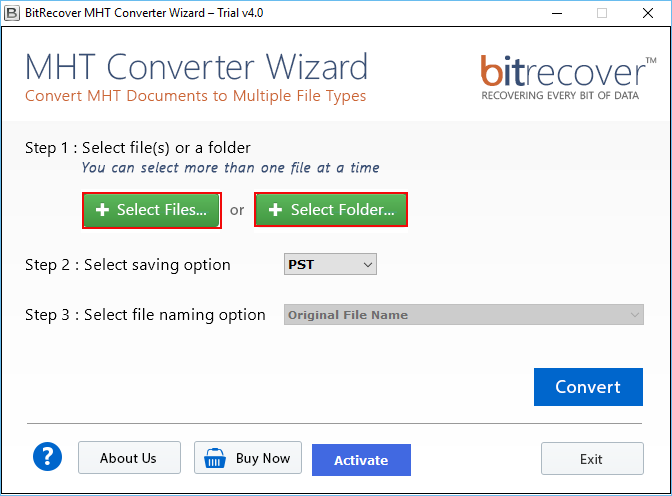
- Select the Select File or Select Folder option.
- Now choose the PDF from the Saving option.
- Select the File name from the file naming option.
- Click Convert, and select the saving path.
- Click Ok to start the conversion process.
- Your File will be converted and saved at the selected location.
Advantages of the Pro Method
Here are the advantages of the professional method to convert the MHT file to PDF:
- User can convert MHT to HTML, PST, MSG, EML, EMLX, PDF, MBOX, and DOC, etc. They don’t have to install any other tool to convert MHT into any other format.
- By using the MHT to PDF Converter tool, users can convert files in bulk, which will save their time and manual effort.
- The interface of this advanced utility is user-friendly, so that even a non-technical user can operate the tool.
- It has a file-naming option, which allows the user to choose the file name, and it manages the files more professionally.
- The converter tool is a standalone software that doesn’t need any other software installation to convert the file.
- You can either select the file option to convert an individual file or you can select the folder option to convert the whole folder at once.
- The software offers 25 free trials, so users can convert the 25 files into any format. By this, the user can understand how this tool performs.
Post-requisites of the tool
Here are the post-requisites of the tool:
- MHT files are successfully converted into the PDF format.
- After the conversion process, the original formatting, images, layout, and content structure remain the same.
- Multiple MHT files can be converted in bulk without any data loss.
- The users can organize the files professionally with the file naming feature.
- PDF files can be accessed and shared safely without an internet connection.
FAQs
Q1. How to convert an MHT file into a PDF?
You can use the BitRecover MHT to PDF Converter tool to convert the MHT to PDF file. This converter tool allows you to convert the entire folder at once.
Q2. Can I convert the MHT to PDF?
Yes, you can easily convert the MHT file to PDF format by applying the above-mentioned easy steps. You can convert the MHT file to PDF format by using Google Chrome, Microsoft Edge, and the MHT to PDF converter tool by BitRecover.
Q3. What is an MHT file?
An MHT file is a file that stores a single webpage, which includes text, images, and links in a single file.
Q4. How to convert MHT to PDF in batch?
In the MHT to PDF converter tool by BitRecover, there is an option to convert the file in batch mode, which will convert the file in bulk.
Q5. How to print.MHT file?
Change MHT file to PDF format and then give the print command using the default options.
Conclusion
Overall, this converter tool simplifies the process of converting MHT to a PDF file by offering fast processing, batch support, file naming options, and multiple format saving options. After using the professional method to change MHT to PDF, you don’t have to install any other third-party software.
About the Author

