Convert MSG Contacts to vCard
This MSG to vCard Converter is a simple & easy to use software that permits users to convert *.msg contacts into *.vcf files. The software supports converting both ANSI & UNICODE MSG file into vCard. This utility converts all contact fields within MSG file created by all MS Outlook versions, including 2024, 2021, 2019, 2016, 2013, 2010, 2007, 2003, 2002, and earlier versions.
Offers Dual Modes to Add MSG Files
MSG to vCard Converter software provides two options to add MSG files and folders in software window for conversion:
- Select Folders: This feature allows users to add an entire MSG folder with multiple subfolders.
- Select Files: This option allows users to add multiple MSG files to the software panel for conversion.
Batch Convert MSG Contacts to vCard
MSG to VCF converter tool allows users to change multiple MSG contacts into VCF format at once with precise information. Users will benefit from this option since it allows them to convert large amounts of MSG contact data quickly. It helps users save time by converting a large number of MSG files to vCard format in one go.
Creates Universal vCard Contact File
This MSG to vCard Converter works flawlessly to convert MSG file to vCard. Users may now use any VCF-enabled device to access their Outlook MSG contacts. The universal vCard format is supported by a variety of devices, including smartphones, email clients, and other email clients, using contacts is simple.
Convert ANSI & UNICODE MSG into VCF
Outlook MSG to VCF exporter allows users to convert both ANSI and UNICODE MSG files to vCard. For Outlook, Unicode is the latest standard, and it supports foreign characters. Old Outlook versions create ANSI MSG files. Outlook 2002 and prior versions can only recognize the ANSI format. Outlook 2003 and subsequent versions create Unicode MSG files.
Convert MSG to VCF with Contact Fields
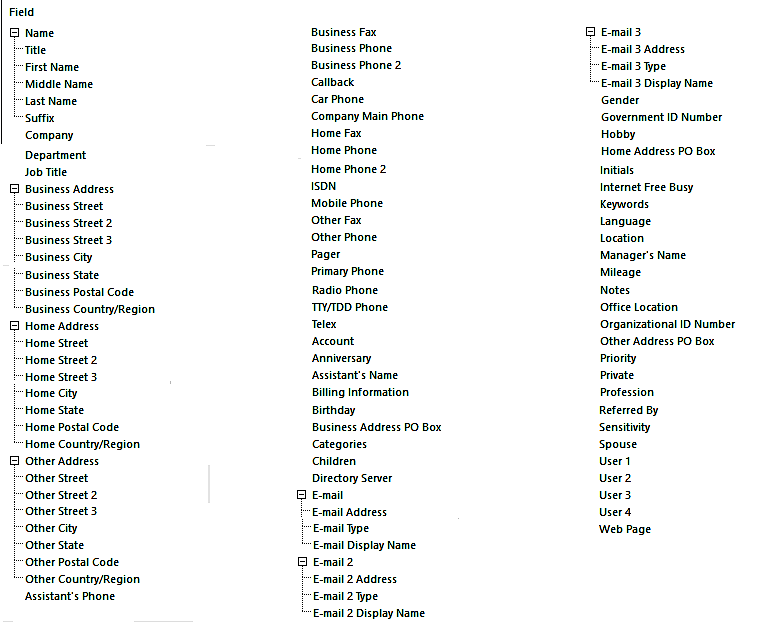
MSG to VCF Converter is capable of converting all necessary fields from Outlook *.msg files to VCF, such as: Name, Title, First Name, Last Name, Company, Job Title, Business Address, Home Address, Other Addresses, Birthday, Email Address, Gender, ID Number, Keywords, Language, Location, Profession, Website, Profile Picture & many more
Save Resultant vCard at Desired Location
The MSG to vCard exporter allows users to save the converted vCard Contact files to any location on their computer. The tool is the most useful feature, since it allows users to store VCF contacts in a user-friendly location on the hard disk. It also allows users to create a new folder to keep all of the data files that emerge.
Supports MSG Files of Latest Outlook
This software supports all MSG files without Microsoft Outlook configuration. MSG contact to vCard exporter tool is compatible with MSG files from Outlook 2024, 2021, 2019, 2016, 2013, 2010, 2007, 2003, 2002, and older versions. This utility even supports orphan MSG files.
Selective MSG to vCard Conversion
After adding Outlook MSG contacts in the software window, users can preview MSG files and folders in the File Explorer view. After that, select the required MSG files/ folders from software panel and convert them into VCF format. This feature is helpful to skip unnecessary files from conversion.
Generates Log Report File
After completing the conversion process, the tool automatically generates and opens a log report file named SavingLog.txt. This file stores full information about converted data, such as Start Date and Time, Saving Type, Source Path, Destination Path, Items Converted, Time Elapsed, and Conversion Status.