Email Archive vs Backup: Easily Know Crucial Differences
Fact-checked and reviewed in accordance with our Editorial Policy
Summary: In this blog, users get to know about email backup vs archive. A backup creates external, independent copies of the mailbox for the purpose of disaster recovery surviving hacks, data deletions, and provider changes. Email archiving helps in saving each email in real-time for lengthy compliance needs and record keeping purposes, but stays tied to the same mailing platform. Most business units need both: backup for safeguarding data, and archiving for legal retention.
Email backup is basically the safety net & email archive is the trail, actually!
Picture an employee accidentally emptying his trash folder, when a ransomware attack encrypts his email server overnight, or he switches his email provider only to discover that his old emails did not come along. Mail messages carry crucial contracts, important client approvals, critical invoices, and precious communication. So, when these vanish, the damage done is not only about inconvenience alone, it is actually the loss of trust that was promised.
Confusion comes between email backup and email archiving. Businessmen think that emails being archived for compliance protect them against losses too. But hardly do they know that this won’t work in incidents like deletions or hacks etc as archiving never copies data anywhere independently. Backup and archiving solve 2 different puzzles, and mixing them up messes everything up!
What is Email Backup?
Email backup is the copy of your mailbox data that includes emails, attachments, and folders, which are stored externally in formats such as PST/EML/MBOX. Taken at regular scheduled intervals, this is independent of your original email account, so quite beneficial for disaster recovery and fast data restoration after any data loss incidents, hacks, or provider switches.
What is Email Archiving?
Email archiving helps users to automatically save all incoming & outgoing emails in real time for long-term storage. It helps every organization meet compliance requirements. Email archives also maintain searchable records. Nevertheless, they end up tied to same email platform. Users archive data may not be saved after account deletion or when users switch to another email client.
Archive Button in Gmail and Outlook
Most people get confused about email archive vs backup due to the Archive button in Gmail/Outlook. So, what does this Archive button actually does:
- Gmail: The Archive button removes the message from Inbox and moves to the All Mail folder. The email is still on Google server, and tied to the account, and goes away when the account gets hacked, suspended, or deleted.
- Microsoft Outlook: Archive button moves the message to the Archive folder inside the same mailbox (or to an auto-archive .pst file on the desktop versions), but it never goes away from the Microsoft/Exchange environment.
What this archive button does not do:
- This does not form an independent copy of the email data.
- It does not safeguard if the account is hacked, deleted or suspended.
- It does not survive a provider switch upon leaving Gmail/Outlook unless the user exports the messages separately.
- It is not retrievable as the actual compliance archive is. It is not compliant with HIPAA/FINRA/GDPR.
So, if the aim is to protect data against deletions, hacks, or account access loss, clicking this Archive button is not sufficient. One needs an actual backup in those cases.
| Feature | Email Backup | Email Archiving |
| Purpose | Disaster Recovery | Compliance & Records |
| Copy Location | Independent Storage | Same Mail Platform |
| Survives Account Deletion | Yes | No |
| Search Capability | Limited | Full-text Search |
| Ideal For | Everyone | Regulated Industries |
Email Archive vs Backup: Differences at a Glance
Come to know where the two differ:
| Aspect | Email Backup | Email Archiving |
| Major Aim | Retrieving mail messages after data loss incidences or in disaster scenarios | Keeps mail messages in longer run for recordkeeping and for the compliance |
| Working | Forms copies of mailbox at particular moments | Manages every mail message real-time via journaling |
| Recording Frequency | Periodic formation of snapshots | In real-time, capturing every incoming/outgoing mail message |
| Duration of Data Storing | Small to medium time-period | Sometimes years or sometimes even decades |
| Data Storing Destination | Outside its primary mailing system, including independent storage medium like hard drive, separate account(s), or user-handled cloud storage | Maintained within or alongside email infrastructure on its supported server environment |
| Safe from Account Deletions and Breaches | Yes, copies remain independent of original mailing account | No, if the storage relies on same mailing platform |
| Provider Independent | Yes, these portable PST/EML/MBOX files could be easily opened independently just about anywhere | Usually no, because of being locked to the same mailing platform |
| Access without Internet | Yes | Rarely; in limited cases only |
| Data Restoration Speed | Very quick in restoring mailbox or selected mail messages | Quite slow in entire restoration, much quicker for individual mail messages |
| Search Ability | Very limited search functionalities, majorly depends on backup format | Comprehensive search capability; full text search combined with detailed metadata filtering |
| Ideal For Whom | Solo users, freelance professionals and small business units | Regulated firms having legal retention requirements and who are following legal rules |
| Pricing | Less ongoing expenses, with one-time cost along with own storage | High ongoing subscription cost, with enterprise subscription |
| Handling | End-user, no such dedicated IT teams are needed | System admins and IT professionals required to be present for managing |
| Compliant (HIPAA/FINRA/GDPR) | Only partially supported | Yes, fully optimized for this |
Why Is Email Backup More Preferred?
While differentiating email backup vs email archive, you would come to know that email backup is better than email archiving. Here’s why:
- Backup copies help in safeguarding you from account hacking incidents and mistaken deletions.
- Backups work even after you have left your email provider.
- PST/EML/MBOX files can be opened anywhere. So, this imparts the much-needed independence from your provider.
- Backups actually provide offline copies of your own data.
- Backups could even be used to recover mistakenly-erased data.
What Is Email Archiving Good For?
Email archiving is needed when a business requires a proper defensible email retention policy for meeting regulations such as HIPAA/GDPR/FINRA also making eDiscovery much simpler and allowing people to speedily retrieve and produce specific emails during company audits and/or certain legal proceedings.
Useful Tip: Keeping Email Data Safe
It is always advisable to take regular backup of your email data even if you have a real-time archiving mechanism in place. This is a necessary protocol in order to keep you safe from any external influence such as data corruption, damage to storage devices, any hacking attempt/accidental deletion of data, or complete loss of data in the event of any unforeseen disaster.
Try to Follow the 3-2-1 Backup Rule
Keep 3 backup copies of your crucial email data, on 2 different media types, with 1 backup copy stored offsite. By following this, your emails would survive account hacks, suspension/mistaken erasures, as they don’t depend anymore on your original email account.
Email Backup vs Archiving – Which One Suits Your Need Better?
- Solo users and freelance workers can use email backup better as it is low in costing, simple to handle with no need of IT support, and keeps emails secure from hacking, deletion, and provider changes.
- Small and growing businesses must also prefer email backup as their priority, as it safeguards crucial client communication and other critical data like invoices etc without the overhead costs of any enterprise archiving system otherwise. Know that the professional tool described below can make the email backup tasks simple for such users.
- For regulated industries (finance/legal/healthcare etc), email archiving is good alongside backup for meeting compliance needs such as GDPR/HIPAA/FINRA but again, email backup still remains as the first line of defense here also.
Best Tool for Email Backup
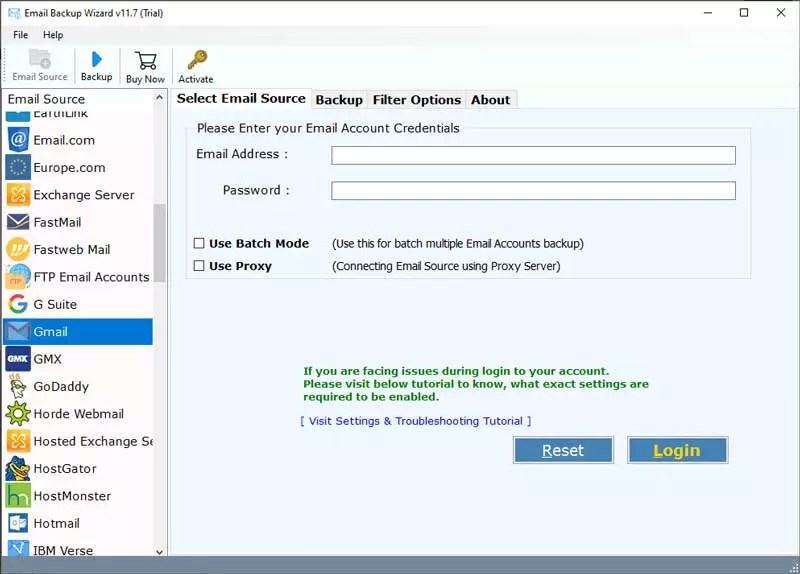
At the time of searching the reply for the query why email backup, you would really know the immense significance to safeguard sensitive email info before any calamity strikes where you unluckily become the victim of data loss. For this purpose specially, you can try making use of BitRecover Email Backup software, which is a great tool.
How to Conveniently Take Email Backup?
- Start the tool and select the email service along with the login account.

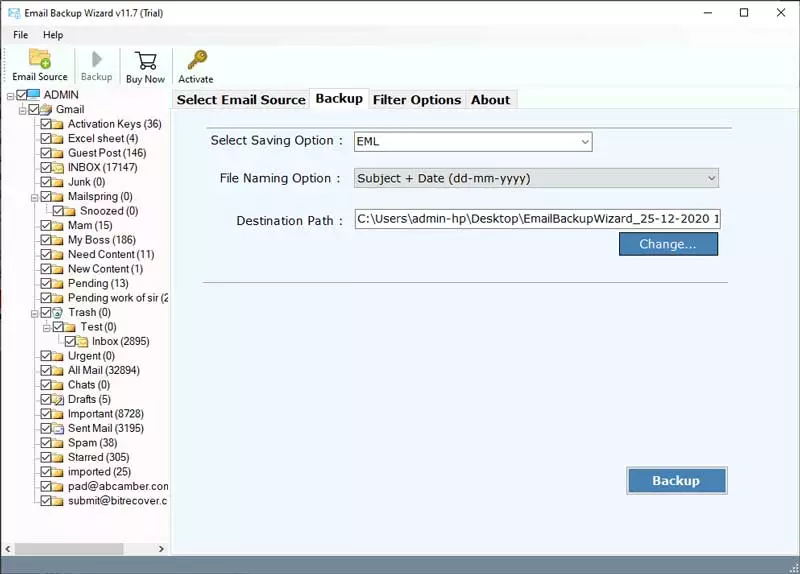
- Now, select folders and choose a saving option from the list.

- Schedule backup if you need it that way.
- You can also make use of advanced filters for backing up specific data only.
- Press Backup to start the process and witness it happening in the matter of a few minutes only.



End Note: Email Archiving Isn’t the Same as Email Backup
Here, in this blog, we tell how each of these protects your data, where do they overlap, where they do not overlap, and how to find out which one your business actually needs, backup or archiving or both. By now, you must have gathered quite a lot of info and details about the differentiating factors between email archiving and email backup. Even though their objectives could be somewhat distinct in terms of data saving as well as functionalities, the major concentration is on securing and maintaining your email data in the long run.
Either of these two, i.e., email archive vs backup, both features are integral to any business unit’s IT processes in order to safeguard all business-related critical email communication. Email backup imparts great advantages that you read here. So, be regular in making those copies!
FAQ Segment
Check the common questions and answers now to be more aware and better informed:
Q1: Which is the safest process of backing up mail messages?
A: The safest procedure is to keep local copies of your mailbox data in an open format such as PST/EML/MBOX etc, that are saved outside the email account probably on a hard drive or on your own cloud storage. Remember to follow the 3-2-1 rule: keep 3 backup copies of your critical email data, on 2 separate media types, with 1 copy saved offsite. This way your mail messages survive account hacks, suspension/mistaken erasure, as they do not depend anymore on the original email account.
Q2: How frequently one must backup the emails?
A: For a personal email account, weekly/biweekly backup is often sufficient. For active business-related email accounts, daily backups or incremental ones are much safer, as those capture new mail messages as those arrive without repeating a full backup every time. The appropriate frequency largely relies on the email volume being handled and the cost spent on losing critical emails.
Q3: Is email backup better than email archiving?
A: For most people and small business units, definitely email backup is better than email archiving as backups form independent copies, which survive email account losses, provider changes and hacks, while email archiving mostly stays tied to the same account or email platform.
About the Author

