How to Download Attachments from Yahoo Mail? Easy Guide
Fact-checked and reviewed in accordance with our Editorial Policy
Are you struggling to download attachments from Yahoo Mail? Don’t worry, here is the solution for you. In this complete guide, we will provide you with a detailed step-by-step explanation for both manual and automated solutions to download all Yahoo Mail attachments easily without losing important data.
Yahoo Mail is one of the oldest and widely used email services that offers its users the ability to send and receive files as attachments whether it is a document, image, video or PDF. Managing these files is a crucial task for users who use Yahoo mail and want to download attachments from Yahoo Mail on their local system.
Through this informative article you will explore the reasons behind this need and how to execute it using simple and effective ways. So, read the article till the end to gain all the related information. Let’s start.
Reasons to Download Attachments from Yahoo Mail
Before directly diving into the article, it is first important to understand why learning how to download all attachments from Yahoo Mail is important and what benefits it provides to users. Mentioned some of them below.
- Downloading Yahoo attachments allows you to access your important files in offline mode, in less connectivity or without any internet connection.
- Storing attachments locally ensures that you have a backup Yahoo of all unimportant files in case your account gets deleted or becomes inaccessible.
- Allow users to easily share documents across other email platforms or via USB, cloud storage etc.
- Yahoo Mail has storage limits, which is why downloading large Yahoo Mail attachments helps in freeing up space in the inbox folder.
- Downloading Yahoo attachments in Yahoo Mail helps in easy organization of files and allows sorting files into folders according to date, type, and more.
- If you are moving to another platform then saving attachments can help you in smooth transfer while migrating all files securely.
- Extracting attachments from Yahoo mail reduces the risk of data loss and keeps your data safe.
When Do You Need to Download Yahoo Mail Attachments?
While the reasons usually focus on why you want to download Yahoo email attachments, on the other hand, causes refer to what triggers the needs. So below we have listed some common reasons that may lead users to download attachments from Yahoo Mail.
- If your Yahoo Mail is running out of space, it is necessary to clear large attachment that cause you to download or save them elsewhere on your device.
- If you want to access your files offline, then you need to download multiple attachments from Yahoo emails in advance for smooth access without any hindrance.
- Migrating to another service requires saving important documents beforehand to transfer them properly and securely.
- If a user is deciding to close their Yahoo account, then downloading files is important so that you don’t lose any of your messages.
- Sometimes, Yahoo built in preview tools fail in opening certain files which lead users to download or extract attachments to their local system.
How to Download Attachments from Yahoo Mail Manually?
Here are the manual ways to extract Yahoo Mail attachments step-by-step:
Method 1- Download Single Yahoo Attachment
- Login to your Yahoo Mail Account.
- Open the email that contains attachments you want to download.
- Click on the attachment preview and select the Download icon.
- That is it, your file will get downloaded in the Downloads folder.
Method 2- Download All Yahoo Mail Attachments from Single Email
- Open the email which holds multiple attachments.
- Navigate to Download all or Save all attachments option, locate above the list of attached files.
- Click on it and download Yahoo Mail attachments in a ZIP file.
Here’s how you can manually download attachments from Yahoo Mail. However, manual methods have a lot of limitations. Read them before choosing the manual method to download attachments from Yahoo Mail.
Limitations of Manual Methods
- It is a time-consuming process and requires a lot of human effort in downloading individual attachments.
- Manual method is not an ideal solution for non-technical users as it requires some technical knowledge.
- Does not offer a bulk download ability, which can lead to a lengthy and tiring process.
- Increases risk of losing attachments if the email is overloaded.
- Do not filter email attachments by subject, date, or their type. This can result in creating a mess in the system’s local folder.
To overcome these challenges, we recommend you use the automated solution that we have mentioned below. It will help you easily download attachments from Yahoo Mail with full security and advanced features. Continue Reading.
Automated Solution to Download Attachments from Yahoo Mail
In this section, we will get you familiar with an ultimate solution to solve all your queries. The tool, BitRecover Email Attachment Downloader Wizard is a robust tool that supports a simple and easy-to-operate interface to extract and download attachments from Yahoo Mail. The tool supports multiple universal file formats to download Yahoo email attachments into any new format such as PDF, PST, DOC, TXT, GIF and more. In addition, it enables users to batch download Yahoo attachment files without saving entire emails, which makes it an ideal solution for backup, archiving or managing large datasets seamlessly. Users can save Yahoo Mail to Zimbra, Thunderbird, Apple Mail, Eudora and other widely supported email clients.
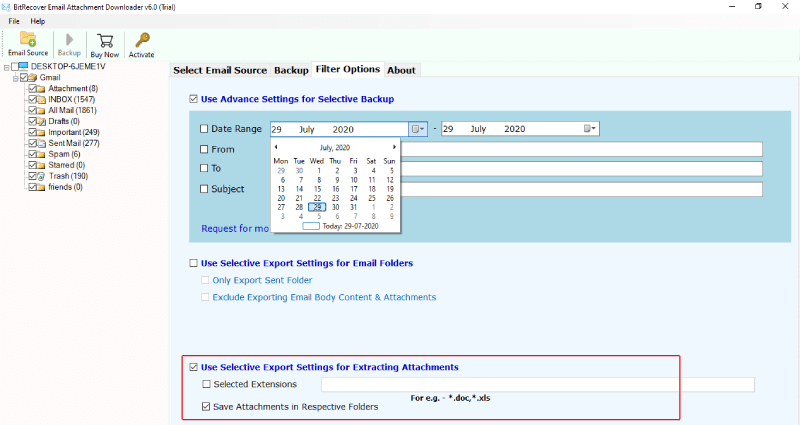
This tool offers advanced filter options such as date range, sender & recipient details (from, to), excluding attachments, etc., allowing users to save Yahoo attachments selectively. With its user-friendly interface, technical as well as non-technical users can effortlessly manage large volumes of email attachments.
This powerful Yahoo Mail attachment downloader also offers its users a free demo version, using which they can download maximum 20 Yahoo email attachments from each folder. This trial version allows them to test the workings and features of the tool before purchasing the licensed edition or the activation key. So, download the tool now!
How to Download Attachments from Yahoo Mail Easily?
- Download and launch the Yahoo Mail attachments downloader on your system.
- Select Yahoo and enter your Yahoo Mail account credentials. Click Login.

- Navigate to Filter options and set all the required filters accordingly.

- At last, browse a destination path and click on Backup to start downloading email attachments.

Core Features of the Yahoo Mail Attachment Downloader Tool
- This Yahoo Mail attachment downloader is a secure and safe application with a user-friendly interface.
- Extract Yahoo attachments without saving entire email messages in batch, saving users time and effort.
- Apart from Yahoo Mail, it supports multiple email services such as Gmail, Outlook.com, Office 365 and IMAP-enabled accounts.
- The date range filter allows downloading attachments from Yahoo Mail received without a specific date range (start date to end date).
- Keeps the original email folder structure and hierarchy intact during the Yahoo Mail attachment extraction process.
- Compatible with all major file formats to save Yahoo Mail attachments including PST, MBOX, EML, MSG, DOCX, DOC, PDF and more.
- Supports preview mode to check or uncheck emails before extracting their attachments. This helps in avoiding confusion and the download of unnecessary Yahoo email attachments.
- Believes in working alone without needing any other third-party software installation to download attachments from Yahoo Mail.
FAQs: How to Download Attachments from Yahoo Mail
Q1. How do I download attachments from Yahoo Mail to my computer?
To save attachment from Yahoo Mail, open the email > click on attachment preview > hit the download icon. This is how your Yahoo mail attachment will be saved to your computer default Download folder.
Q2. Can I save multiple large attachments from Yahoo Mail at once?
With the help of the automated solution, you can batch download large Yahoo Mail attachments in a single cycle while ensuring quick processing and no data loss.
Q3. Why can’t I download attachments from Yahoo Mail?
If you are unable to download attachments from Yahoo Mail, these can be the common reasons:
- Browser issues
- Poor internet connection
- Yahoo Mail preview tool error
- Large Attachment Size
To avoid these, use the pro tool discussed above.
Conclusion
The process to download attachments from Yahoo Mail is an essential task for accessing important files locally. But some issues may arise while downloading. In this post, we have mentioned the manual methods to save attachments from Yahoo Mail, but I would highly recommend that you to use the automated solution. The Yahoo Mail attachment downloader ensures that you will never lose important documents, photos, or videos during and even after the backup is complete. To enjoy a seamless process, download the software. If you still face any query, contact our support team, they are available 24/7.
About the Author

