How to Convert MHT to TEXT Format with Expert Solution?
Fact-checked and reviewed in accordance with our Editorial Policy
Blog Summary: Users can convert MHT to text format by using manual methods, but it takes a lot of time and risks to lose important data. That’s why we introduce the MHT to text converter by BitRecover, which is tested and trusted by many IT professionals.
Do you have MHT files, which won’t open in a text editor? And you want to read the content of a web page without using a browser? If yes, then you have come to the right place because, in this blog, we will explain how to convert MHT to text format so, you can easily read the MHT files without opening the browser. Many users face these difficulties while working with MHT files because this tool saves users time and manual effort.
In this guide, you can discover the simple ways to convert MHT to text using both manual methods and the professional method to convert MHT files. Here, we will discover why users convert MHT files and the advantages of saving them in text format. Let us first learn what is mht format and its Characteristics.
What is an MHT File?
An MHT file is a web archive format, which is used to save the whole webpage in a single file. It stores the webpage content, images, links, and formatting all together so the page can be viewed without being online.
The MHT files are commonly created by applications like Microsoft Internet Explorer, Microsoft Outlook, and some web browsers. This file format is useful to save the web pages, emails and content.
Why Convert MHT to Text?
These are the following points which can explain you why users should convert MHT to text:
- Wide Compatibility: The text format almost works on all the operating systems and devices without any issues.
- Easy to Share: Text format is very lightweight, it can be easily shared through apps or emails without any difficulties.
- No Browser Needed: Users don’t need a web browser to read or view the text content.
- Easy to Edit: The user can edit the content without dealing with the web page.
- Quick Search and Access: In-text, users can easily find the particular words or information that they are searching for.
- Useful for Documentation: For users, it can become easy to collect and use the files to get any information for study and documentation.
Pre-requisites for Converting MHT to Text
Before converting an MHT to text format, some points are needed to make the steps smooth and interruption-free.
- Basic Computer Knowledge: The user should have basic knowledge to operate the computer.
- MHT Files Ready: Users need to ready the MHT files on their computer, which they want to convert.
- Working System: The users need a good working system to run the conversion process.
- Good Storage Space: It needs enough storage space to save the converted text on the computer.
- Trustworthy Conversion Tool: If user is using software to convert MHT to text format, then install the reliable converter tool.
- Error-Free Environment: Make sure that the system is working properly without any errors and interruption.
- Good Internet Connection: The process needs a good internet connection to install the software and for license activation.
Manual Method to Convert MHT to Text.
These are the 3 few simple manual methods to convert MHT to text format. Below are the instructions to follow:
1: Using a Web Browser.
Below are the instructions to follow to convert MHT to text format using a web browser manual method:
- Go to where the MHT files are located.
- Right-click on the MHT file.
- Select Open With from the options.
- Choose Chrome browser.
- After the complete file load, press Ctrl + A to select all content.
- Press Ctrl + C to copy the selected content.
- Now, open the Notepad on the computer.
- Press Ctrl + V to paste the content.
- Click File and then click save as.
- Choose the desired location and choose file type (.txt) from save as type.
- At the end, click Save button.
2: Using Notepad.
Here are the instructions to follow to convert MHT to text format using the direct Notepad manual method:
- At first, go to MHT file location.
- Right-click on the MHT file.
- Select open with from the options.
- Choose Notepad from the options.
- Now, edit the content if required.
- Click File from top left menu.
- Select the Save as from the option.
- Choose the preferred destination to store the file.
- Select the (.txt) format from Save as type options.
- Hit the save button.
3: Using the Drag and Drop Method.
Below are the drag and drop manual method to convert the MHT files:
- Drag the MHT file into a browser window.
- After file is completely open, copy all the required content by pressing Ctrl + C.
- Now, open the Notepad.
- Press Ctrl + V to paste in Notepad.
- Click File>Save As, choose desired destination.
- Choose TXT format from the save type option.
Drawbacks of Using the Manual Method.
Using the manual methods to convert MHT to text format has several limitations. It is not always the best option, especially for large or important files.
- Data Loss: While converting the file, important information can be lost.
- Time-Consuming: The conversion process is completely manual, so it is slow and repetitive, and it gets boring after some time.
- Manual Effort: Users have to copy and paste everything by themselves manually.
- Higher Chance of Error: Copying the content and pasting it into Notepad files can lead to mistakes.
- Hard to Handle Large Files: Large MHT files can be hard to handle in the manual conversion process.
- Multiple Manual Steps: The users need to do many steps manually, which takes too much time to convert the files.
- No Batch Conversion: Users can only convert one file at a time, they cannot convert multiple files at the same time.
- Formatting & Structure Loss: While converting MHT to text format, it may lose its original layout and structure.
Professional Solution to Convert MHT to Text
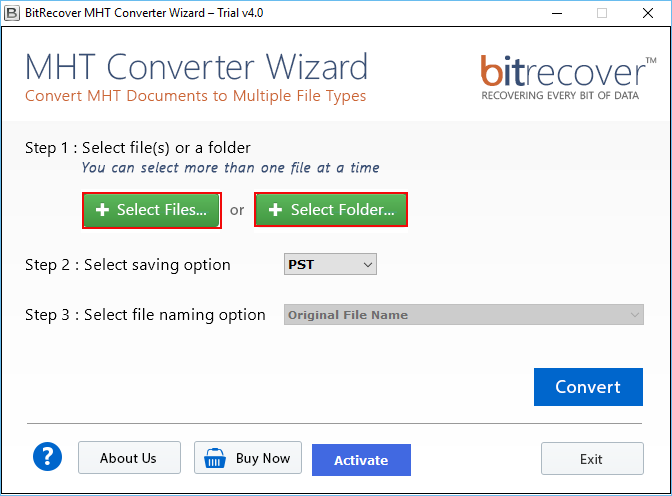
Converting MHT to text format can make the content easier to open, read, edit and share. The manual methods work for a few files, but they can be time-consuming for larger file conversions. Users who require a fast approach can use the BitRecover MHT Converter Wizard to convert either a single file or an entire folder at once. This software simplifies the process and also provides options to save MHT files in up to 8 formats, depending on users’ requirements.
Easy Step-by-Step Guide to Convert MHT to Text Format
Below are the easy steps to follow to convert MHT to text format:
- Install the MHT to text converter on computer.
- Select files from Select file or select folder options.

- Choose DOC format to convert MHT files into Text format.
- Select the file name from file naming options.
- Click convert and select the desired location to store the file.
Top Features of MHT to Text Converter
Here are the main effective features of the MHT to text Converter, this tool can convert MHT to text format in bulk at once, and it has a dual selection mode.
- 100% Safe: This tool reduced the risk of data loss during the file conversion process.
- Independent Utility: MHT to text converter tool is a standalone tool, so it doesn’t need any other application installation to perform the task.
- Multiple Output Format: This tool can convert MHT files into any format because it has up to 8 formats.
- Batch Mode: Users can convert multiple MHT files together at the same time instead of doing it one by one.
- Dual Selection Mode: The user can add a single file or can also add an entire folder for the conversion process.
- Preserves Data Integrity: This tool can keep the original structure and content of the file without changing the data.
- File Naming Option: It gives an option to save the file with a different file naming style for easy file management.
Post-Requisites for Converting MHT to Text
After converting an MHT to a text format, some basic steps are needed to make sure everything is correct and usable.
- Open & Review File: Open the converted file and make sure all the text is properly saved or not.
- Verify Data Accuracy: Verify that no important data is missing after the file conversion process.
- Remove Unwanted Content: If needed, then delete the unwanted lines and extra code.
- Ensure Readability: Users should make sure that the text is readable and clean.
- Keep Backup Data: Store a copy of both MHT and text format for safety.
- Rename File: Rename the converted file to manage the file properly on your computer.
FAQs
Q1. Can I convert MHT to PDF?
Yes, you can convert MHT to PDF by opening the MHT file in Chrome browser, clicking the print icon, choosing PDF from the save as option, and clicking the save button. Your MHT file will be saved in PDF format, but if you need a secure converter tool, then you can use the MHT to PDF converter by BitRecover.
Q2. How do I open an MHT file?
You can open an MHT file using the web browsers like Chrome, Internet Explorer, or Microsoft Edge by right-clicking on MHT file and selecting Open With from the options.
Q3. What is an MHT file?
The MHT file is a saved web page which store the links, images and text all in one file.
Q4. Can you open MHT files in Chrome?
Yes, Chrome can open the MHT files by going to the location of the MHT file, right-click on the file, choose Open With, then select Chrome browser to open the MHT file.
Q5. How to print an MHT file?
You have to open the MHT file in a browser, then press Ctrl + P or use the print icon to print it directly.
Conclusion
Overall, this blog explained you what an MHT file is, why to convert MHT to text, and the manual and professional methods to convert MHT to text. However, the manual methods can work when you only need to convert a single file, but they take more time, and they can also cause errors and missing data. On the other hand, for bulk and accurate conversion, BitRecover MHT to text converter is the best choice because it is faster, safer, and reduces manual effort. At the end of this blog, we would like to say if you have any queries related to this software, then you can coordinate with the support team, which is 24/7 available to solve users’ queries.
About the Author

