How to Convert MHT to PST File Format in a Bulk at Once?
Fact-checked and reviewed in accordance with our Editorial Policy
Blog Summary: You can convert the MHT to PST file by manual methods using copy/paste and drag and drop methods, but these methods are time-consuming and risky, that is why we introduced our BitRecover MHT to PST converter tool. This tool can convert multiple files in bulk at once.
MHT files are most commonly used to store webpages or emails in an individual file, while PST files are used by Microsoft Outlook to store email, contacts, calendars, and other mailbox data. An MHT to PST converter helps users to convert MHT to PST format so the data can be easily imported and accessed in Outlook.
PST is the file format used by Microsoft Outlook to store mailbox data. It stores emails, attachments, contacts, calendars, and notes. Users can archive old mailbox data easily by PST file; PST files can be opened without having an internet connection.
Reasons Why Users Should Convert MHT to PST
Most of the users are now converting MHT to PST files. Here are the reasons why the convert MHT to PST:
- The MHT files usually can store only a single email or webpage, but PST files can store an entire mailbox with thousands of emails.
- MHT files are just saved files; PST files work inside Outlook and allow sorting, searching, and managing the emails.
- The MHT files can contain webpage or email content, but PST files can save contacts, calendars, tasks, and notes.
- Files do not support advanced mailboxes folders in MHT files, while in PST files, it allows users to create and organize multiple email folders.
- Managing thousands of files becomes very difficult for MHT files, but PST files can store a large amount of email data in a single file.
- Users can only view content in MHT file, while PST allows users to move emails, archive emails, categorize emails, etc.
Prerequisites for converting MHT to PST
User should know these important points before converting the MHT file to PST:
- The user needs a good internet connection to install the software and activate the license.
- Choose trusted software for safe and accurate conversion.
- User should avoid shutting down or restarting the system during file conversion.
- Keep MHT files organized on the system for converting into a PST file.
- System must have enough space to store converted file.
- By understanding the instructions, it will help user to avoid mistakes during the conversion process.
- User must have basic knowledge to operate a computer.
Manual Methods to Convert MHT to PST
The user can convert MHT to PST format with these below mentioned manual methods, such as:
1: Using Copy / Paste Method
Here are the manual instructions to follow for converting MHT to PST file:
- Go to the location where the MHT file is located.
- Right-click on the MHT file.
- Open it using Microsoft Edge from the options.
- Press Ctrl + A to select the content, and press Ctrl + C to copy content.
- Open Outlook.
- Compose a new email.
- Press Ctrl + V to paste the content.
- Save the email in the Outlook folder.
- Repeat for all MHT files.
- Export Outlook data to a PST file.
2: Using the Drag and Drop Method
By using this drag-and-drop manual method, you can convert MHT to PST. Here are the steps to follow:
- Open Microsoft Outlook on your system.
- Create a new folder in Outlook
- Open the folder where the MHT files are located.
- Drag the MHT file and drop it into Outlook.
- Repeat the process for all MHT files.
- After all files are inside Outlook.
- GO to File, click Open & Export from the options, and then click Import/Export.
- Choose Export to a PST file.
- Save the PST file.
Drawbacks of Manual Methods
Manual methods for converting MHT to PST may work without spending a single penny, but this manual method has many drawbacks. Here are the main reasons for not choosing the manual method to convert MHT to PST:
- Users have to move or copy each MHT file one by one, which takes up a lot of users’ time.
- In the manual method, there is no button that, when pressed, it will convert all your data at once.
- By converting the file manually, user can lose the data accidentally.
- The manual method is not suitable for bulk data conversion. Users need powerful software to convert data in bulk.
- Images, layout, or styling of the original MHT files can be changed after the manual method.
- Users who are not from a technical background can find this manual method difficult.
Expert Solution to Batch Convert MHT to PST
As we understand the reasons behind converting MHT files to PST files, and also we discover that the manual method is a time-consuming process for file conversion, that is why we are introducing you to our expert solution, which is the MHT file converter. This software is a standalone tool that converts the file without any support of third-party application installation.
This Converter tool is a globally used software, which is used and reviewed by many IT professionals and stakeholders. This tool gives you feature customization, if the user needs to add or modify any features in the software, according to the user’s work requirements.
How to Use MHT to PST Converter Tool Step By Step?
Here is the easy guide to follow on how to use the MHT to PST converter tool, which is easy to use and supports all elements, with 8+ formats:
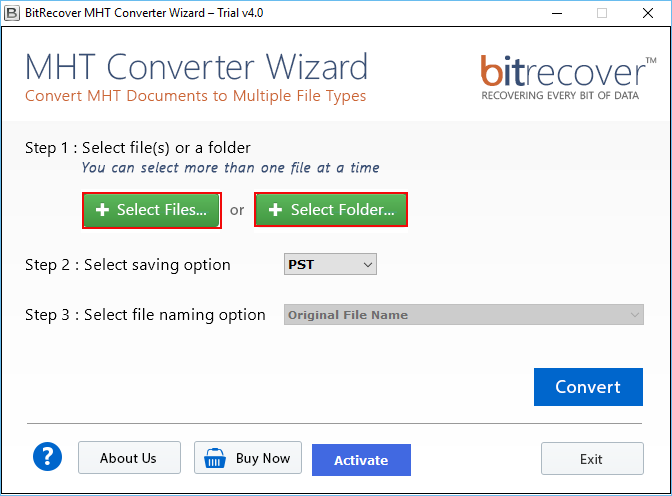
- Install the MHT to PST converter tool on your system.
- Select the Files form, Select Files, or Select Folder options.

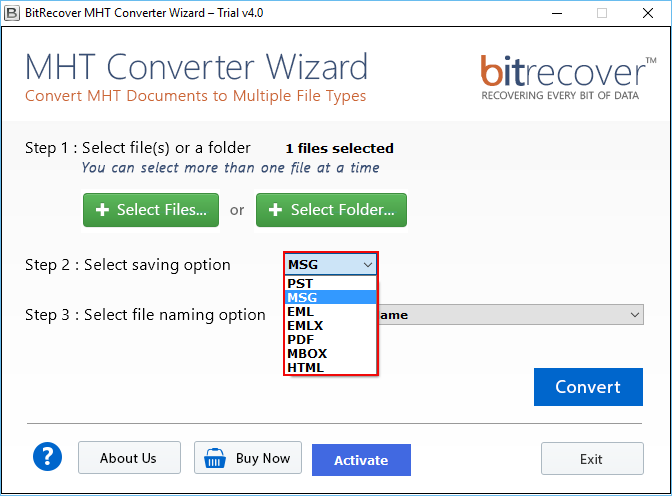
- Choose the PST format from the select saving option.
- Select the file name from the select file naming option.
- Click the convert button, and choose the desired destination to store the files.
- Click Ok, the conversion process will start.
Advantages of MHT to PST Converter
The MHT to PST converter tool has many advantages, such as dual selection mode, it offers 8+ formats to convert the file, and many more, which is below:
- Users can view everything in one place because of this one-screen GUI, and by using this, users can perform the conversion process quickly.
- It has a dual selection feature; with this, a user can choose a single or an entire folder to convert at once.
- Users can convert MHT to DOC, PST, MSG, EML, EMLX, PDF, MBOX, and HTML, etc. Users don’t have to install any other software for converting MHT files.
- After the conversion process, users’ folders and subfolders are organized in a structured way, which makes it easy for users to record.
- This converter tool supports all elements, which include image, embedded links, formatting, etc. The user’s content will be the same as before.
- It is easy to use, if a user is from a non-technical background, they can still use this converter tool to convert MHT to a PST file.
- If a user wants to add or modify any feature that is related to the work requirement, then you can contact our technical team, and they will customize the feature for you.
- This tool needs an internet connection while installing and enabling the software, after this process, users can operate this tool offline.
- It is a standalone software, it doesn’t need any other third-party tool to convert the file. This one tool can do the conversion process by itself.
- It is a globally used software, and the company’s MVP is approved.
- This converter tool is safe and virus-free.
- It gives multiple license options, it is created keeping the user’s budget and preferences in mind.
- If users want to convert the large files, they can choose remote certified services, given by the converter tool.
- MHT to PST converter tool provides a 24/7 support system. If you have any queries regarding the tool, you can contact the support team anytime.
By looking at advantages, you can understand that this converter tool provides valuable features and works as per users convenience.
Post Requisites of Convert MHT to PST
These are the post requisites of convert MHT to PST, and check if the selected files are converted properly. Here are more points to check:
- Open the PST files and check if all emails are converted or not properly.
- Verify the email content, for example, email text, images, attachments, and formatting, etc.
- Check whether all email attachments were transferred successfully.
- Ensures folders and subfolders are maintained as it was before the conversion process.
- Save a backup of the converted PST files for safety.
FAQs
Q1. What is an MHT to PST Converter?
An MHT to PST converter is a tool that converts MHT to PST files so they can be opened in Microsoft Outlook. PST files are mostly used to store mailboxes, emails, attachments, and contacts, etc.
Q2. Can I convert multiple MHT files at once?
Yes, you can convert MHT files at once with the MHT to PST converter by BitRecover Converter Tool.
Q3. Will the converter keep email attachments and formatting?
It is a most reliable tool to convert the MHT files to PST files, it maintains email formatting, attachments, folder structure, and metadata like sender, receiver, and date.
Q4. Do I need Outlook installed to open PST files?
No, with this converter tool, you don’t need to install Microsoft Outlook to open PST files.
Q5. Why should I use a converter instead of manual methods?
Manual methods need technical knowledge, and it is a slow and risky process to perform for converting MHT to PST files, but the BitRecover MHT to PST converter tool doesn’t need any technical knowledge to operate, and it is a safe and fast way to convert the files.
Conclusion
In this article, we explore the reasons of why to convert MHT to PST file, understand the manual methods to perform for converting a file, and we have also provided you with an expert solution, which is very helpful for bulk file conversion. If you are looking for a software that is safe and converts files quickly without losing any data, then you can blindly trust the BitRecover MHT to PST converter tool. If you need any information related to this software, you can contact the customer care, which is available to you 24/7.
About the Author

