BitRecover ®
BAT Converter Wizard

Batch Export The Bat! TBB Files into 10 Email & File Formatsimage

A powerful software designed to convert the TBB files directly from The Bat! Folder or any external folder. This The Bat! TBB converter helps you to access and export your TBB files to several email or file formats, including EML, MBOX, PST, HTML, PDF, RTF, etc. Users do not need to worry about the location of the TBB files. This tool can convert The Bat! Mailbox even if the files are orphaned or stored in some external directory.

Download The Bat Converter

Screens

Video

Guide

Features Highlights

The Bat! Converter Software Prime Functionalities

  • Auto TBB Files Detection: This software can automatically load The Bat! Mailbox data if your TBB files are not orphaned.
  • Dual Mode to Add TBB Files: If you have orphaned TBB files, then you can use the Select File or Select Folder feature to bulk add TBB files for conversion.
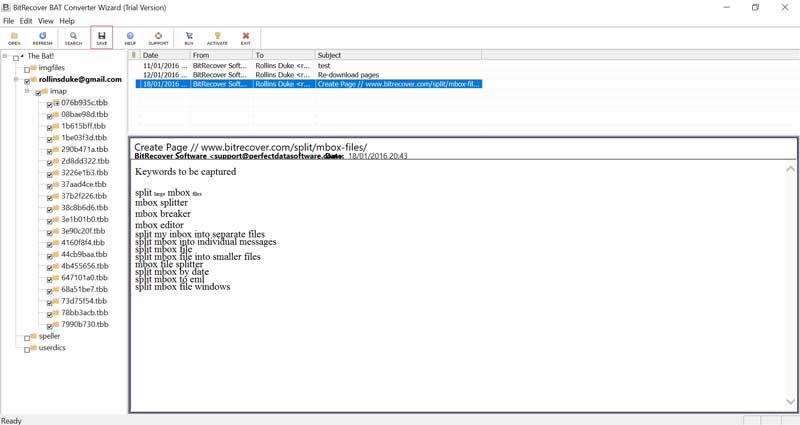
  • Preview TBB Files Before Conversion: This BAT converter software is equipped with a preview feature to access The Bat! Mailbox data before conversion.
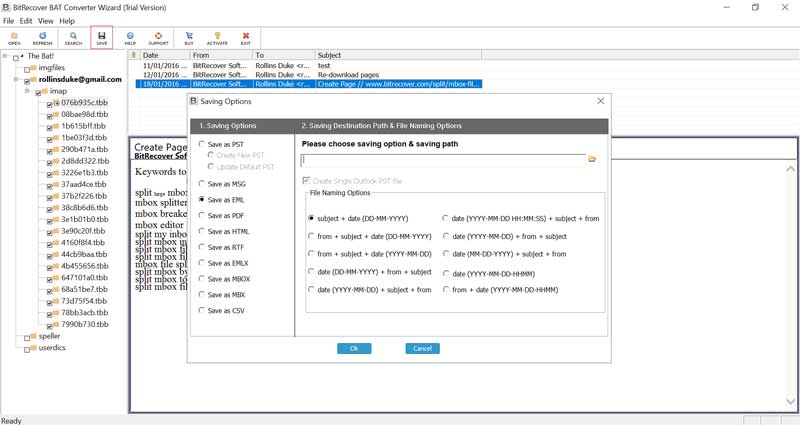
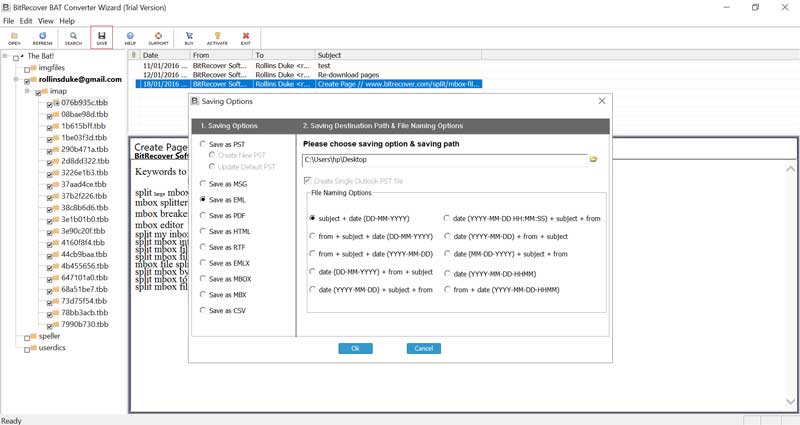
  • Pre-Defined File Naming Options: To manage converted TBB files efficiently, users can choose the file naming option based on From, Subject, & Date combinations.
10 saving options

Saving Choices

Export The Bat! Mailbox into 10 Email & File Formats

BitRecover developers developed this software to meet every user's requirement. Therefore, using this offline application, users can convert The Bat! TBB files into a variety of file formats.

Using the Bat converter application, users can save TBB files in two file format categories. The first is in email format, and the second is in a document formats. The TBB file conversion options offered by the tool are:

search features

Search Feature

Easily Find Specific Email within the TBB Files Before Conversion

To help users convert only the necessary data. The Bat! Converter is equipped with exclusive search functionality. Using the search feature, users can search for a specific word in the email body or header of the TBB file. The search filters equipped in the TBB file converter are based on:

  • Search Term: This setting helps users search for a specific word in the TBB files in two ways. Either you may search for a whole word. Secondly, you may select for Case Sensitive option if the term you are looking for matches a specific letter case.
  • Search Scope: In the Search settings of the tool, users can define the Search Scope to specify where the search term should be applied within The Bat! emails. You can choose to search within the Visible Message Header or across the Entire Raw Message
  • Search Date: In the search settings of the tool, users can define the date settings to search emails between a specific date range. In these settings, you may select the start and end dates to find specific TBB email data.

Core Features

Unique Functionalities of the BitRecover BAT Converter Tool

update default PST

Update Default PST File Intelligently

When users want to migrate The Bat TBB files, then the software provides an option to update the default PST file, which is already available. After choosing the “Update Default PST” option from settings, you can add The Bat TBB emails in the existing default PST (Personal Storage Table) format.

saving location selection

Saves Data at Desired Location After Conversion

The tool provides an option to save the data at the desired location before starting the conversion. It gives ease of access for the user immediately after the data conversion of the BAT email data. Users can easily browse a destination path to store output email messages and documents

offline The Bat converter

100% Offline The Bat Converter Tool

This utility is a desktop-based solution to bulk convert Bat TBB files. This software can run independently with all functionalities in offline mode. While converting the Bat mailbox using the application, users are not required to have an active internet connection.

convert TBB files with all properties

Convert TBB Files with All Email Properties

Convert all TBB data with all email properties like sender, receiver, date, time, Metadata, email formatting, etc., to the selected file format. It also converts all the data along with attachments like Word documents, PPT, images, etc., without altering the information.

run without The Bat! installation

The Bat! Installation Not Necessary

This application does not require The Bat! desktop installation to convert The Bat files. So, to convert the Bat data, the software only requires the email data present in the machine. If you have The Bat TBB files, then you can proudly download BitRecover Bat Converter Wizard for conversion.

simple UI/UX

Simple, Easy-to-Use Interface

The Bat TBB Converter is designed with a simple interface, which makes it easy for users to understand the software features easily and get a rapid email conversion process. Because of its easy interface, all technical and non-technical users can easily use it.

progress bar feature

Progress Bar to Monitor TBB Conversion

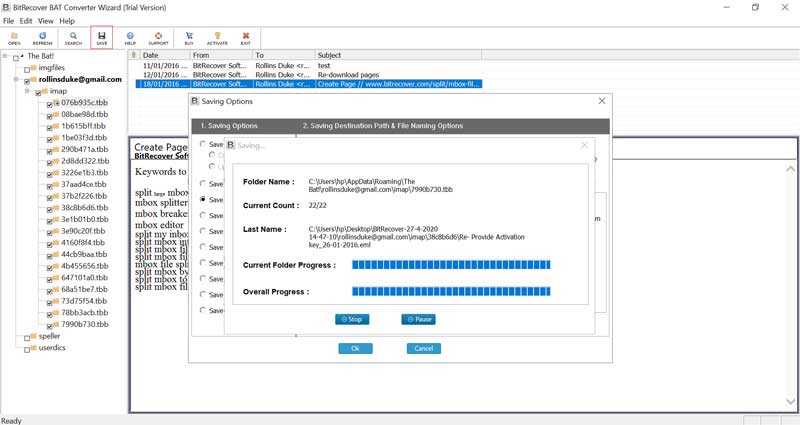
The software interface of the tool allows you to view the live Bat mailbox conversion process. Users can monitor the progress bar to identify the time required for conversion.

directly print the BAT emails

Print Bat Email Directly from Software UI/UX

One eminent functionality of the Bat converter software is the built-in print option. The users can directly print the TBB email using the software interface. You just need to right-click on the preview and select the print preview option to print Bat TBB emails.


Working Steps

How to Use Bat Converter Software in Easy Steps?

run BitRecover BAT Converter

Install and Run Bat Mailbox Converter

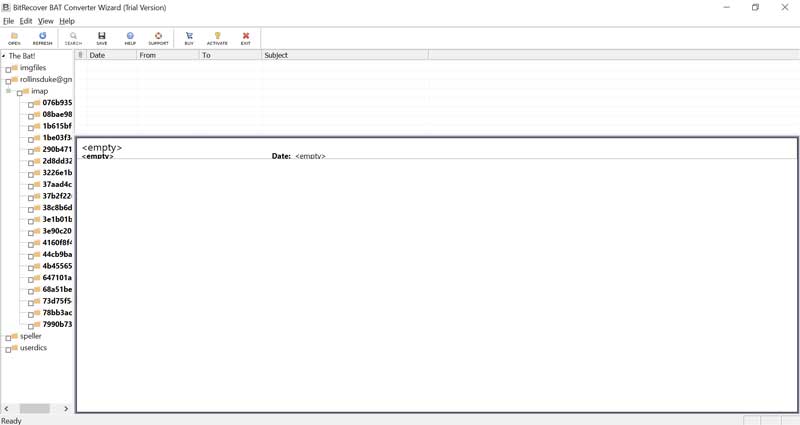
Initially, download the latest version of The Bat! Converter and follow the on-screen instructions to complete the installation process. After completing the installation, run The Bat! Email converter.

Detailed Guide  ➟

add TBB files

Select TBB Files or Add TBB Files

Now, if you have your TBB files inside The Bat! Email client, the tool automatically load the TBB files. Otherwise, click on the Open option from the ribbon and click on the Select File or Select Folder option to add TBB files.

choose saving option

Choose the Desired Export Option

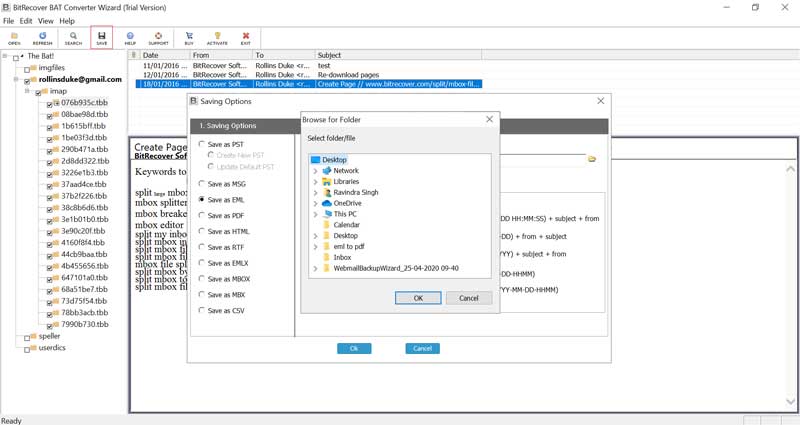
Next, click on the Save button to choose the desired saving option and select the desired storage path. Additionally, for better management of the Bat mail converted data, choose the predefined file naming option.

TBB conversion process

Start TBB Files Conversion Process

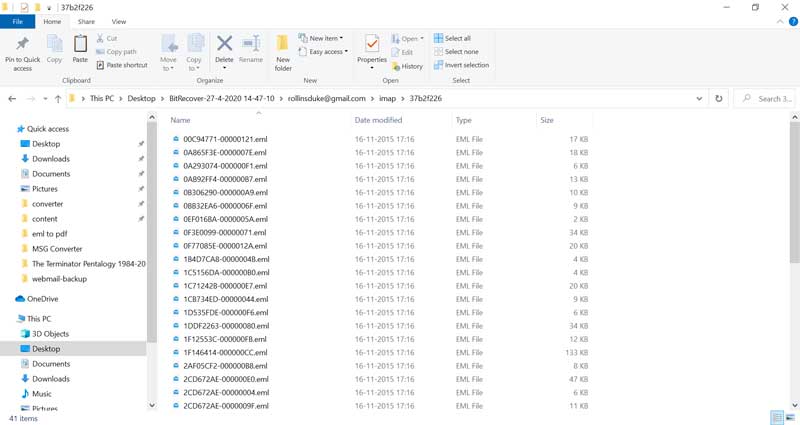
Lastly, click on the Ok button to start the Bat TBB files conversion process. You monitor the progress bar to discover the time required to convert the TBB files.

Convert The Bat! Email With:

Email Header

Email Header

Attachments

Attachments

Signature

Signature

Image

Image

Font Size

Font Size

Text

Text

Desktop Specifications

Minimum System Requirements Needed to Use The Bat Converter Tool

The Bat converter box
Product Name: BitRecover BAT Converter Wizard
Version: 6.3
Size: 18.4 MB
License: Single user and multiple users
Edition: Standard, Pro, & Migration
Major Update Date: November, 2025

Trial Limitations

The Bat! converter free version is available. The functionality of the trial version is similar to the license edition. However, the free demo version is limited to file size, you will be able to convert only 25 emails, whereas, in the full version, The Bat! converter software is a verified and exclusive tool for converting TBB email files.

System Specifications

Hard Disk Space
200 MB of free hard disk space

RAM
Minimum 2 GB RAM

Processor
Intel® Pentium 1 GHz processor (2.4 GHz is recommended)

Supported Editions

  • Windows OS – Windows OS 11 (64 bit), 10, 8, 7 (32 bit or 64 bit) & Windows Server 2022, 2019, 2016, 2012 R2, 2008, etc.

Electronic Delivery

The delivery of BitRecover BAT Converter Wizard is automatic. After your payment is confirmed, you will receive an email with a link to download the product and the activation key.

Feature Comparison

Free Vs Paid The Bat! TBB File Converter Software

  •  
  • Batch Convert Bat Mailbox
  • Auto Load The Bat! TBB Files
  • Preview TBB Data Before Conversion
  • Search Specific Email in the Bat Mailbox
  • Search Specific Email in the Bat Mailbox
  • Convert TBB Files in 10 Formats
  • Cost
  • Free
  • First 25 Files.
  • Free
  • Download
  • Most Popular
    Pro
  • All Items
  • $29
  • Buy

User Queries

Frequently Asked Questions Regarding the Bat Converter Tool

No, the software does not have any file size limitations to convert TBB files. Users can convert TBB files of any size regardless of the no of TBB files.

Yes, the Bat! Converter software allows users to convert the TBB email preview directly from the software interface.

Yes, of course, this trusted Bat mailbox converter is designed with advanced algorithms to preserve all the metadata of the TBB emails after the conversion process.

Yes, this Bat converter software is compatible with all the latest versions of Windows OS, including Windows 11.

Yes, the software to convert the Bat mailboxes is equipped with the functionality to convert multiple TBB files in one go without any restrictions.

Client Reviews

What Customers Say About The Bat! Mailbox Converter?

Live Chat