Get QQ Mail IMAP Settings and Create QQ Mail App Password

If you are looking for QQ Mail IMAP Settings you can use the QQ email account in other Email Clients such as Thunderbird, Outlook, Apple Mail, or MailSpring and Mobile Devices Such as Android, iPhone etc.
In the following description, you will get all the information about QQ Mail IMAP Settings.
Important Email Settings of QQ Mail Account:
You just need to copy the below IMAP details in the configuration of QQ Mail Settings. It will work perfectly.
If you have any other questions about QQ Mail IMAP Settings? so, please Contact us.
| Email Settings | Port Number |
|---|---|
|
QQ IMAP Incoming mail server:
imap.qq.com
|
993, requires SSL
143, non-secure
|
|
QQ POP3 Incoming mail server:
pop.qq.com
|
995, requires SSL
110, non-secure
|
|
QQ SMTP Outgoing mail server:
smtp.qq.com
|
465, requires SSL
587, non-secure
|
Need to Backup Your QQ Emails to Another Email Application?
If you are searching to back up or migrate emails from your QQ Mail Account so, we would recommend you most advanced software Email Backup Software.
Click on the below Download Now button and install the software. As this is recommended by professionals, therefore, it will work ideally for all the users.

Watch this video illustrating the complete QQ Mail backup process:
Note: Tencent QQ (Chinese: 腾讯QQ), also known as QQ, is an instant messaging software service and web portal developed by the Chinese tech giant Tencent. QQ offers services that provide online social games, music, shopping, microblogging, movies, and group and voice chat software.
This email conversion software is an amazing utility. It helps to take easy backup with correct output. You will get Multiple saving options to backup your QQ emails like PST, EML, HTML, PDF, DOC, etc or you can also convert your QQ emails to any desktop Email application which will improve your workflow.
In short, QQ Mail Backup Software is a reliable solution that provides output with 100% accuracy. so, go ahead and give it a try once.
Generate App Password in QQ Mail Account (Step-by-Step)
If you can’t access your QQ mail account, you will need to use a different kind of password called an “app password”. This is how you can generate an app password in QQ Mail:
- Login to QQ Mail via the website and click on your account settings (the icon of a gear).

- Click Account & Security.
- Hit on Security Settings to enable the POP3/IMAP/SMTP/Exchange/CardDAV options.
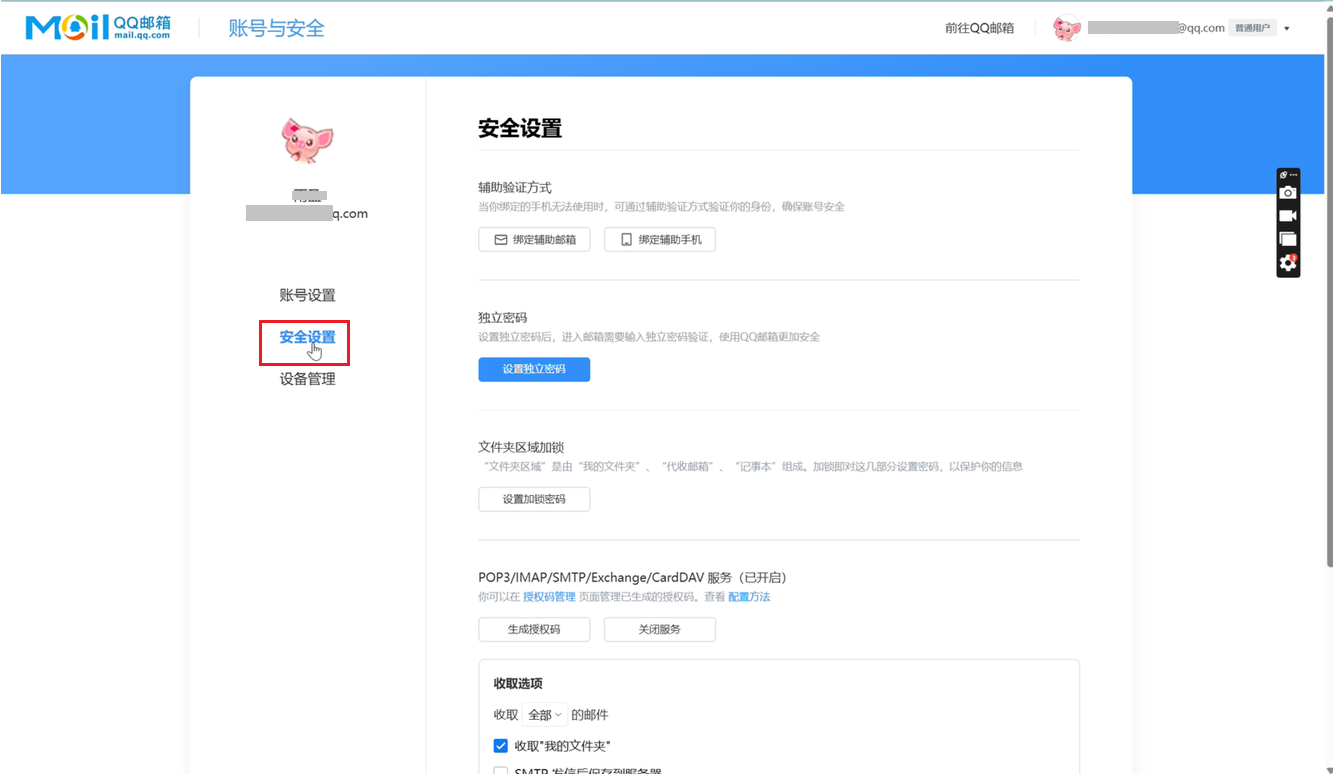
- Click the button labeled Generate Authentication Code.

- On the next page, you will see a 16-character code which you will use as your app password.
- Use this app password in place of your normal QQ password when logging in to any email software/apps.
Notes:
- App passwords are auto-generated, you cannot change the password of each app password.
- If you need a new app password, you may generate another app password using the same way as above.
- The app password can only be used for email access, not for your regular QQ password.
