How to Fix Outlook Error 0x8004060c Safely and Easily?

Published: February 16th, 2026 • 6 Min Read
If you are looking for the solution to Outlook error 0x8004060c, this blog post is for you. You are working on the Outlook and sending your important email to your important client or family person and suddenly your Outlook starts displaying the send receive error 0x8004060c. You do not need to worry; you are going to read the right ways to fix this issue.
Error 0x8004060C mostly appears when the Outlook PST file or mailbox is full and unable to store more data in Outlook. Due to this, you are unable to receive and send emails, and Outlook might crash or freeze.
This issue is common in all versions of Outlook from 2003 to Office 365. To fix this issue, we are going to use some manual methods like compacting the PST file, old email archive, and mailbox cleaning. Along with this, we also use a professional method to fix this solution more quickly. So, without delaying, let’s start with understanding the root causes of the issue.
Why Does This Error 0x8004060c Appear?
- When the Outlook PST and OST file size limits are version-specific, then Outlook is unable to send/receive emails, and you will see this error.
- If the Outlook is closed directly due to power cuts or the forced shutdown of the computer, then this appears.
- Your computer has suffering from malware or virus attacks, due to which your PST and OST files get corrupted, then this error occurs.
- Sometimes the sync failure between exchange server and Outlook is also responsible for this error.
- Using an old Outlook version or an un-patched version is also responsible for this error.
These were the root causes that tell why the error 0x8006040c appearing. Let’s fix this error using manual solutions.
Fix Outlook Send Receive Error 0x8004060c Manually
To fix Outlook error 0x8004060C manually, you need to try the solutions listed below carefully.
1st Solution: Empty Deleted Items Folder
- Open the Outlook application on your Windows PC.
- Go to the “File,” choose “Options,” and go to the “Advanced”.
- Then, navigate the “Outlook start and exit options”.
- After that, enable the “Empty Deleted Items folder when exiting Outlook.”
- Done! Now, whenever you close your Outlook, the deleted items folder automatically gets empty.
2nd Solution: Compact Data File
- Open the Outlook application on your Windows PC.
- Then, go to the “file” option, and click on the account settings.
- After that, select the account settings option.
- Go to the “Data File” tab, select the PST file, and click on the “Settings” option.
- Then, click on the “Compact Now” option, and click on the “OK” button.
3rd Solution: Archive Old Emails
- Open the Outlook application on your computer PC.
- Go to the “File” menu and choose the “Options” button.
- Then, select the “Advanced” option, navigate to “AutoArchive” option.
- Now, click ok the “AutoArchive Settings” button.
- After that, enable the button “Run AutoArchive every n day.”
- Finally, click on the OK button to complete the process.
By carefully following the above instructions, you can fix error 0x8004060c. However, you need to know the certain drawbacks of manual solutions before applying any of them.
Drawbacks of Manual Solutions
- Enabling the Deleted item folder only frees up the space of item folders; it does not repair the entire PST file.
- If the PST file is already in max size, then the empty method won’t be effective for this.
- The use of the compact data file option only reclaims unused space; it cannot repair the PST file.
- In the case of a big file size, the manual process is become time consuming and lengthy.
- You need to manage the archive file individually, as finding old emails has become time-consuming.
These were the limitations of using manual solutions. To overcome these limitations, you can try an expert-tested professional method that allows you to fix this error without facing any limitations or account risk.
Professional Way to Fix 0x8004060c Outlook Error
Now, we already tested a manual solution to fix the error 0x8004060c. While the manual solution helps in some areas, like clearing deleted emails and reclaiming unused space of outlook that is a temporary solution to fix this issue. To fix this problem permanently, try BitRecover PST Repair Tool. This tool simply repairs all PST files with complete data integrity and attachments. It also maintains the folder hierarchy during the entire repair process.
Steps of Professional Solution
- Download and open the application on your Windows PC.
- Then, choose the option between file or folder, and click on the “next” button.

- After that, select the folders manually where your PST file is stored, and hit the “Next” button.
- Select the saving option “PST” format.
- Finally, set the destination path and click on the “Repair” button.
- Done, your “PST” files repairing process has started.
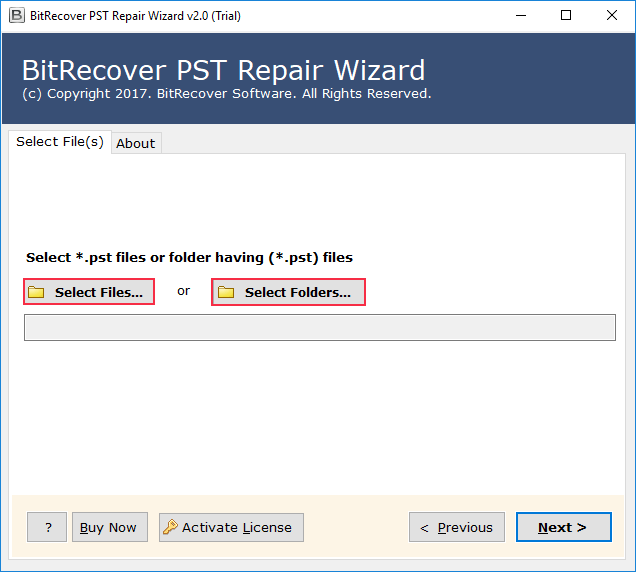
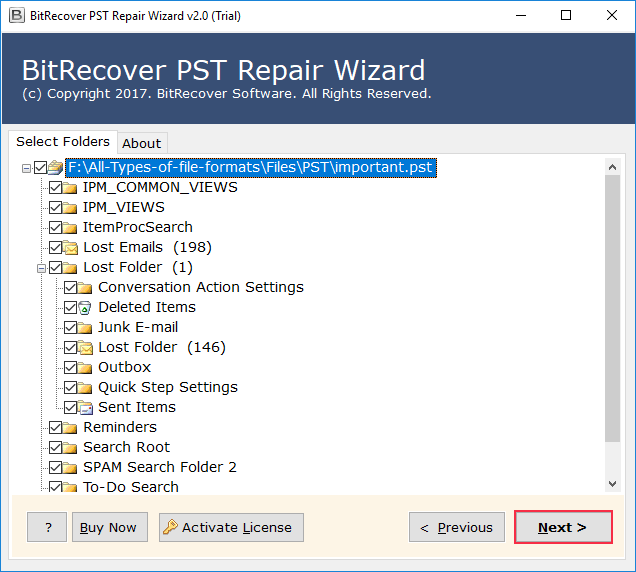
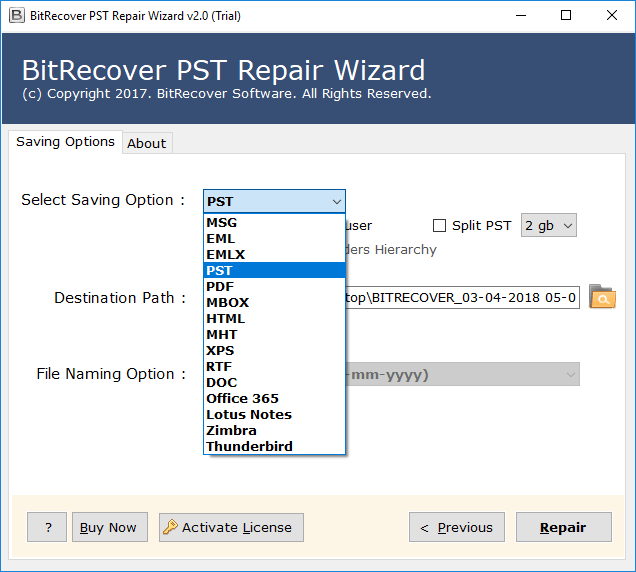
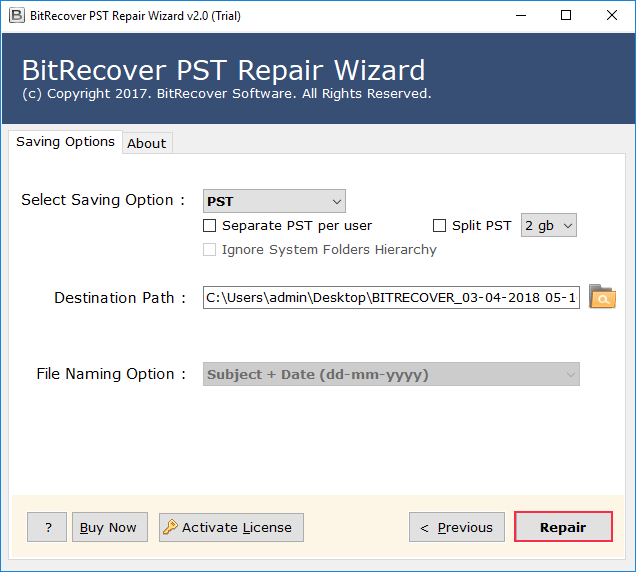
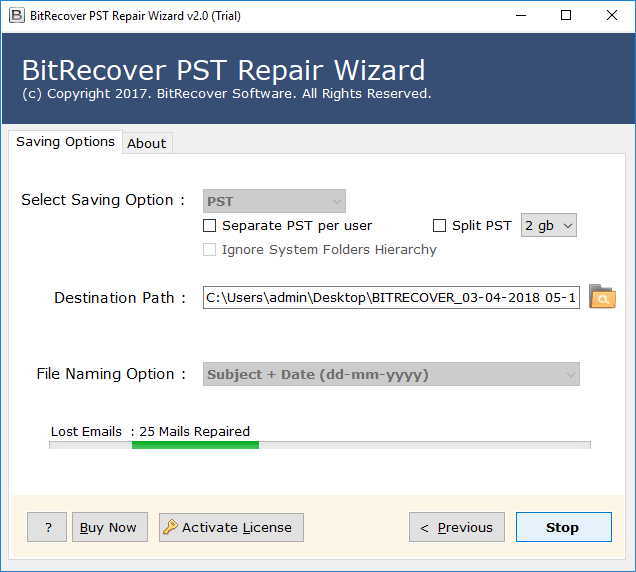
You can quickly fix the Outlook error 0x8004060c within a few clicks by using the mentioned.
Benefits of Professional Solution
- You can repair Outlook Error Code 0x80040600 using this tool.
- This tool can repair corrupted and damaged PST files easily.
- It can restore your Outlook account emails, contacts, and notes.
- The tool allows you to save repaired files in others formats like EML, MSG, and PDF etc.
These were the benefits you got if you used the mentioned solution to solve the error 0x8004060c.
Final Thoughts
In this blog post, we discussed why Outlook error 0x8004060c appears. We explained the reason behind it. Furthermore, we shared three manual solutions solve the issue, while these manual solutions solve error 0x8004060c temporarily. Therefore, the problem is critical, the manual solution would not be effective. However, the expert-tested professional solution to solve the problem without any limitations and with complete data integrity and attachments.