Migrate Thunderbird to Google Workspace with Contacts & Calendars

Published: March 6th, 2026 • 5 Min Read
To migrate Thunderbird to Google Workspace with all the emails, their attributes, and contacts & calendars, there are multiple methods available, like drag & drop for limited folders or an automated migration tool.
Important: There is no direct way offered by Google to bulk import Thunderbird mailboxes into a Google Workspace account.
Many businesses or organisations upgrade from Mozilla Thunderbird to Google Workspace, as Google Workspace is an all-in-one suite for productivity and enables you access your emails on the go using webmail or a mobile application.
Additionally, restoring mail archives from Thunderbird to Google Workspace provided backup and security, and consolidated complete data in one place.
What Data Can Be Migrated from Thunderbird to Google Workspace?
- Emails
- Contacts
- Calendar
- Attachments
- Local Folder
What Cannot be Directly Transferred from Thunderbird to Google Workspace?
- Account Settings
- Email Filters
Prerequisites for Migrating Thunderbird to a Google Workspace
- Ensure that the admin has enabled IMAP for your Google Workspace account.
- Based on the environment, you may require Admin Permissions.
- Ensure enough storage quota on the GWS account.
Manual Thunderbird to Google Workspace Migration
This is a cost-free approach to migrating Thunderbird to Google Workspace. However it is best suited if you have limited mailboxes in Thunderbird.
Step1: Thunderbird Email Account Setup with Google Workspace
You can securely configure all Google Workspace account Admin/User in all the latest Thunderbird versions using auto-configure & OAuth.
- Open Thunderbird on Mac/Windows.
- Click on the Menu option.
- Select New Account >> Email.
- Enter your Google Workspace email ID.
- Thunderbird will autofill server details.
- Login Thunderbird with Google.
- Provides all the required access.
Step 2: Move Thunderbird Mailboxes to Google Workspace Account
For Custom Folder:
- Select all the custom mailboxes under an account.
- Right-click and choose the Move To option.
- Select the Google Workspace account as the destination.
Note: You can also drag & drop Thunderbird mailboxes into a configured Google Workspace account.
Transfer emails from the Inbox, Sent, or Draft folder to Thunderbird:
You cannot move the Default Folders, such as Inbox, Sent, or Draft, in one go. Thus, you have to manually move emails in batches.
Tip: Create an identical folder in the Google Workspace account to maintain folder hierarchy.
- Open the Thunderbird Mailbox you need to transfer to Google Workspace.
- Select emails use Ctrl/Shift for bulk selection.
- Right-click and choose Move To.
- Select the destination folder in your GWS account.
- Repeat the process for each email folder.
Learn: How to Import Thunderbird Contacts to a Google Workspace Account?
Limitations of “Drag & Drop” and “Move To” to Migrate Thunderbird to Google Workspace
- Restricted to Thunderbird email to GWS migration.
- Can be time-consuming, manual, and prone to manual errors.
- The folder structure is likely to get lost after importing Thunderbird email in Google Workspace.
- The migration completion depends upon the IMAP sync.
Know More: How to Import MBOX Files into a Google Workspace Account?
Automated Solution to Transfer Thunderbird Data to Google Workspace
BitRecover Thunderbird Converter is a professional tool to migrate Thunderbird to Google Workspace with complete security and data integrity. Skip the manual hassle of account configurations and perform an enterprise-level Thunderbird to Google Workspace Migration without any limitation on mailbox size. Download the free version of the tool today.
How to Migrate Thunderbird to Google Workspace? Steps
- Install and run the tool on your Windows and Mac desktop.

- Choose Convert Configures Mailbox Data option.

- Select the Thunderbird Mailboxes, Contacts & Address Book to be imported in Google Workspace account.

- Choose G Suite from the saving option.
- Enter your Google Workspace email ID and connect using OAuth.
- Press Convert to migrate Thunderbird to Google Workspace.
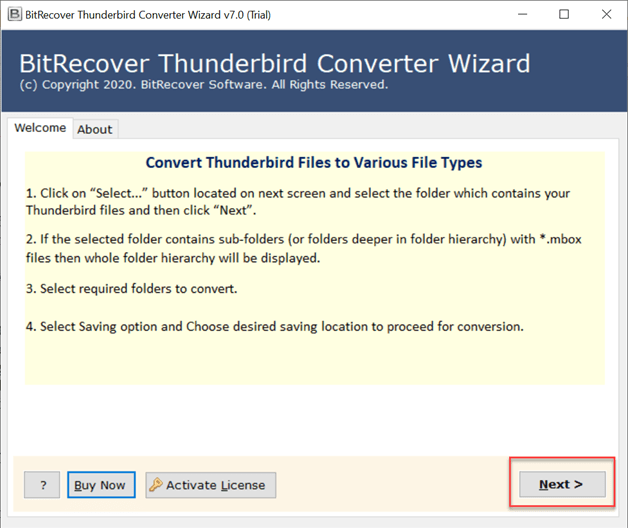


Advantages of Pro-Tool to Transfer Thunderbird Data to Google Workspace
- Migrate the complete Thunderbird profile to Google Workspace in one go. The tool supports limitless bulk migration.
- Preserves emails, attachments, folder structure, and email metadata like CC, BCC, Time, Date, and more.
- Has advanced filters to selectively move Thunderbird email to Google Workspace based on Date, Time, Subject, and more.
- Easy-to-use software enabling you to skip the manual hassle and errors of account configuration.
- Functional even if Thunderbird crashes, and with local Thunderbird MBOX.
- Fully secure
- This advanced tool is functional with all Thunderbird versions.
Verification Post Thunderbird to Google Workspace Migration
Before you uninstall Thunderbird or delete data, verify if everything has been migrated properly:
- Email Count and Mailbox Size
- If all attachments are working properly
- Folder structure/labels remain identical
Need Help Migrating Thunderbird to Google Workspace?
Get in touch with BitRecover experts. 24*7 Free tech support available globally for seamless import.
FAQ: Migrate Thunderbird to Google Workspace
Q1: How long does it take Thunderbird to migrate to Google Workspace?
Manual migration using IMAP or drag-and-drop of email folders depends on the mailbox size and IMAP synchronization. However, you can significantly reduce the migration downtime by using the BitRecover tool with high-end algorithms.
Q2: Can I use Thunderbird with Google Workspace?
Yes, Mozilla Thunderbird supports Google Workspace email accounts. However, migrating Thunderbird data to a Gmail account offers better accessibility across mobile devices and improved security due to cloud storage.
Q3: How do I migrate Thunderbird MBOX files to the GWS business account?
- Configure the Google Workspace account in Thunderbird
- Download the ImportExportNG Tools extension.
- Import MBOX in Thunderbird Local Folder with ImportExportNG Tools.
- Right-click on the newly created folder.
- Select Move To, select Google Workspace account as the destination.