Where are Windows Live Mail Storage folders Located? Let’s Find
Fact-checked and reviewed in accordance with our Editorial Policy
In this guide, we will cover all the details you need to know about how to find Windows Live Mail storage path. Here, you’ll find both manual as well as professional solutions to locate Windows Live Mail storage folders location with proper steps. It also explains about the discontinuation of WLM and how users can still access their WLM data files.
Microsoft announced that Windows Live Mail (WLM) is no longer supported and has reached its technical end in January 2017. Services of Windows Live Mail are replaced by Windows 10 Mail App, which integrates with the Microsoft Outlook. Since users can no longer stay or access the WLM platform, they are left with two options: first to transfer their data to MS Outlook and second, migrate it to Windows 10 Mail.

How to Find Windows Live Mail Storage folders? Manual Way
From the above scenario, the picture is quite clear that you need to upgrade to MS Outlook, but you can’t stay at the same level. So, let’s see where are Windows Live Mail storage folders located in Windows 11, and 10. The default location for WLM data is the “App Data” folder, which is hidden, so follow the procedure to access the application data.
- Open File Explorer.
- Go to Local Drive (C:) >> Users >> <username>.
- Click the View button and check Hidden Items from the Ribbon tab. (for Windows 11, follow View > Show > Hidden items)
- Afterwards, users will see the App Data folder in the list.

Now, users can access “Application Data” and follow this string to locate Windows Live Mail folder path:
- Local drive >> Users >><username>\AppData\Local\Microsoft\Windows Live Mail.
This is the default path for WLM to store its data files. Once you open the folder, you will find a cluster of email files with .eml file extension.
Here is a valuable read:
Find Windows Live Mail Storage folder Location without Technical Steps
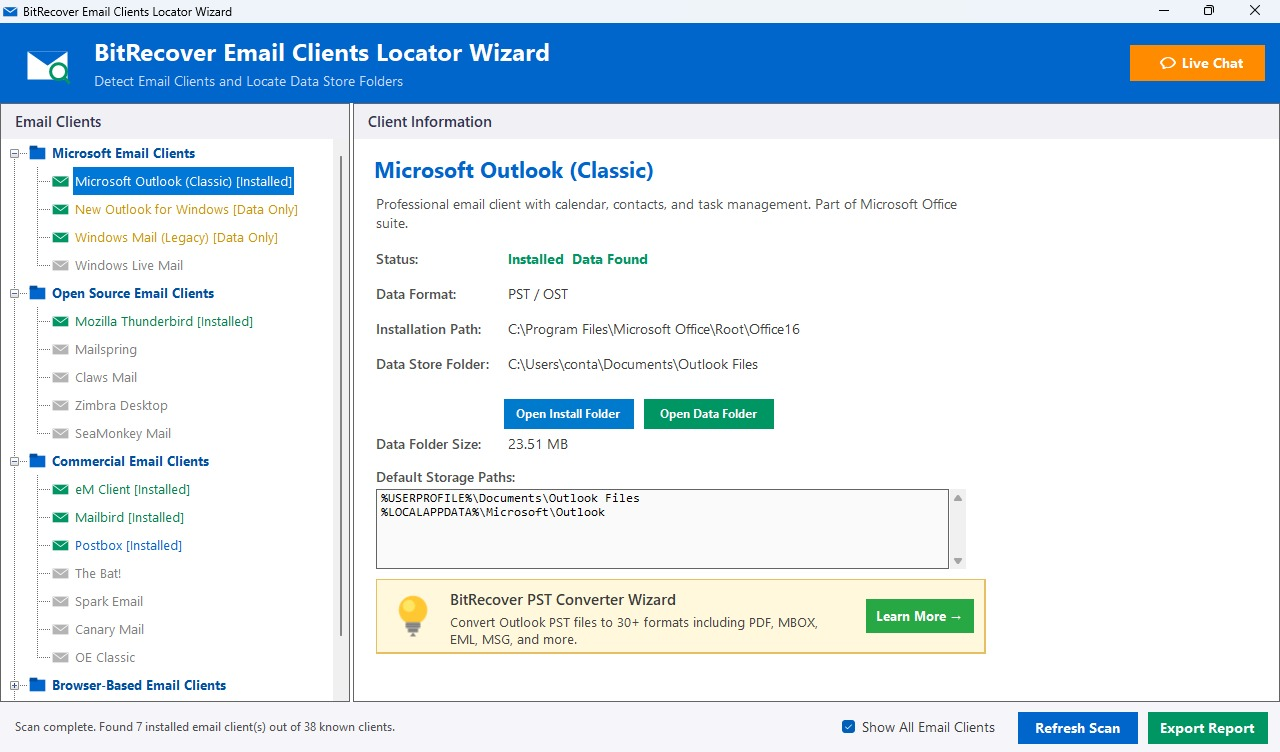
If you are unable to locate Windows Live Mail storage folder location using manual ways, then don’t worry. The BitRecover Email Clients Locator Wizard is a free and perfect solution to find Windows Live Mail store folder path as it supports a single graphical user interface that allows all users to find location with one-click. It is a quick and easy-to-use tool, and does not require any technical knowledge.
Users can directly view both WLM installation files and data files without doing any manual effort in searching hidden folders. Plus, once the scan is complete, the tool generates an email client detection report which displays the installed email clients on the system, scanned files, and more. In short, for a fast and secure way to reach the location of Windows Live Mail data file, try this software.
Easily Locate and Convert WLM Emails to Multiple Formats
What if I say that users will get a solution for their query, “Where are Windows Live Mail storage folders located?”, in a single click. Well, this can be possible by using the Advanced Windows Live Mail Converter.
It is one of the best solutions available in the market to find Windows Live Mail storage folders in no downtime. The advanced algorithms of this wizard automatically detect the configured file location from the source. Additionally, the software allows you to directly export WLM data files to a variety of formats. For users’ convenience, there is a demo edition of the software available. Users can download it for free to evaluate the software working.
Straightforward Steps of the Automated Solution
Follow these steps to know the location of Windows Live Mail storage folders:
- Download and install the above WLM converter on your device.

- In the next software panel, users will get the default location of all configured accounts. Users can upload EML files or EDB files to the software panel.
- The software will generate a directory of all configured WLM profiles. Users can mark the required folder for conversion and click on the Next button.
- Now, select your preferred format from the saving options.
- Browse the destination path and click Next to start the conversion process.


Frequently Asked Questions
Q1) How Can I Locate Windows Live Mail Contacts Folder?
You can find WLM contact folders on this location:
- C:\Users\<username>\AppData\Local\Microsoft\Windows Live\Contacts\
Q2) Where Does Windows Live Mail Store EML files?
The Windows Live Mail keeps all the EML files in default folders, including Outbox, Inbox, or any custom folder. The path to reach its location is:
- C:\Users\<username>\AppData\Local\Microsoft\Windows Live Mail\Storage Folders\Sent Items
Q3) Where are WLM Storage Folders Located in Windows 10?
In Windows 10, the default location of WLM emails is the “App Data” Directory. Users can access it from “AppData\Local\Microsoft\Windows Live Mail.”
Q4) Name the storage folders of Windows Live Mail
The storage folders for WLM are:
- Sent items
- Drafts Emails
- Deleted Items
- Newsgroup Posts
Final Words
After finishing this blog post, users must have got the solution of their query, “Where Are Windows Live Mail storage folders located?” Here, I have listed all the possible ways to find Windows Live Mail folder paths on all Windows OS editions. Additionally, by using the automated solutions, users can easily reach the direct location and access the option to import the WLM files to popular webmail services and file formats.
If you have any questions regarding these automated solutions, feel free to contact our support team via Live Chat.
About the Author

