olm converter

Screens

Video

Guide

BitRecover
OLM Converter Wizard

Safely convert OLM files into XPS, RTF, MHT, and 26+ other formats. Securely migrate your entire mailbox while preserving 100% of data, metadata, & calendar integrity.

  • Convert full OLM data accurately, including emails, contacts, calendar, attachments, notes & journals.
  • Migrate OLM emails seamlessly to file formats & cross-platforms securely without interruption.
  • Export structured output datasets with SHA, OAuth 2.0 & Graph API securities in batches.

Supported Saving Options

Steps to Convert OLM Files into Multiple Formats

OLM Converter Tool is an enterprise-grade utility designed to migrate Outlook for Mac (.olm) files into standard formats like PST, MBOX, & EML. Made for all types of users, whether you are home user or professional, it migrates efficiently for many platforms, including desktop & web-based, while maintaining strict data integrity.

4 Quick Steps to Convert OLM File

  1. Download OLM Converter and Launch
  2. Add OLM File and View Complete Data
  3. Apply Advanced Settings and Filters
  4. Select the Export Option and convert OLM Files
naming options

Convenient Naming Option

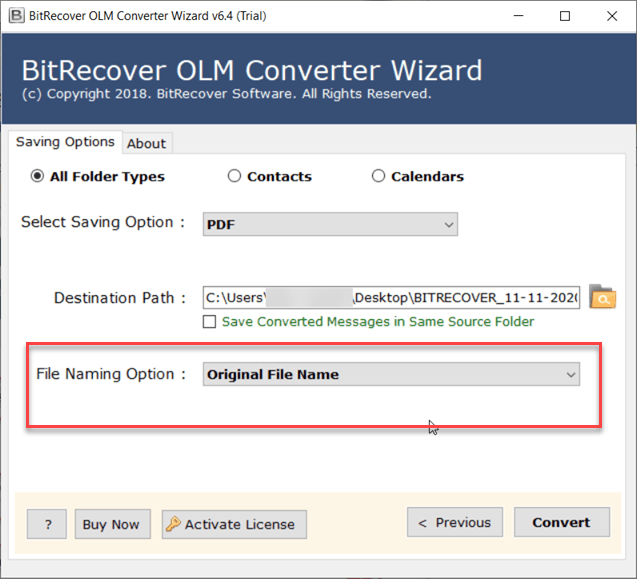
To save exported files into required name structure, OLM converter provides multiple naming conversion options. You can select one from Original File Name, Subject + Date (dd-mm-yyyy), From + Subject + Date (yyyy-mm-dd), From + Subject + Date (dd-mm-yyyy), Date (dd-mm-yyyy) + From + Subject, Date (yyyy-mm-dd hh: mm: ss) + From + Subject, Date (yyyy-mm-dd hhmm), From + Date (yyyy-mm-dd hhmm), Date (mm-dd-yyyy) + Subject + From, Date (yyyy-mm-dd) + From + Subject, Auto Increment.

Such file naming options offers flexibility to organize and manage their files as per their convenience especially during batch exports. OLM Converter helps users check the necessary files from large volumes of data.

multiple export options

Multiple Convert Options

This deeply engineered desktop-based OLM converter tool is best choice for users who are actively looking solution to convert their OLM archive files into their desired formats. Tool migrates Outlook Mac files quickly, & delivers accurate results while maintaining lag-free workflow with zero data loss.

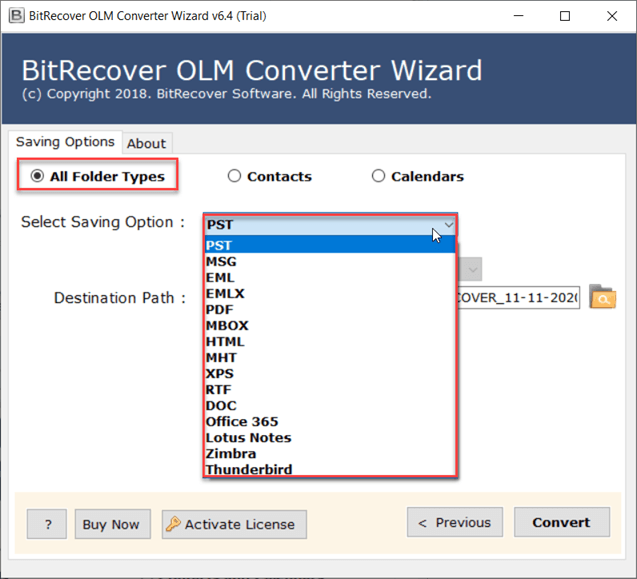
It is compatible with popular email file formats like EML, MSG, PST and MBOX making it easy for migration purposes. Secondly, it allow users to convert Outlook data file into a range of 25+ saving formats, including PDF, HTML, DOC, CSV, RTF, MHT, XPS as per their backup needs. Besides that, users can directly import OLM file to email clients like Gmail, Outlook, Yahoo Mail, Thunderbird, G Suite, Rediffmail, and more. Moreover, it is well-suited to export OLM files to email servers including Exchange Server, Hosted Exchange Server, Zimbra and more, making it an all-purpose solution to convert OLM file.

Core Features

Explore Functionality of Standalone Utility to Export Mac OLM File

several formats

Convert OLM File in Several Formats

OLM File Converter is perfect solution for users, who are seeking to convert multiple OLM files into several popular file-formats. This OLM converter wizard provides safe & reliable results while converting Outlook for Mac OLM files. Moreover, this software also offers simple GUI which allows users to convert large amounts of data effortlessly in just few clicks. Notably, it comes with its free demo version, that allows users to explore all significant functions of this tool before making purchase.

email attachments

Export Mac Outlook Emails Attachments

One of the OLM Converter tool's most prominent features is its capability to export all components of the mailbox including emails, attachments, contacts, calendars, tasks and notes. Tool preserves all types of attachments associated with email, including images, documents, PDFs, Excel sheets, or other file types, maintaining original quality & formatting of files. It's an all-in-one solution for users & organizations finding for complete data backup solution to migrate another format or platform.

export contacts

Export OLM Contacts Easily

The BitRecover OLM Converter tool provides a separate feature to extract just contacts from Outlook OLM files into multiple file formats in case a user needs only contacts and not the entire email data.

  • vCard Format – The OLM tool exports OLM contacts to vCard format (version 3.0), which is widely supported and can be smoothly imported into several applications.
  • Outlook Contacts - It can export .olm contacts to Outlook contacts in a CSV file which can be easily imported into Microsoft 365.
  • Thunderbird Contacts - This feature can also convert .olm contacts into a CSV file, which users can seamlessly import and use in Mozilla Thunderbird email application.
  • Windows Live Mail Contacts(CSV) - This option converts OLM contacts to CSV, making it quite easy and simple to import and use them in the Window Live Mail application.
  • Yahoo! Contacts - This function converts OLM contacts to a CSV file, which can further be imported into Yahoo Mail.

convert all data

Convert OLM File with All Data

The OLM converter ultimate is a powerful software which has the ability to detect complete data present within Outlook for Mac OLM files and convert every folder inside them. It efficiently scans Outlook to convert the included folders to the respective format and ensures complete and accurate conversion without facing any data loss. The OLM exporter tool offers three different methods to convert OLM files:

  • All Folder Types: If a user chooses this option, it will convert all folders from Outlook for Mac Files into multiple export options to the user’s desired location.
  • Contacts: This option allows users to convert only OLM contacts to multiple contact formats like vCard Format (v3.0), Outlook Contact (CSV) Thunderbird Contacts (CSV), Windows Live Mail Contacts (CSV) and Yahoo Contacts (CSV) as per their requirement.
  • Calendar: In case a user only wants to export calendar events from the OLM file they can simply choose the Calendar option from within the software panel to convert OLM calendars to ICS format.

convert mac olm files

Convert Mac Outlook OLM Files

The OLM Converter tool can convert OLM files into PST files, proprietary to Outlook for Windows only. It's beneficial for those who need to migrate from Mac to Windows system or in case they need to access OLM emails on Windows PC. The tool offers a “Create separate PST for every OLM” option. When enabled, the software creates a separate PST file for each OLM file. It keeps email files segregated and organized, provided that a user is working with multiple accounts to convert files. If a user disables this option, it will combine all the OLM files into one PST file.

Another feature is “Change Language” option. It can change the folder names in the preferred language. For example, if a user chooses German, the Outlook folders will be renamed as follows:

  • Inbox becomes Posteingang
  • Drafts becomes Entwürfe
  • Deleted Items becomes Gelöschte Elemente

bulk conversion

Offers Bulk OLM Files Conversion

Allows to load many files at once instead of adding them one by one, which saves you a lot of time. Also, the app works entirely on its own you don't need to have Outlook or any other email program installed to use it.

OLM Converter tool offers dual options to convert data from OLM files to other desirable formats as per user’s convenience. The following 2 options for bulk conversion are:

  • Select Files – This option allows users to select one or multiple OLM files as required for conversion.
  • Select Folder – Users can select entire folder including multiple OLM files, making it quick and easy to convert large volumes of data, at once.

convert calendars

Convert Calendars from OLM File

The OLM Converter tool by BitRecover can efficiently detect all the email file data like calendars, events, appointments, meetings, and reminders and convert them into ICS file format. The ICS file is a versatile format which is widely accepted by several calendar applications such as Google Calendar, Yahoo Calendar, MS Outlook, Thunderbird, Evolution SeaMonkey, eM Client and Apple Calendar (formerly iCal), guaranteeing smooth migration of calendar data.

convert corrupted files

Convert Corrupted OLM Files

The OLM Converter software is developed to cater to all kinds of user needs. The software not just converts healthy OLM files but is also capable of converting corrupted OLM files to multiple file formats. In the Select Folder view, The software efficiently detects and displays the damaged folders in red. This feature makes users aware of their corrupted files in the folders and thereby provides the option to convert them also to their desired format along with other files.

selective items

Convert Selective Items from OLM File

The OLM files can consist of numerous data including archived emails, calendars, contacts and other email components which may or may not be relevant to the user's requirement. In order to prevent the unnecessary conversion, the OLM Converter pro tool provides the “Select Folders View” option which allows users to view their email data from within the software panel before beginning the conversion process. Once the OLM files are selected, users can specifically select or deselect the required mailbox folders and subfolder, providing users customized conversion service. This feature ensures that no nonessential data is transferred, preventing any clutter and saving user’s time. Moreover, the OLM tool pledges to preserve the folder hierarchy as original throughout the conversion process. It keeps all the mailbox items intact and doesn’t disturb the structure and organization of email data post the migration.

file naming options

File Naming Options After Conversion

The OLM Converter for Mac is precisely developed to provide various popular file saving options including MSG, EML, EMLX, PDF, HTML, MHT, XPS, RTF, DOC, etc. and many others. It allows users to choose naming conventions as per their preferences. Tool offer this feature to keep your files in organized & professional way. For instance, it offers file naming options by Original File Names, Subject + Date (dd-mm-yyyy), From + Subject + Date (dd-mm-yyyy), Date (dd-mm-yyyy) + From + Subject, Date (yyyy-mm-dd hh: mm: ss) + From + Subject, Date (yyyy-mm-dd hhmm), Date (mm-dd-yyyy) + Subject + From, Date (yyyy-mm-dd) + From + Subject, among others. Users have choice to select name for their resultant data from 28+ naming options to save emails locally. This option simplifies management process, particularly for users who has large volumes of files.

office 365 support

Support Office 365 Mailbox (Admin/User)

BitRecover OLM Converter is a flexible and adaptable software which helps users to upload OLM mailbox data to Office 365 Webmail or OWA and Outlook.com. The tool not only imports emails from OLM files and Directories, but also exports all Office 365 Account email attachments and email metadata. The application is capable of importing OLM data into both primary mailbox of user account as well as Admin account. To facilitate process, users simply need to enter the email account credentials of respective user account or admin account. Using this feature, both individuals and organizations can efficiently migrate Mac Outlook data to the cloud maintaining 100% privacy of user’s data.

maintain data integrity

Executes Complete Conversion of OLM Files

OLM file converter software is capable to migrate elements from exported OLM files into required format with merely a few clicks. Using this tool, users can effortlessly move all their Outlook for Mac archive data, including attachments, calendars, contacts, & more. This tool keep hierarchy is maintained and data folders are kept intact throughout the conversion process without disturbing any element. The application preserves all metadata properties of Mac Outlook emails, such as To, Cc, Bcc, Date, Subject, etc., ensuring everything remains un-changed after the completion of conversion process. The confidentiality of emails is completely protected without any loss in formatting and structure of OLM emails.

mac contacts

Export Mac Outlook Contacts

Tool, often called OLM Contacts Converter, allows the seamless transfer of contacts from Mac Outlook to Windows Outlook separately from emails, in case users only need contacts to be transferred and not the email folders. The tool efficiently converts OLM contact files into various formats like vCard, Outlook contacts, Thunderbird contacts, Windows Live contacts and Yahoo contacts. It’s an perfect choice for looking to switch systems or combining contact lists from across different email programs.

user-friendly interface

User-Friendly OLM Conversion

OLM Converter is specially designed for both technical and non-technical users. Users just need to launch the application, add their Outlook for Mac Archive (.olm) files, select the desired email folders for conversion, choose the required saving format, select the destination path of your choice and finally press the Convert button to convert OLM file.

maintain folder hierarchy

Maintained Complete Folder Hierarchy

The OLM Exporter tool is an exemplary application for those who cannot compromise with folder hierarchy & folder structure of Outlook OLM mailboxes. OLM Converter Pro preserves OLM files in their original state during & after migration process without disturbing any elements. The trusted tool helps users to manage and organize a complete database in an appropriate manner.

windows and mac compatibility

Windows & MacOS Compatibility

This OLM file converter tool is not only Windows-based application but also a separate version of application is available for Mac users. It’s a versatile software widely compatible with both Mac & Windows operating systems. The Windows version of OLM converter operates on all Windows versions including Windows 11, 10, 8 and 7, making it accessible for all kinds of users.


Use Cases

Why BitRecover OLM Converter Tool is Useful for Microsoft Mac Outlook Users.

all attributes

Convert OLM File with All Attributes

Emails and other associated attributes are stored in the Mac Outlook OLM file. The OLM converter can export all data from an OLM file. Simply add the OLM file into the software environment to export emails, contacts, calendars, tasks, attachments, and so on.

  • Select File for Single OLM File: - After installing the OLM file converter, you can add a single OLM file at a time by selecting the Select Files option.
  • Select Folders for Multiple OLM Files: - Using the Select Folders option, you can add entire folder of OLM files. It will allow you to export whole folder of OLM files at the same time.

multiple export options

Multiple Export Options for Mac Outlook OLM File

BitRecover OLM Converter is trusted software that can convert single or multiple OLM files with no restrictions. The software directly exports OLM files into several widely-used file formats, for both desktop and cloud-based applications. Users simply need to launch the software and browse the desired OLM files for the conversion process.

File Formats:

  • PST
  • MSG
  • PDF
  • MHT
  • MBOX
  • EML
  • HTML
  • DOC
  • vCard
  • EMLX
  • TXT

standalone software

Stand-Alone Software to Convert OLM Files

The BitRecover OLM converter is a standalone software accessible for both Windows and Mac. It is important to mention that separate EXE files are available for both platforms. The application runs independently and doesn’t require any external software to facilitate the migration process. Notably, the OLM converter tool also provides a demo version, which allows users to examine the software before making a purchase.

Supports OLM File Migration:

  • Office 365
  • Zimbra
  • Lotus Notes
  • Thunderbird

Reviews & Awards

Examine the Tool to Convert OLM Files' Awards and Reviews

software informer

SOFTWARE INFORMER AWARD

SoftwareInformer gave BitRecover OLM Converter Wizard a perfect score. The official product page, according to Software Informer Team, contains no spyware, viruses, or adware. This product is completely harmless and will not harm your computer.

download.hr

DOWNLOAD.HR AWARD

The Download.hr awarded OLM Converter Wizard with a 100% clean and safe software award. This software contains no viruses or adware, making the process seamless. According to Download.hr moderators, it is a four-star tool with the robust and best features.

cnet award

CNET AWARD

CNET editors rated OLM Converter as a five-star application for its capabilities to convert OLM files along with all the components such as attachments, address book, calendars, deleted items, journals, to-do lists, notes and more, making it a trusted choice for all kinds of users.

listed in top 5 products

LISTED IN TOP 5 PRODUCTS

The software is listed among the top 5 OLM Converter software, paving its way through all the obstacles and standing out for its excellent performance. The efficiency, accuracy, and intuitive interface makes it a top preferred choice for both domestic and technical users.

Tool Specifications

Learn About Minimum System Requirements for Installing OLM Converter Tool.

olm converter
Software Name: OLM Converter
Version: 7.1
Size: 23.2 MB
License: Single User
Edition: Standard, Pro, & Migration

Trial Limitations

Free OLM converter wizard performs the same functions as the pro edition, but it is limited to converting 25 emails from each OLM folder to a single file format. Use the free demo edition to test the software's functionality before purchasing license keys to convert unlimited Outlook OLM emails, contacts, calendars, and so on. There is also a free edition of OLM Converter for Mac.

System Specifications

Hard Disk Space
50 MB of free hard disk space

RAM
Minimum 2 GB RAM

Processor
Intel® Pentium 1 GHz processor (2.4 GHz is recommended)

Supported Editions

  • Microsoft Windows – Windows OS 11 (64 bit), 10, 8, 7 (32 bit or 64 bit) & Windows Server 2025, 2022, 2019, 2016.
  • MacOS – macOS 26 Tahoe, macOS 15 Sequoia, macOS 14 Sonoma, macOS 13 Ventura, macOS 12 Monterey, macOS 11 Big Sur, macOS 10.15 Catalina and all older versions.

Electronic Delivery

The product is delivered automatically. After your payment is confirmed, you will receive an email with a link to download the product and the activation key.

Comparison

Feature Comparison of OLM Converter - Free and Full Version

Features

Free Version

Full Version

Load Mailbox Folders

Multiple saving options

Apply Naming Convention

Preserved Original Folder Hierarchy

Compatible With Windows 11 & Below Versions

Free 24*7 Tech Support & Secure 100%

Convert OLM Files

25 items/folder

Unlimited

Cost

Free

$39

FAQs

Find All Answer Related to Questions of OLM Converter Wizard

4 Steps to Use OLM File Converter:

  • Step-1: - Download and Install OLM Converter
  • Step-2: - Launch The Tool and Add OLM File.
  • Step-3: - Select Export Option and Browse Location.
  • Step-4: - You Will Have the Resultant File with the Same Data.

No, there is no file size limitation to open and preview files. You can export OLM file of any size to multiple format.

Yes, you can add multiple files stored in one folder to the application for the conversion process.

Yes, the OLM Converter software will maintain the complete folder hierarchy of the OLM files.

Yes, the OLM Converter is available for both Windows-based and Mac-based users.

Yes, the tool is compatible with OLM files of Mac Outlook 2026 and 2015.

Yes, it is a suitable utility to export Mac Outlook data to Windows Outlook.

Yes, this software provides a separate option to convert OLM emails directly.

Yes, it will export all the Mac Outlook OLM emails with attachments. The software is capable enough to export the emails, contacts, calendar, tasks, notes, etc. mailbox items with ease.

Client Reviews

What Users Say About OLM Converter