Fix Thunderbird Keeps Crashing Issue with Top 6 Methods

Published: January 20th, 2026 • 5 Min Read
Summary: In this expert blog, we will discuss what to do when Thunderbird keeps crashing continuously. It will cover all the common yet root causes for this issue, and will outline some best practical techniques to fix it with stability while keeping entire data intact.
Mozilla Thunderbird has earned its place as a trusted desktop mail client for years. It’s flexible, open-source, and widely used by individuals for professional and personal communications and to store their email data carefully. Sometimes Thunderbird may crash without any prior warning during opening it, or syncing messages, or sometimes when opening a particular folder or message.
For many users, the problem isn’t Thunderbird itself, but the environment around it. Oversized mailboxes files, outdated add-ons, profile corruption, or system changes. Ignoring these signs often makes things worse. Understanding what actually causes Thunderbird to crash is the first step towards fixing it.
Let us know why Thunderbird keeps crashing continuously and top ways to fix it.
Why Does Thunderbird Keep Crashing?
Below are some causes that Thunderbird keeps crashing continuously:
- Oversized Mailbox Files: Thunderbird usually stores emails in large mailbox files. These files grow bigger over the time and performance may drop which can cause Thunderbird crashing issue.
- Corrupted Profile Data: A system crash, an unexpected shutdown, or a force update can damage a user’s Thunderbird profile. Once the profile is affected in any way, it may start crashing frequently.
- Add-on and Extension Conflicts: Sometimes users install add-ons to improve productivity and unfortunately outdated or incompatible extensions often conflict and cause instability with the data of new Thunderbird versions.
- Incomplete or Failed Updates: Interrupted updates can also leave Thunderbird in a partially upgraded state. This often results in crashing while starting an application or accessing account settings.
- Damaged Mailbox Files: A mailbox file that is damaged can silently corrupt mailbox files over time. When Thunderbird tries to read damaged files, it may freeze or crash without any prior warning.
1. Start Thunderbird in Troubleshoot Mode
- This way all the add-ons temporarily disable or remove.
- If Thunderbird words are fine here, the issue can be in the extension.
2. Repair Corrupted Folders
- Right-click on the folder that is not opening.
- Go to Properties and then Repair Folder.
- This rebuilds the index files and often resolves crashing while opening file/folder.
3. Compact Mail Folders
Making a file and folder compact and small in size helps a lot. As deleted mailbox files still remain even after removing them. Large mailbox files increase storage usage and this may lead to thunderbird crashing issues.
Users can make the folders compact regularly, especially in inbox and sent folders.
4. Delete and Rebuild Index Files
If Thunderbird crashes while opening any specific folders, index files may be damaged.
Solution: Rebuilding index files forces Thunderbird to recreate clean folder references without affecting emails.
5. Create a New Thunderbird Profile
If Thunderbird crashes even after repairing them, it is possible that the profile itself may be damaged.
Creating a new profile eliminates hidden corruption that is caused by years of usage.
When Manual Fixes do not Work?
Sometimes, Thunderbird keeps crashing even after using all the manual techniques. This usually indicates deeper mailbox corruption or data integrity issues. At this point, reopening these files and folders again and again may increase the risk of permanent data loss. This is where controlled data extraction and conversion professionally come into action.
Fix Thunderbird Keeps Crashing with Professional Tool
If Thunderbird crashing constantly on your system and manual methods does not fix this issue, the BitRecover Thunderbird Converter tool can be used to fix this problem professionally. This tool offers a wide range of features that helps users transform the entire mailbox data with compatibility and accuracy.
It even supports corrupted data to make them accessible as per the user’s choice. It offers some quick steps that do not consume much time and are worth using when it comes to saving precious time and energy.
Quick Steps to Use this Professional Tool
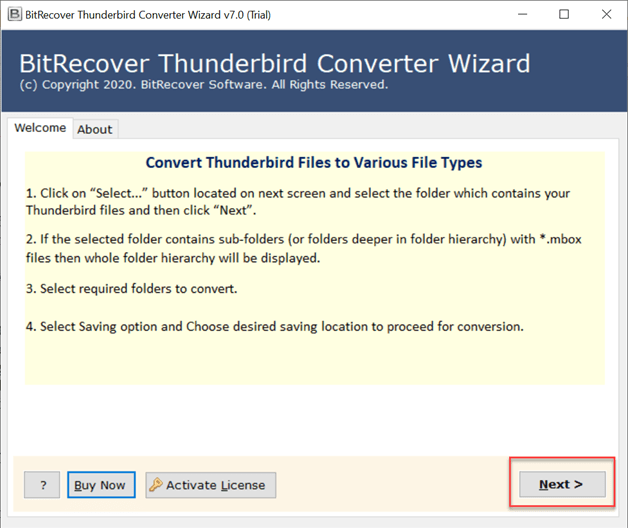
- First of all, download and open the solution on your system and click on the Next button.

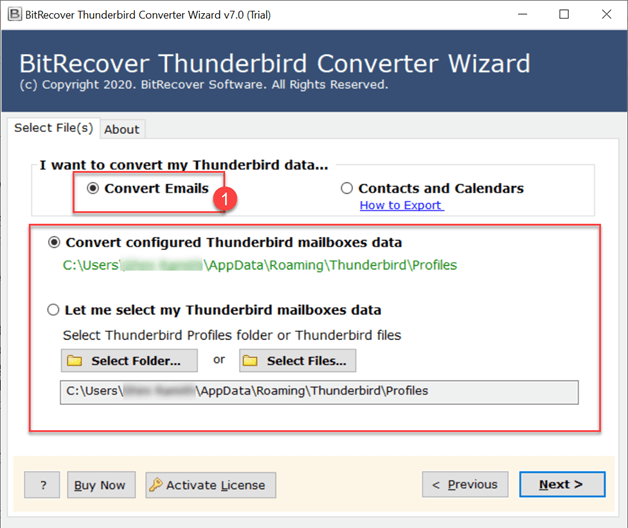
- Choose the option to upload Thunderbird data into the software panel.
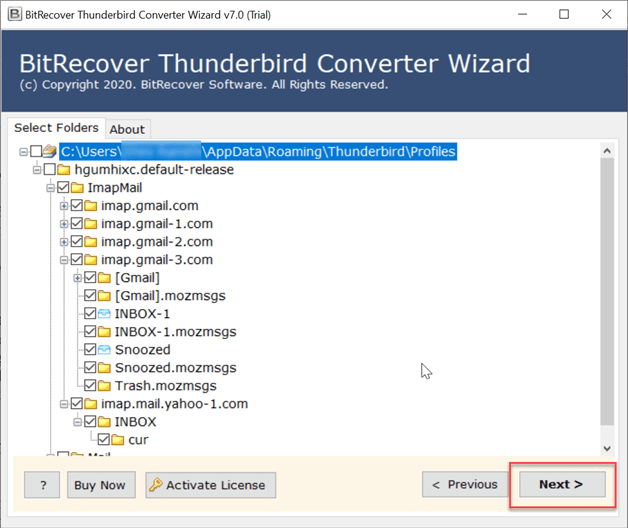
- Preview uploaded data carefully before starting the process.
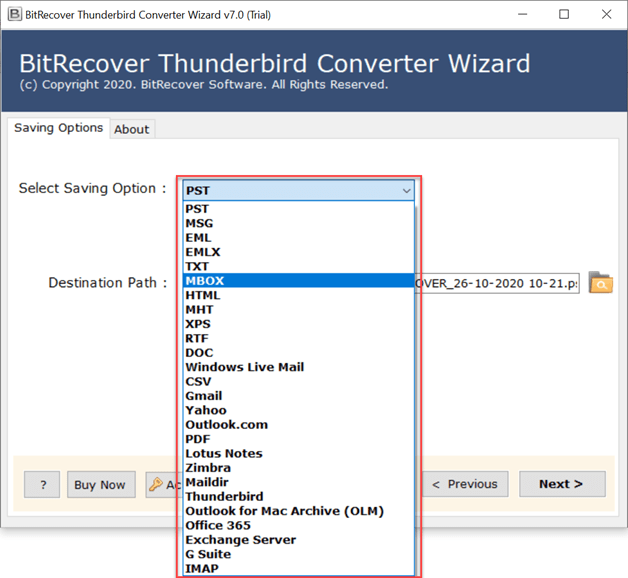
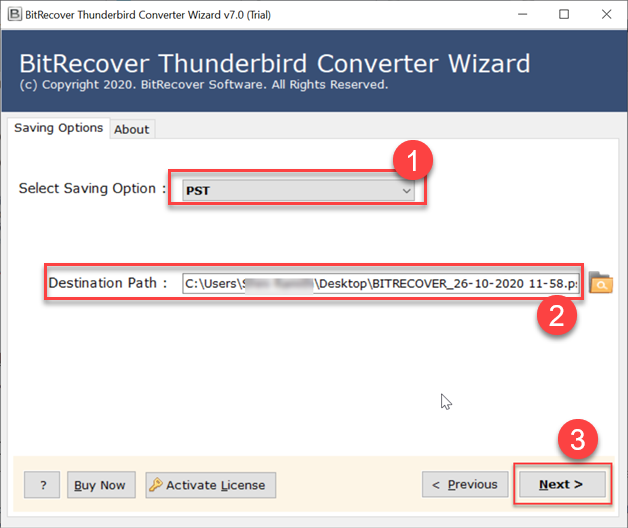
- Choose any format to convert your Thunderbird data to access your mailbox,

- Now, choose the destination path to save your data at a location of your choice and click on Next to complete the process.
Features of this Professional Solution
- Offers to convert Thunderbird to EML, PST, HTML etc as per user’s preferences.
- Maintains originality and hierarchy of the entire data uploaded into the software.
- Allows to even transfer data from thunderbird to other platforms with safety.
- Offers quick and easy to understand steps for smooth conversion of the data.
- Offers multiple file naming options to rename output data as per needs.
- Standalone tool, does not let users to feel the need of installing any supporting tool.
Conclusion
In conclusion to this blog, we discussed the best ways to fix Thunderbird keeps crashing issues. We discussed multiple manual methods as well as professional solutions to solve why does Thunderbird keep crashing. Users can use manual methods but, to solve this problem directly professional solution can be used to directly make this file accessible.
Still confused, why does Thunderbird keep crashing? Or how to fix this issue? Get in touch with our Technical Support Team directly as they are always available to assist and guide you through their expertise.