Why is My Outlook New Email Button Not Working?

Published: January 24th, 2026 • 6 Min Read
In this blog, we will guide you through the Outlook New email button not working issue and tell you the reasons why the Outlook New button is greyed out. We are going to use both manual and professional methods to fix this issue, with their limitations and the benefits of using both methods.
Microsoft and its applications are used daily around the world. Of all its applications, Outlook is the most popular and widely used for email communications. The new email option not working in Outlook can be a serious problem for anyone, whether they are a business user or a normal user. This problem is frustrating, especially when you’re communicating.
Today, we are going to fix the new mail option not working in Outlook issue, so keep reading this blog if you are serious and looking for the right solution for the Outlook new email button not working issue. So, go through the complete blog till the end and find the correct solution.
Let’s start with understanding the main cause of the Outlook New Email greyed out.
Reasons Of Outlook New Email Greyed Out
- Outlook New Email not working happens due to many reasons; we are giving some main reasons below.
- Sometimes, when there are fluctuations in the internet, the sync of the Outlook account with the server gets broken, and this button does not work.
- This problem occurs when your computer system hangs badly, and all the software applications is freezed.
- When your Microsoft Office package license or subscription has expired, and you haven’t purchased a new one.
- This happens because Outlook’s server frequently crashes, goes down, or the server doesn’t update.
- If your Outlook is outdated and you have not updated it from its official updates for a long time.
- When your Microsoft Outlook application crashes due to add-ons, corrupted OST files, graphic acceleration, faulty emails, or antivirus software.
These were the most common problems of Microsoft Outlook, due to which your Outlook new email button not working.
Let us now move towards the solution to fix this problem.
Manual Ways to Fix Outlook New Email Button Not Working
We will fix the Outlook New Email not working problem manually through some of the points given below.
Internet Fluctuation:
- Check your Home or Office Wi-Fi and LAN connections, restart your Wi-Fi router, and reconnect through your computer system.
- After that, open your Outlook application after 5 to 10 minutes.
- Then, go to the “Send/Receive” Tab, and turn off the Work Offline button (if it is ON)
Done!
System Hanged:
- Open the task manager in your windows Operating system by using the shortcut.
{Ctrl + Alt + Delete} - Then, select Outlook and click the “End Task” button.
- After that, restart your computer, and open the Outlook application first.
- Then, check the “New Email” button, and close all the unnecessary applications.
Office License/Subscription:
- Open the Outlook application on your computer PC.
- Then, go to the “file” menu and go to the “Office Account.”
- Check your License status, purchase the license or subscription that has expired.
- After that, validate the Microsoft 365 subscription, close and restart Outlook, including your complete computer system
Outlook Server Down:
- Check the Microsoft Outlook service status in your internet browser.
- After that, wait a while (the server issue is temporary).
- Then, close and reopen Outlook.
- After that, re-login to your Outlook profile and try again later.
Update Outlook:
- Open the Outlook application on your Windows OS.
- Then, go to the “File” menu, click on the “Office Account”, and go to the “Update Options.”
- After that, click on the “Update Now” and wait for the update to complete.
- Then, Close Outlook application and restart your systems and check!
Done!
After following all the tested manual methods, you can fix the Outlook new email button not working issues, but it has some limitations, which you must know before using any of the given steps.
Limitations of Using Manual Solution
- Disabling antivirus software can create a security risk.
- Every method requires tech-knowledge, which is not useful for non-tech users.
- Manual solution doesn’t work in case of OST and PST file corruption.
- If the server is down from Microsoft side, then you are unable to control
- Chances of missing important features of Add-ins in case of disabling.
- These manual methods work in case of temporary problems and will not solve your issue permanently.
- Disabling hardware acceleration may slowdown performance of Outlook.
- If the Internet keeps fluctuating, then this problem occurs continuously.
- Troubleshooting is time-consuming in manual solutions and may need multiple attempts.
- Identifying faulty emails manually is difficult and risky, due to which there is chances of deletion of important emails.
These were the limitations of manual solutions, which may occur during the use of every step. Additionally, manual solutions only work when the problem is common; in serious case doesn’t work. To overcome these limitations and for a quick solution, you can try the next solution described below.
How to Fix Outlook New Email Not Working Issue Professionally?
To fix the Outlook new email greyed out issue professionally, you can try the BitRecover PST Repair Tool to fix this problem securely. This program simply repairs your PST file and fixes the Outlook new email button not working within a few clicks. Its user interface is easy to use for both tech and non-tech users. You can download its trial version for free and check its working.
Steps to Repair Outlook New Email Options Greyed Out
- Open the recommended tool on your desktop PC.
- Then, click on the “folder/files” option, and click on the “next”.

- After that, select the folder you want to repair and click “Next.”
- Then, select the saving option “PST,” and set the “destination” path.
- Afterwards, set the “file naming option,” and click on the ”repair” button.
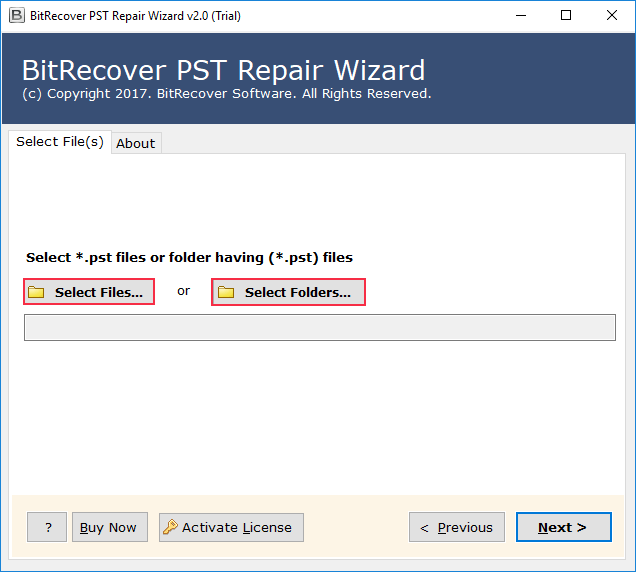
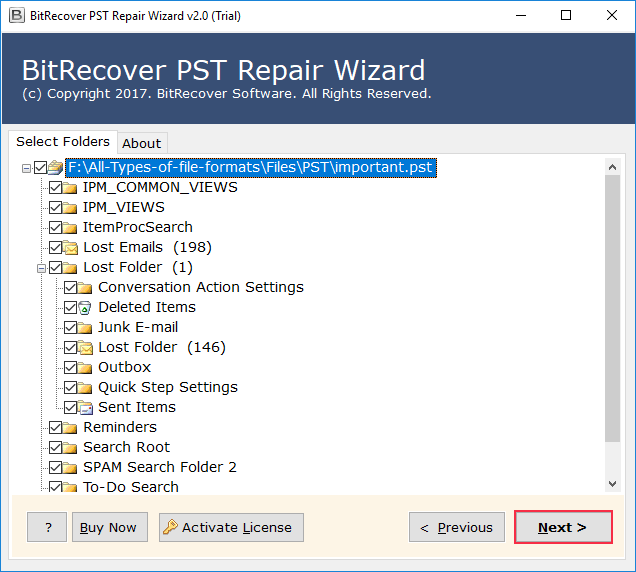
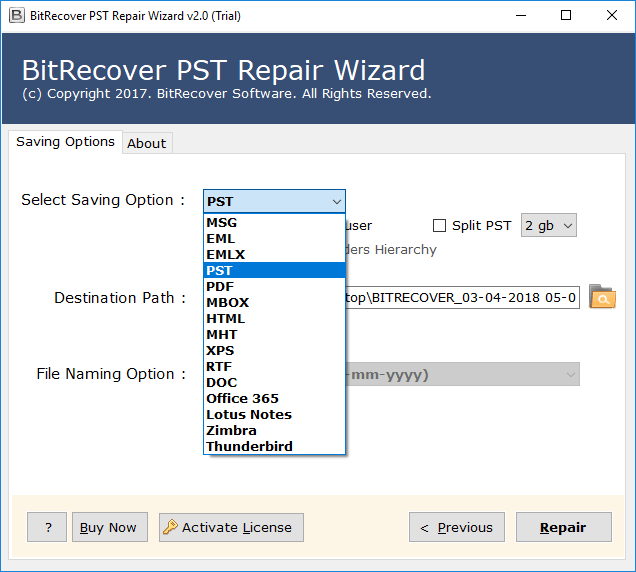
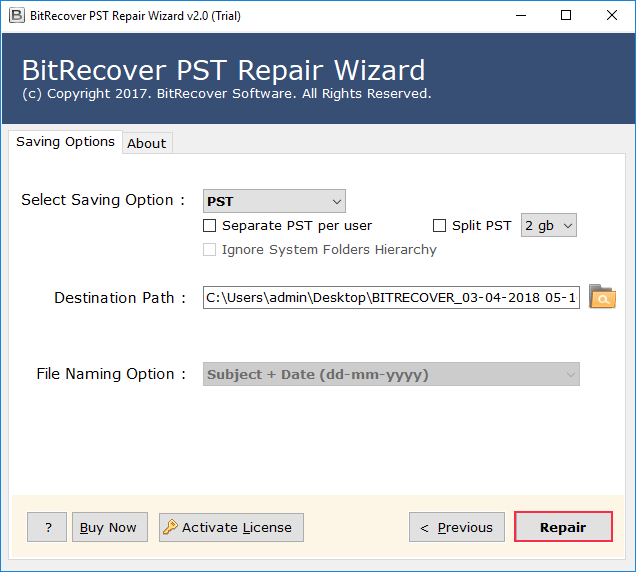
Done! Your PST files have been repaired successfully.
Using this professional method, you can easily solve the new mail option not working in Outlook.
Benefits of Using Professional Solution
- It maintained data integrity during the complete repair process.
- You can repair MSG, EML, EMLX, and PDF files using the same tool.
- This wizard allows you to save your repaired files with a custom naming option.
- You can repair any corrupted or password-protected PST files in a few seconds.
- It allows you to do repairs selectively from a particular folder and file.
- This software doesn’t need an internet connection to repair your PST files.
Final Thoughts on Outlook New Email Greyed Out
In this blog, we discussed Outlook new email button not working issue, which occurs daily in both professional and non-professional communication, and impacts the productivity of users. Using a manual solution to fix the issue of the new mail option not working in Outlook, but only when the problem is common, and issues are less. This solution doesn’t work when issues happen from the server. However, using the recommended solution to fix this issue quickly is the correct option for users who are facing this kind of problem.