Facing Outlook Error Code 0x80040600 While Sending Email

Published: February 10th, 2026 • 7 Min Read
You are creating a important emails for clients, and suddenly, Outlook error code 0x80040600 appears. Don’t worry! This is a common issue, and it occurs if your PST file and OST file get corrupted or their size is more then required size.
This error has stopped you from sending and receiving emails, accessing contacts, and opening folders. In some case the Outlook will crash or freezes due to which your work files may be stacked.
Microsoft Outlook also shows this error code 0x80040600 when some technical glitches happen in the Personal Storage Table (PST) file, which stores your emails, contacts, and other data, and has become corrupted.
This blog will help you know how this problem can be fixed while saving your important emails, contacts, and other important data. Along with this, you will know its common symptoms and causes. Additionally, you will also learn about how to fix 0x80040600 error in Outlook using both manual and automated solutions, with their limitations and advantages. So, now let’s start with the error code 0x80040600 causes.
Common Symptoms and Root Causes
Here are the symptoms of error code 0x80040600:
- Your Outlook gets crashed multiple times or closes automatically.
- Outlook is open, but not working; every section of Outlook is frozen.
- When you receive or send an email, this error 0x80040600 occurs.
- Some of the folders and emails in your email account are not opening.
- Your Outlook is running slowly or hangs while using.
These are the symptoms of the occurrence of Outlook error code 0x80040600. Let’s see the root causes of this error.
- Corrupted PST File: When the PST file gets corrupted, then Outlook is not able to read or send your emails, due to which you will see the 0x80040600 error.
- Large File Size: If the PST file size is more than 2GB in older versions of Outlook, such as Outlook 2002 or earlier. Then, Outlook crashes, and the error occurs.
- No Proper Shutdown: When your computer suddenly shuts down due to power cuts or your Outlook is not closed properly, then the PST file gets damaged, and you will see the error.
- Other Factors: Some malware damages Outlook files, which corrupts the PST file, and you will get the error.
- Unsupported Add-ins: If you are using old Outlook and using any other third-party add-ins, then you will face this issue.
Now we understand the Outlook error code 0x80040600 symptoms with their causes. Now let’s fix this error in the upcoming sections.
Fix Outlook Send Receive Error 0x80040600 Manually
To fix the Outlook error 0x80040600, you need to follow the detailed instructions listed below.
Repair Using (ScanPST.exe):
- Open the ScanPST.exe tool on your computer PC, enter the following location to find:
C:\Program Files\Microsoft Office\root\Office - After that, double-click on the “ScanPST.exe” tool icon.
- Then, “Browse” the corrupted PST file and select it.
- Now, click on the “Start” or “Repair” button.
- After that, the tool starts scanning fix all the minor corruption.
Create New Outlook Profile:
- Open the Outlook application on your computer PC.
- Go to the “file,” click on the account settings, and select the account settings option.
- Then, click on the add account to add a new account.
- After that, completely configure your account with Outlook with its new id and password.
- This process will solve errors caused by the corrupted profile.
Reduce File Size and Data Compact:
- Open the Outlook application on your Windows PC.
- Then, go to the “file” option, and click on the account settings.
- After that, select the account settings option.
- Go to the “Data File” tab, select the PST file, and click on the “Settings” option.
- Then, click on the “Compact Now” option, and click on the “OK” button.
- After that, again go to “File” menu and choose “options” button.
- Then, select the “Advanced” option, navigate to “AutoArchive” option.
- Now, click ok the “AutoArchive Settings” button.
- After that, enable the button “Run AutoArchive every n day.”
- Finally, click on the “OK” button to complete the process.
Setting the auto archive option moves emails to a different file and reduces the PST file.
Using the given instruction carefully, you can fix the Outlook error code 0x80040600. But it has some drawbacks that you must know before using any of these solutions described above.
Limitations of Manual Solution
- The mentioned tool will only repair minor PST corruption.
- ScanPST.exe doesn’t work in the case of multiple PST files.
- Emails might be missing after using ScanPST.exe.
- The compact now option only reduces file size; corruption is not repaired.
- Adding a new profile will only fix profile-related issues; in case of a corrupted PST file, the problem will remain the same.
- You need to re-configure your account that is a time-consuming process and not easy for non-tech users.
Now we know the disadvantages of using manual solutions, which shows that manual solutions only work if the error can be fixed with these solutions. To avoid this situation and get a hassle-free solution, you can check out the next solution in the next section.
Automatic Solutions to Solve Outlook error 0x80040600
The manual solution only works when the Outlook error code 0x80040600 happens due to minor corruption. In the case of server PST corruption or multiple PST files, the manual solutions don’t give the satisfactory results that you want. You can try the BitRecover PST Repair Tool for a safe and easy solution. This tool will fix the error 0x80040600 without data loss.
Steps of Automated Solution
- Open the application on your Windows OS.
- After that, select the option between file/folder, and hit the “next” button.

- Then, choose folders manually where your PST file is stored, and click “Next.”
- Afterwards, select the saving option “PST” format.
- Lastly, add the destination path and click on the “Repair” button.
- Done, your “PST” files will start repairing.
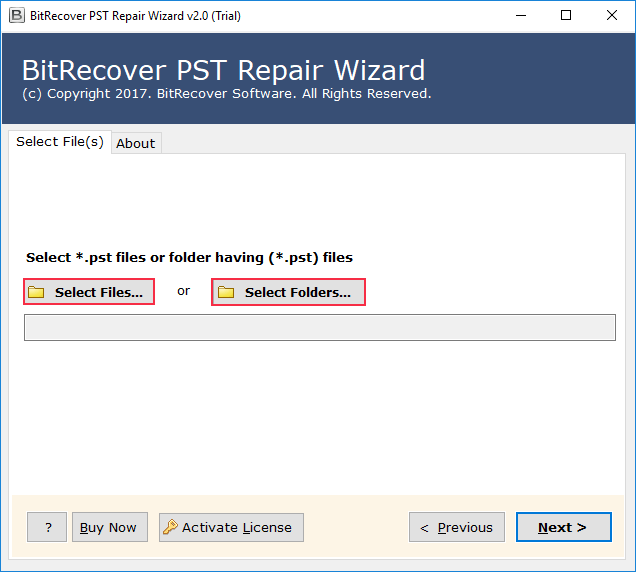
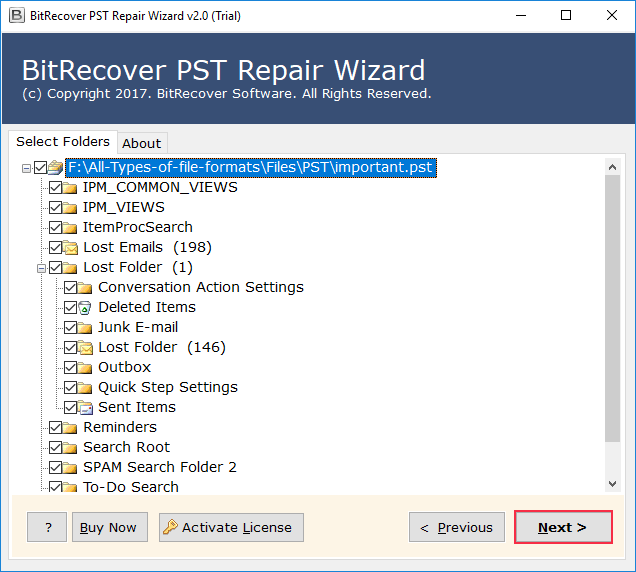
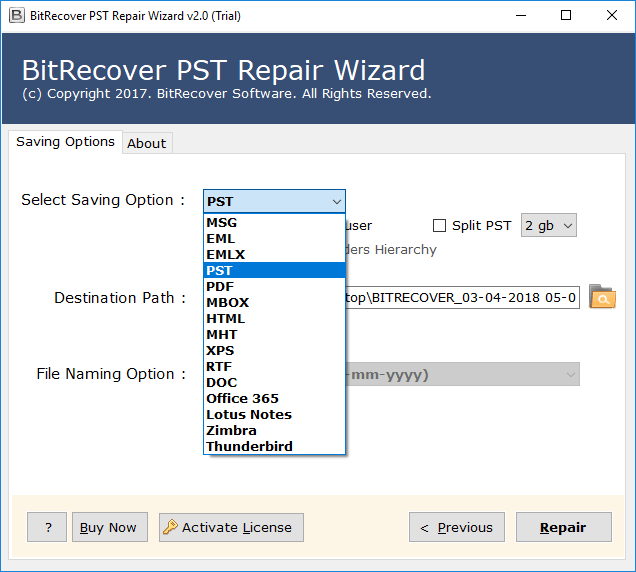
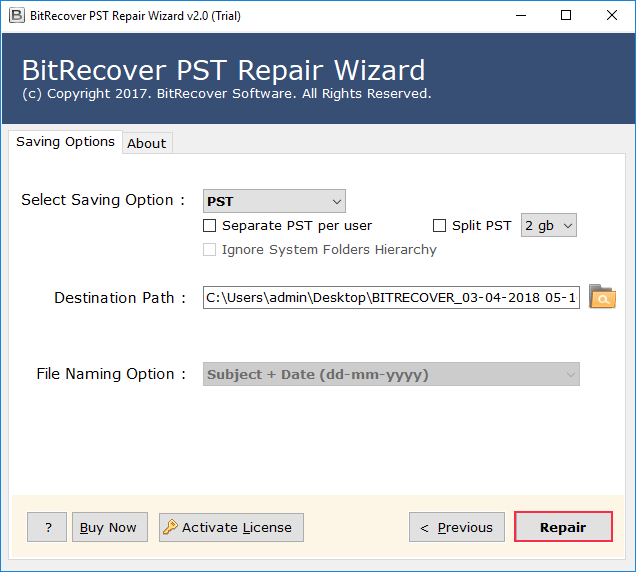
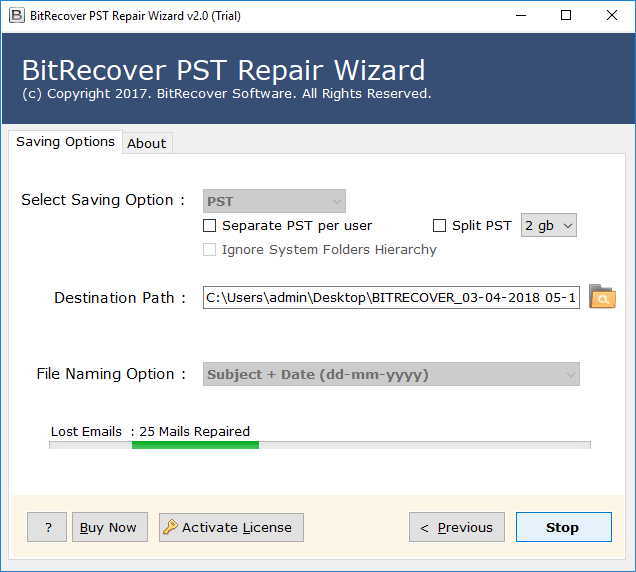
Simply follow these steps to repair your PST file in a few clicks and fix your Outlook error 0x80040600.
Advantages of Using Automatic Method
- You can save your repaired PST files in other file formats like, MSG, EML, and PDF, using the same tool.
- Software easily recovers any corrupted PST files within seconds.
- You can fix Outlook error 0x800ccc0d using this tool.
- It keeps data integrity maintained during the entire repair process.
- The tool allows users to do repairs selectively from both the folder/file options.
These were the benefits of using the automatic solution to fix the Outlook send error 0x80040600.
Final Thoughts
The Outlook error code 0x80040600 is irritating, especially when you are using your sending mails to important persons, or managing important files. In this blog, we discussed the common symptoms and causes of error code 0x80040600. We shared both manual and automated solutions to resolve this problem, with the limitations of the manual solution. The manual solution will only work if the problem is minor, but in the case of server issues, the manual solution doesn’t work. On the other hand, the automatic solution keeps the data integrity maintained and the safest and easiest option to fix this issue.