Why Did Outlook Attachment Disappeared?

Published: January 24th, 2026 • 5 Min Read
If you are the one who is facing the Outlook Attachment Disappeared issue. Don’t worry! You’ve reached the right page. The Outlook email attachments are essential for every business and non-business communication. However, it can be frustrating if an email attachment disappears. Whether you’re working with your important documents, images, or other files, or you lose them in the middle of a conversation with your clients or known ones, all of these situations create hassles for you.
In this blog post, we bring a solution for you that will help you fix this, and share the two best-tested step-by-step solutions to fix this issue. So, without more delay, let’s start.
Common Reasons Why Outlook Attachment Disappeared
There are many reasons why the Outlook attachment disappeared from the email. Here is the major reason are listed below:
- When the attachment limit is set on both the email server and Outlook, the attachment will automatically drop.
- If the email or attachment gets corrupted or does not load properly, then it will disappear.
- Sometimes antivirus and firewall software will block the attachment settings, due to which your Outlook attachments disappear.
- Some Outlook add-ons will block or remove the attachments, which can cause this to happen.
- If the Outlook profile got corrupt then attachments could not show properly.
- When the automatic download settings are disabled, it will not show properly.
These were the major reasons why attachments are not showing. Let’s fix outlook attachment disappeared from email issue in the next section.
Manual Ways to Fix Outlook Attachment Disappeared from Email
If an attachment is missing in Outlook, and you want to fix the problem manually, then you need to follow the steps described below.
- Firstly, Restart your Outlook
- Go to the “File” menu and select the “Options” menu.
- Then, go to the “trust center” section and click on the “turn center settings.”
- After that, go to the “Attachment handling” section.
- Here, you will see the option “attachment and document preview.”
- Then, Uncheck the “Turn off Attachment Preview” option.
- Finally, click on the “OK” button.
Done! Your attachment issue is fixed.
The manual solution described above can help resolve missing attachment issues in Outlook.
Now, it is also important to know about the limitations of this manual solution to the Outlook attachments disappeared issue.
Limitations of Using Manual Solution
- Limited Scope: Only solves preview attachment issues, not useful for other attachments.
- Can Be Overwritten: Settings may be reverted by automatic official updates.
- Not Always Effective: If the problem occurs in the server or with the corrupted email accounts, then this may work.
- Requires Human Effort: It has multiple steps, which are risky for the email account; any mistake made by non-tech users can lead to account corruption.
These are the key limitations of using this manual solution. However, to get a limitations-free solution, you can try expert tested method that is described in the next section.
Outlook Attachment Disappeared When Replying: Issue Fix Professionally
Now you know the manual way to fix the Outlook attachment disappeared issue with its limitations. As per the limitations, the manual solution only works when the problem is minor or works only when your account is not corrupted. In such a case, you can try the BitRecover PST Repair Tool as the right option. This tool simply repairs PST files without any account corruption and makes your email attachments accessible again.
Steps to fix the Outlook Attachment Disappeared Issue
- Open the tool on your Windows OS, select the folder/file option, and click “next”.

- Select the email folder where your attachment was previously stored.
- Then, click on the “Next” button and select the “PST” option.
- After that, set the destination path and file name option.
- Click on the “Repair” button.
- Done! After a few seconds, you will get a message of successful completion.
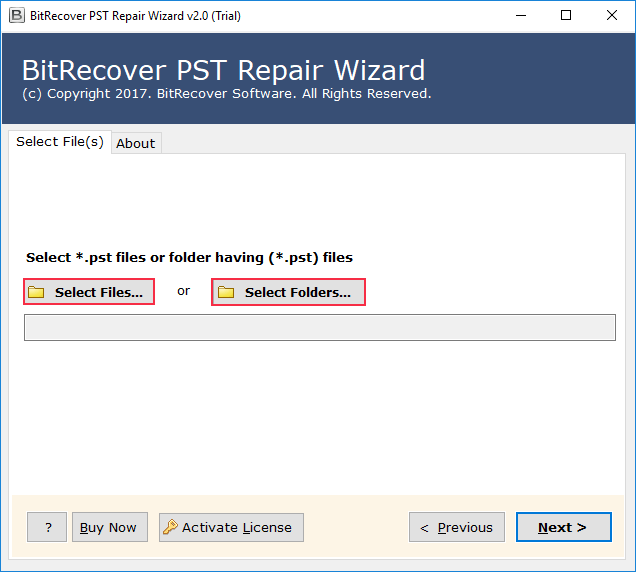
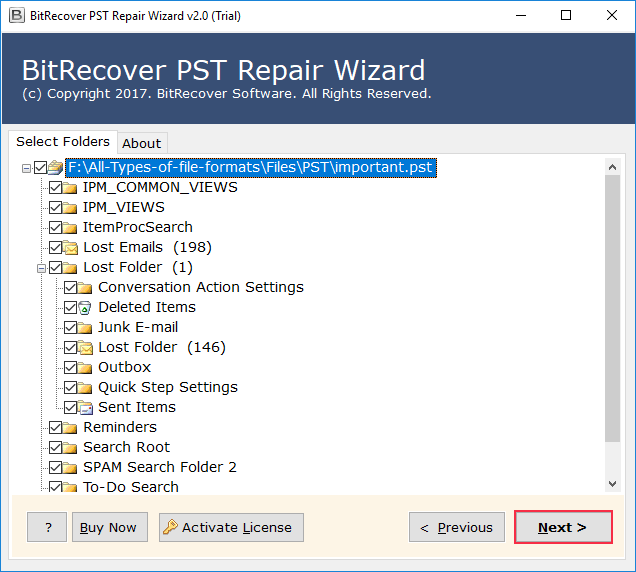
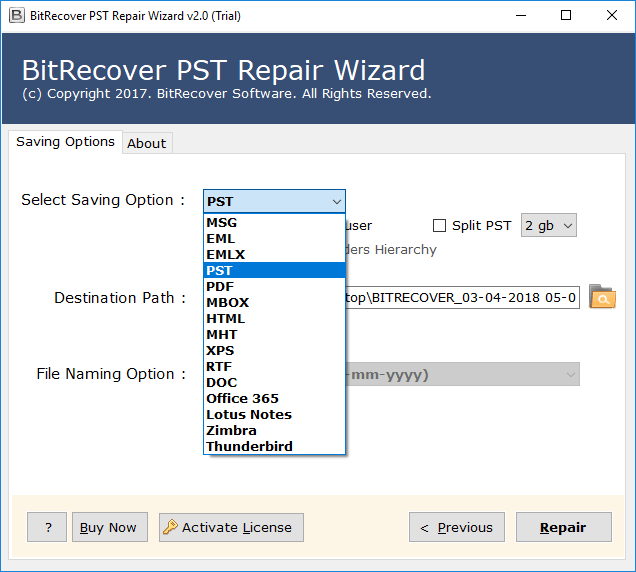
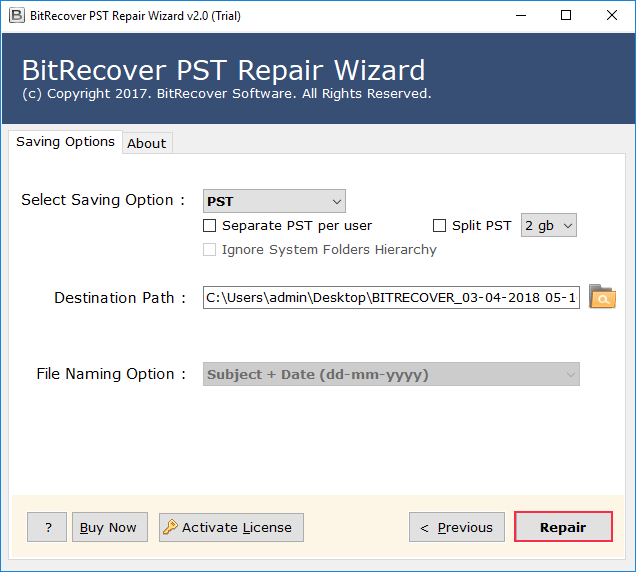
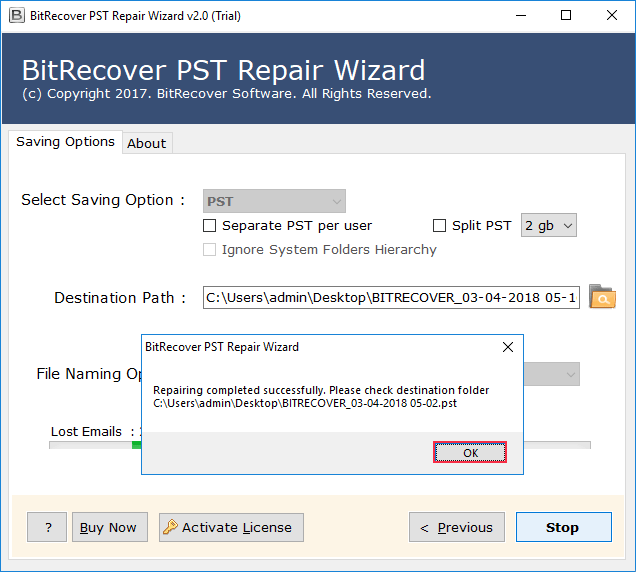
By following these steps and using this recommended tool, you can recover all attachments and easily resolve outlook attachment disappeared issue.
Advantages of Using Professional Solution
- It repairs and stores all the PST files with complete data integrity
- This tool works on corrupted PST files and makes them useful again.
- IT has advance filter option that allows users to fix outlook attachment disappeared issue from selected mails.
- Can repair bulk PST files at once and give you instant results in a few clicks.
- The tool offers advanced flexibility to export in various formats such as PST, MSG, MBOX, EML, PDF, HTML, and many more.
- This tool generates a repaired file report that gives you information about your PST files.
Final Thoughts
In this blog, we discussed the reasons why the Outlook attachment disappeared. We explained the two solutions to fix the Outlook attachment disappeared from email. The manual solution to fix the attachments disappearing issue only works when the problem is common and not from the server. However, the suggested professional solution can fix this attachment issues instantly with complete data integrity.
You can try its trial version for free, and if you are satisfied with the results, you can go with its licensed version.