How to Migrate Thunderbird to Betterbird in Bulk Safely?

Published: January 28th, 2026 • 5 Min Read
Summary: In this blog, we will explain why users need to migrate Thunderbird to Betterbird, its key advantages, and best methods to complete the process while maintaining the data integrity.
Email clients play a big role in how smoothly we manage our daily email communication. Mozilla Thunderbird has been a trusted choice for years but users nowadays are looking for something more stable, responsive and regularly improved.
This is where Betterbird comes into action. Introduced in 2021 as a refined version Thunderbird. It aims to offer better bug fixes, improved user experience, and enhanced compatibility.
Why Do Users Need to Migrate Thunderbird to Betterbird?
There are many reasons that pushes them to move Thunderbird to Betterbird and below are some of them:
- Frequent bug fixes and enhances performance.
- Betterbird responds faster and smoothly while dealing with large mailboxes.
- Offers a way more better stability.
- Regular updates while focusing on the user’s real problems.
Betterbird keeps the Thunderbird data intact while improving what users often complain about.
How to Migrate Thunderbird to Betterbird Manually?
- No migration, copying or importing is needed.
- Make sure both use the same Thunderbird ESR Version.
- Now, install Betterbird on your system.
- Betterbird automatically uses your Thunderbird profile.
- If the profile detection fails, start Betterbird with the -p option.
- Select your existing Thunderbird profile from Profile manager.
- Users can also switch profile with the help of clicking on Help then Troubleshooting Information and then click on about:profiles.
- Lastly, start using your emails instantly in Betterbird
Although this method is very technical when it comes to accessing Thunderbird data into Betterbird. Several users would require help and guidance from technical experts for this process. To transfer Thunderbird to Betterbird interface directly and hassle-free users need to opt for a solution that is easy-to-use and does not complicate the process for a non-technical user.
How to Migrate Thunderbird to Betterbird Directly & Safely?
If you want to migrate Thunderbird to Betterbird due to any reason, and need a solution that works efficiently to let you access your large amount of Thunderbird data into Betterbird interface, BitRecover Thunderbird Converter tool is a one stop solution.
As moving Thunderbird to Betterbird manually can be very hectic, time taking and technically sound. This solution is very easy to use, and offers quick and safe steps to complete this process very easily while maintaining each and every bit of your Thunderbird data.
How to Use this Solution for Safe Migration?
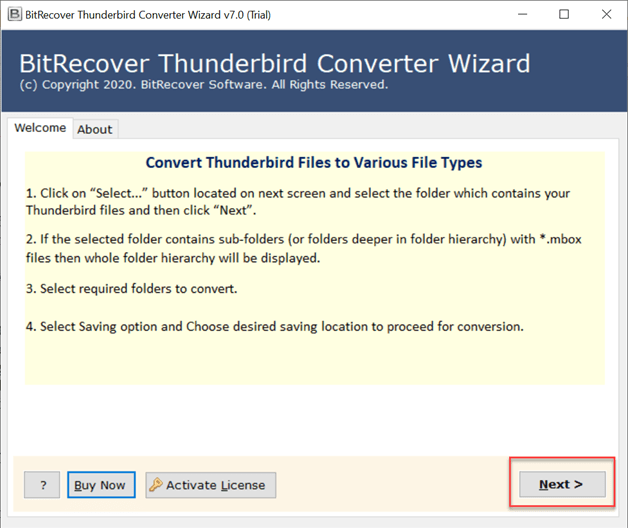
- First, download this solution and open it on your system.

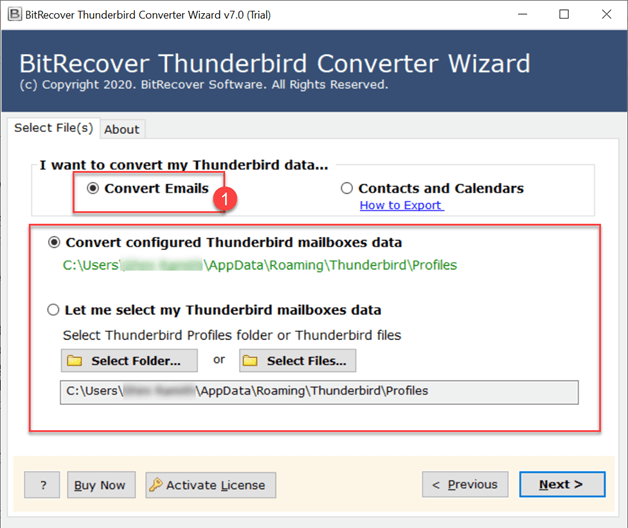
- Now, choose the option to load your Thunderbird data into the software panel.
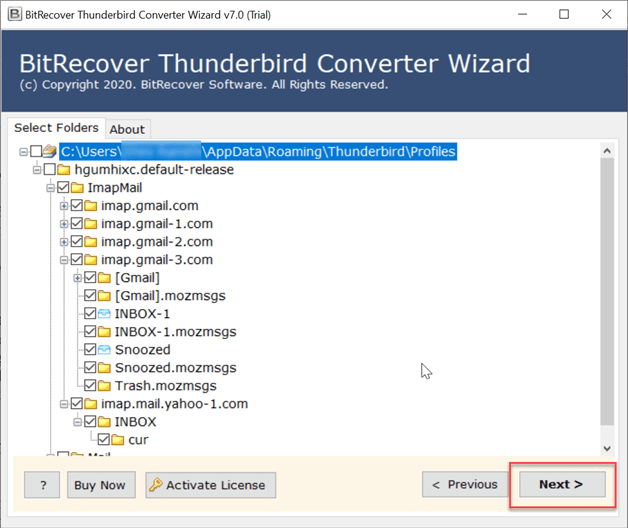
- Once the data is loaded, Preview it and click on Next button to proceed.
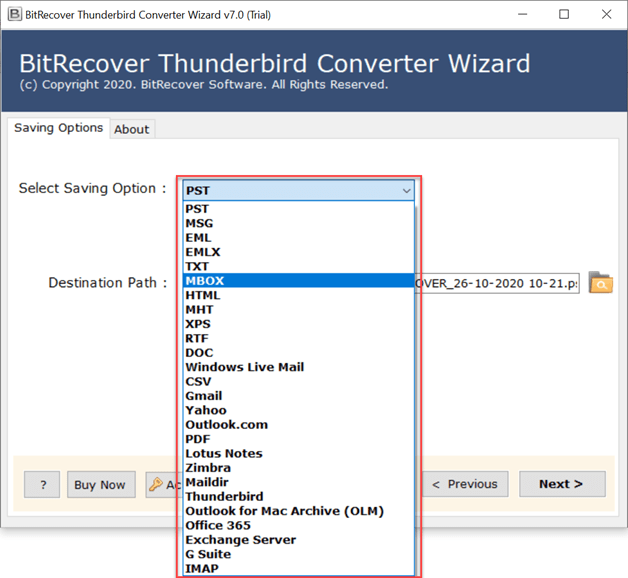
- Now, choose the MBOX format from Select Saving Option lists.

- Lastly, choose the Destination Path to save the output and click on Next to proceed.
Post Migration Steps to be Followed
- Make sure to check all the emails, folders, and filter if they are safely transferred or not.
- Check SMTP and IMAP settings are entered correctly by sending or receiving emails.
- Check if Thunderbird add-ons are compatible with Betterbird. If not, reinstall it.
- Make sure to use the latest version of Thunderbird for better security and performance.
- Go to the settings and select Betterbird as default email application.
As Betterbird is a community-driven soft fork of Mozilla Thunderbird, it offers a more polished experience with a wide range of features including better interrogation, calendar enhancements, multi-line view etc. This professional tool allows users to transfer Thunderbird to Betterbird with effective results. Once you have exported your Thunderbird data directly into MBOX format, you can use it into Betterbird easily.
Compelling Features of this Solution
- Consumes very less time and offers quick results without much effort.
- Allows users to deal with bulk data very efficiently and smoothly
- Guarantees to keep data 100% safe and intact throughout the process.
- Allows users to extract attachments from Thunderbird with safety.
- Offers option to convert Thunderbird emails to MSG, HTML, EML, PST etc.
- Provides a wide range of advanced features for selective results.
- Quick and easy-to-understand steps that do not complicate the process.
- Standalone tool that migrate Thunderbird to Betterbird efficiently.
The Final Words
In conclusion to this blog, we discussed the best ways to migrate Thunderbird to Betterbird with safety and making sure that all the Thunderbird data stays intact. We discussed the manual way to access Thunderbird data into Betterbird and also the professional and best solution to move Thunderbird to Butterbird effectively. We also discussed their drawbacks and features deeply. Now, users can either choose the manual way or the professional one whichever is suitable to their requirements.
For more information or assistance feel free to get in touch with our technical support team anytime. They are 24/7 available to help you.