Why Does Apple Mail Keeps Quitting Unexpectedly? Solved!

Published: March 10th, 2026 • 7 Min Read
If Apple Mail keeps Quitting unexpectedly, it can interrupt your email workflow and make it difficult to access important messages. This issue can occur due to several reasons and in this blog we will discuss why Mac Mail keeps quitting unexpectedly and the best ways to fix it with step-by-step methods.
Email communication is an important part of both professional and personal life. So many Mac users rely on Apple Mail as their primary email client due to its seamless integration with macOS, strong security, and a clean and easy-to-understand interface.
If Apple Mail keeps quitting unexpectedly, it can be resolved by first identifying the root cause and using the correct troubleshooting method. If you have a question “why does Mail keep quitting unexpectedly on my Mac” then you need to read this blog carefully and completely. Before jumping to the solution let us first understand the main causes behind Apple Mail crashing repeatedly.
Common Reasons Why Apple Mail Keeps Quitting Unexpectedly
- Corrupted Mailbox Files: The most common reason that Apple Mail crashes, damaged emails, attachments, and cached data can cause the application to close constantly.
- Outdated macOS Version: It is important to update the version of macOS regularly, as the latest version of Apple Mail prevents frequent crashes.
- Large or Overloaded Mailbox: Too many emails and large size attachments can lead to slower the application or even sometimes cause it to crash while syncing.
- Internet Issues: Apple Mail constantly syncs with servers such as Outlook, Gmail, iCloud. Due to server timeout and unstable internet connection, the application may not open properly.
- Incompatible Mail Plugins: Sometimes users install third-party plugins and add-ons that can conflict with the application and cause sudden Mac Mail crashes.
- Damaged Preference Files: Apple Mail stores its configuration settings in preference files. If these files become corrupted, the application may not load properly.
Manual Ways to Fix Apple Mail Keeps Quitting Unexpectedly
Below are some manual techniques to work with when your Mac Mail app keeps quitting unexpectedly:
Restart Your Mac Machine
Most of the time this issue occurs due to temporary system glitches and restarting the Mac refreshes background processes and can fix the problem.
- First click on the Apple menu on your Mac Machine.
- Click on the Restart option.
- Wait for a few minutes for the system to reboot.
- Now, open your Apple Mail once your system restarts.
Update Your macOS
It is important to keep your system updated for a smooth and seamless performance.
- Initiate with opening System Settings.
- Now, click on the General option.
- Select Software Update option.
- Now install the latest available version.
- Once the latest version of macOS is installed, restart your Apple Mail.
Rebuild Mailbox
Rebuilding the mailbox can resolve the Apple Mail keeps quitting unexpectedly issue. It can fix corrupted mailbox folder.
- First open Apple Mail.
- Now, select the problematic mailbox from the sidebar.
- Now, click the Mailbox option in the top menu.
- After this, choose the Rebuild option.
Remove Mail Preference Files
If Mac Mail settings are corrupted, removing the preference files can resolve the problem.
- First close your Apple Mail completely.
- Now, open Finder.
- Click on Go >> Go to Folder.
- Now, enter:
~/Library/Preferences/ - Locate the file com.apple.mail.plist.
- Now, move it to the desktop.
- Once done, restart the Apple Mail.
Remove and Re-add Email Account
Your account configuration can also cause issues and Apple Mail stops opening. You can remove your account and re-add it.
- Open System Settings.
- Click on Internet Accounts.
- Select the email account that is causing the issue.
- Now, click on the Remove Account option.
- Restart Mac Mail.
- Add your account again and check if it works properly.
While manual methods to fix Apple Mail keeps quitting issues can be very time-consuming and prone to human error. It often lacks flexibility and does not help much when you have a large volume of data. This is where you need a reliable solution to ensure that your Apple Mail data remains safe and accessible.
If you are choosing the process where you need to remove and re-add your account, make sure to make a safe backup of your entire Apple Mail data so that if you re-add your account and some of your attachments, emails and other data are missing you have a backup to restore and use.
Still Stuck with Apple Mail Keeps Quitting Unexpectedly?
To ensure that your Apple Mail data retains every data safely and securely after re-adding the account, BitRecover Apple Mail Converter stands out as the ideal solution. Unlike manual techniques, this professional utility guarantees the integrity of your data and emails, while preserving attachments, metadata, and folder structure throughout the process.
It offers batch conversion for large volume data, supports a wide variety of output formats such as PST, EML, MSG, and PDF, and offers a user-friendly interface that is even easy to use even for non-technical users. Below are the direct links to download the demo version of the solution for better understanding.
How to Use this Solution on a Mac Machine?
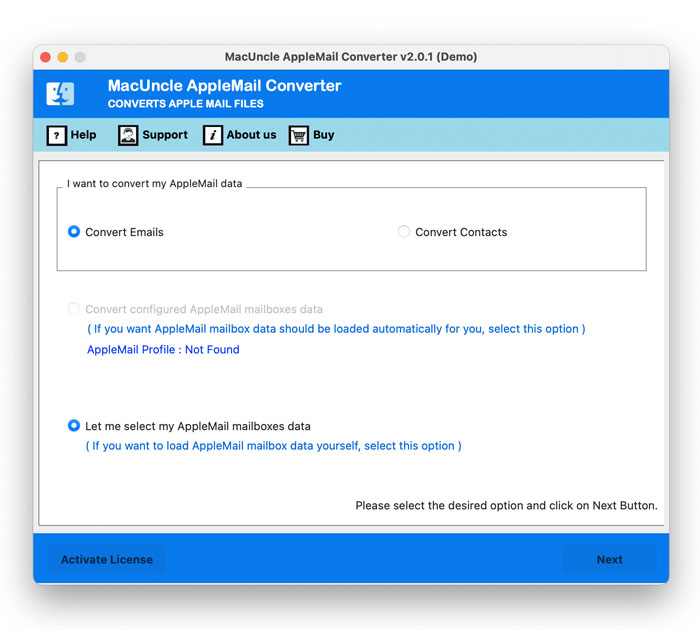
- Firstly, Download and install the solution on your Mac Machine. Now, choose from the given options to load your data.

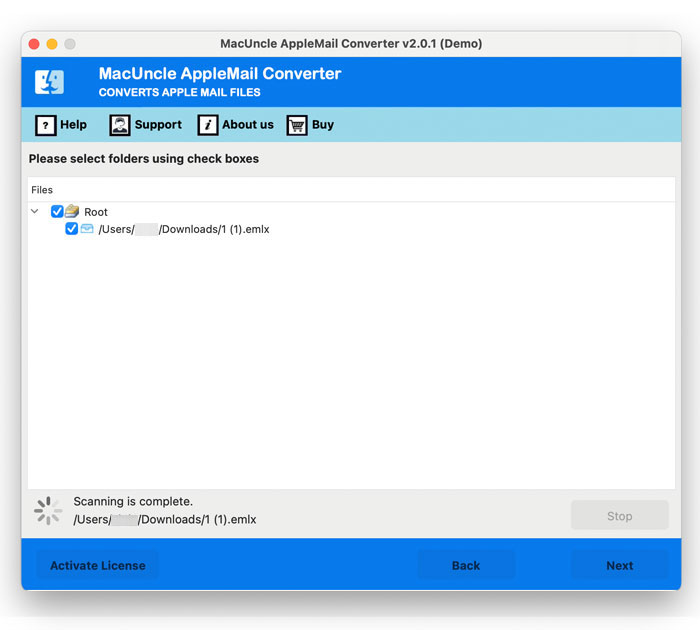
- Once you have loaded your Apple Mail data, check and preview all the data carefully before proceeding.
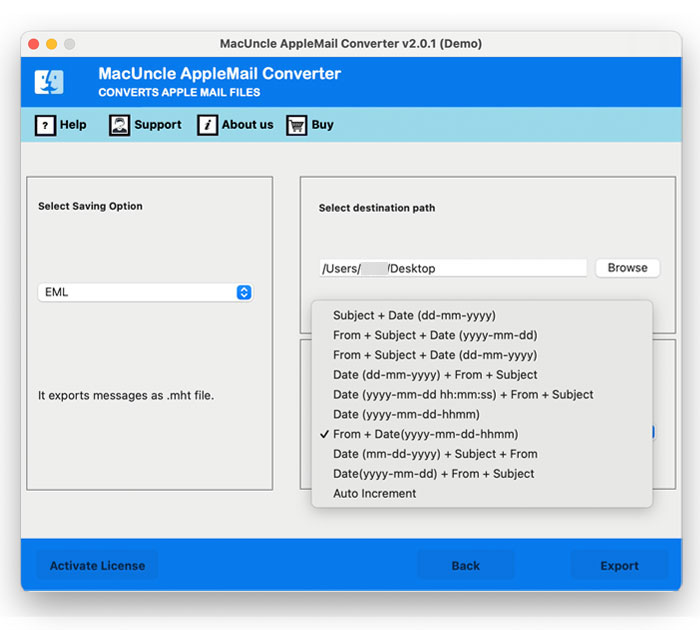
- Choose a File Format, Destination Path and a New Name for your final data from the given option.
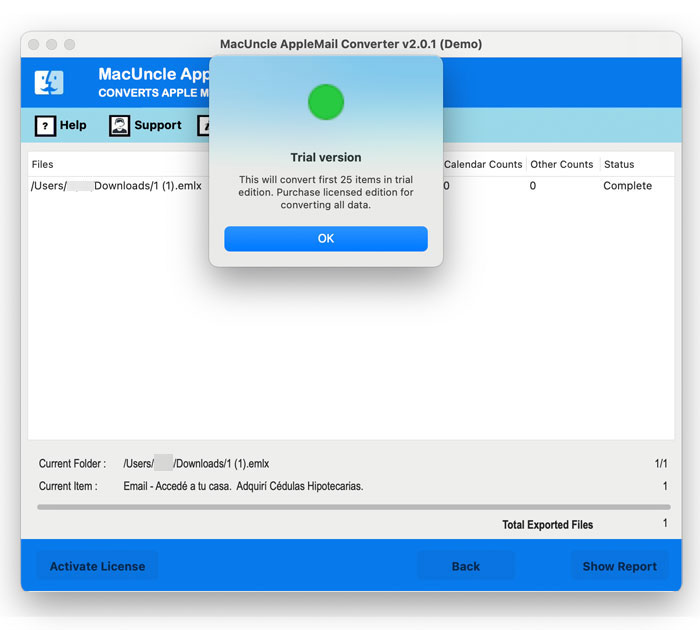
- At last, click on the Export button to backup Apple Mail data entirely.
How to Use this Solution on Your Windows System?
- Firstly, download and install the software on your Windows system.

- After that, choose Select Files and Select Folders to load Apple Mail data into the software panel.
- After that, preview and check all the uploaded Mac Mail data to free up mail storage on mac.
- Now choose any format to backup all your important emails along with attachments in your storage.
- Finally, choose the Destination Path and a name from File Naming Option list.
- Apply Advanced Filters from Filter options if required.
- Lastly, proceed with clicking on the Convert button for an accurate result.


Why Choose to Preserve Data with this Solution?
- This solution ensures that all your emails, attachments, and metadata remain intact, preventing any data loss or corruption.
- Support bulk conversion of data that helps to manage a large volume of emails and attachments with safety without much effort.
- Allows you to export Apple Mail data to PST, PDF, EML and many more formats and allows Apple Mail data compatibility to be imported into a variety of email clients.
- Does not impose any file size restrictions and can handle both single and multiple files making it an ideal solution for varied user needs.
- It processes data locally on your Mac Machine and ensures that all the sensitive data is safe and secure even after making a backup.
Tips to Prevent Apple Mail From Crashing
To avoid facing the Apple Mail keeps quitting unexpectedly in future, you can follow some tips. These practices help to maintain a better performance and stability for Apple Mail:
- Backup your Apple Mail data and important emails regularly.
- Make sure to keep macOS updated always.
- Archive or delete old and unnecessary emails.
- Make sure you have a stable internet connection.
- Avoid installing untrusted third-party plugins.
The Final Thoughts
In conclusion, we have discussed some manual and professional fixes if your Apple Mail keeps quitting unexpectedly constantly. We would suggest you choose the mentioned professional method over manual techniques as they come with a wide range of drawbacks. Due to its compatibility and multiple advanced features, the professional solutions stand out. If you need any assistance or have any questions, our Technical Support team is available 24/7 to guide you every step of the way.